Node-RED IP Camera Integration
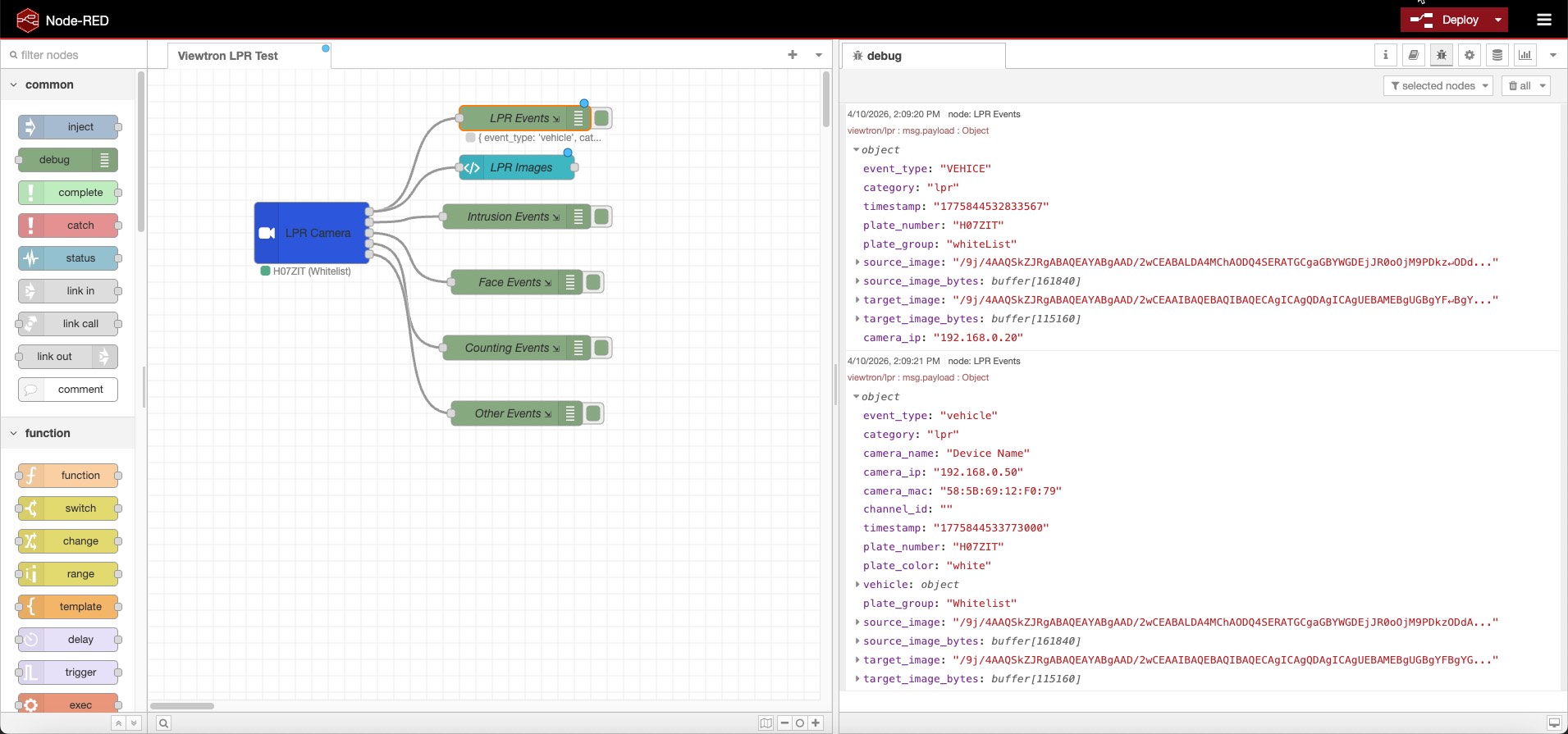
The Viewtron AI Camera node for Node-RED receives AI detection events directly from Viewtron IP cameras and Viewtron NVRs, outputting structured JSON messages. License plate recognition, human detection, vehicle detection, face detection, and people counting — all processed on the camera with no cloud service, no middleware, and no bridge required. The camera posts events directly to your Node-RED flow.
Supports both direct camera connections (IPC v1.x) and NVR forwarding (v2.0) with automatic version detection. LPR is fully tested with the Viewtron LPR-IP4 camera and NVR. Other AI event types are supported and being documented.
Install
Install from the Node-RED palette manager or the command line.
Palette Manager: Menu > Manage palette > Install > search node-red-contrib-viewtron
Command line:
cd ~/.node-red
npm install node-red-contrib-viewtron
Requires Node.js 18+ and Node-RED 2.0+. The viewtron-sdk dependency is installed automatically.
npm: node-red-contrib-viewtron
How It Works
v2.0.0 uses a Config Node + Listener Node architecture built on the Viewtron Node.js SDK:
                                    +---> Viewtron AI Camera node ---> LPR Flow
                                    |
Camera 1 ---+                       +---> Viewtron AI Camera node ---> Intrusion Flow
             \                      |
Camera 2 ----+---> Viewtron Server -+
             /    (Config Node)     |
Camera 3 ---+     port 5050        +---> Viewtron AI Camera node ---> Dashboard
                                    |
NVR ---------+                      +---> Viewtron AI Camera node ---> MQTT Bridge
Viewtron Server (config node) — runs a shared HTTP server on a single port. All cameras and NVRs connect to this one server. Handles persistent connections, keepalive heartbeats, XML parsing, and all camera protocol requirements via the SDK. Hidden from the palette; created from the server dropdown on the Viewtron AI Camera node.
Viewtron AI Camera (listener node) — receives parsed events from the server and routes them to 5 category outputs: LPR, Intrusion, Face, Counting, and Other. Multiple listener nodes can share one server. Each listener receives every event from every connected camera. Use standard Node-RED Switch nodes after any output to filter by camera, channel, plate group, or any other field.
No middleware, no bridge, no cloud API — the cameras post directly to Node-RED.
Outputs
The node has 5 outputs, one per detection category:
| Output | Category | Key Fields |
|---|---|---|
| 1 | LPR | plateNumber, plateGroup (raw value from camera/NVR plate database), vehicle (brand, color, type — NVR only), carOwner (NVR only) |
| 2 | Intrusion | targetType (person, car, motorcycle), eventId, status, boundary (area, tripwire — NVR only) |
| 3 | Face | face.age, face.sex, face.glasses, face.mask (NVR only) |
| 4 | Counting | targetType, boundary |
| 5 | Other | Video metadata and unclassified events |
Wire each output to the flow logic you need — separate handling for plates vs. people vs. faces.
LPR Fields (Output 1)
| Field | IPC | NVR | Description |
|---|---|---|---|
plateNumber | Yes | Yes | Detected license plate text |
plateGroup | Yes | Yes | Plate database group — see Plate Groups |
plateColor | No | Yes | Plate color (e.g., "white") |
vehicle.type | No | Yes | Vehicle type (e.g., "sedan", "SUV") |
vehicle.color | No | Yes | Vehicle color |
vehicle.brand | No | Yes | Vehicle brand (e.g., "Toyota") |
vehicle.model | No | Yes | Vehicle model |
carOwner | No | Yes | Owner name from NVR plate database |
sourceImage | Yes | Yes | Overview image (base64 JPEG) |
sourceImageBytes | Yes | Yes | Overview image (Buffer — ready for file/dashboard/MQTT nodes) |
targetImage | Yes | Yes | Plate crop image (base64 JPEG) |
targetImageBytes | Yes | Yes | Plate crop image (Buffer) |
Common Fields
Every event message includes:
| Field | Type | Description |
|---|---|---|
msg.payload.source | string | IPC (direct from camera) or NVR (via NVR) |
msg.payload.category | string | lpr, intrusion, face, counting, metadata |
msg.payload.eventType | string | Raw alarm type from camera (e.g., VEHICE, PEA, regionIntrusion) |
msg.payload.eventDescription | string | Human-readable description of the event type |
msg.payload.cameraIp | string | Camera IP (direct connection) or NVR IP (NVR connection) |
msg.payload.cameraName | string | Device name configured on the camera or NVR |
msg.payload.cameraMac | string | MAC address of the camera or NVR |
msg.payload.channelId | string | NVR channel number (intrusion, face, counting only — not present on NVR LPR events) |
msg.payload.timestamp | string | Event timestamp from the camera |
msg.payload.hasImages | boolean | true when images are present |
msg.topic | string | viewtron/{category} for easy MQTT republishing |
Images
When Original picture and Target picture are enabled on the camera, events include both base64 strings and decoded Buffer bytes:
| Field | Type | Description |
|---|---|---|
sourceImage | string | Full scene image as base64 JPEG |
sourceImageBytes | Buffer | Full scene image as decoded JPEG bytes |
targetImage | string | Cropped target (plate, face) as base64 JPEG |
targetImageBytes | Buffer | Cropped target as decoded JPEG bytes |
The Buffer fields are ready to pipe directly to file nodes, dashboard image widgets, or MQTT nodes. The base64 fields are useful for embedding in HTML or sending via API.
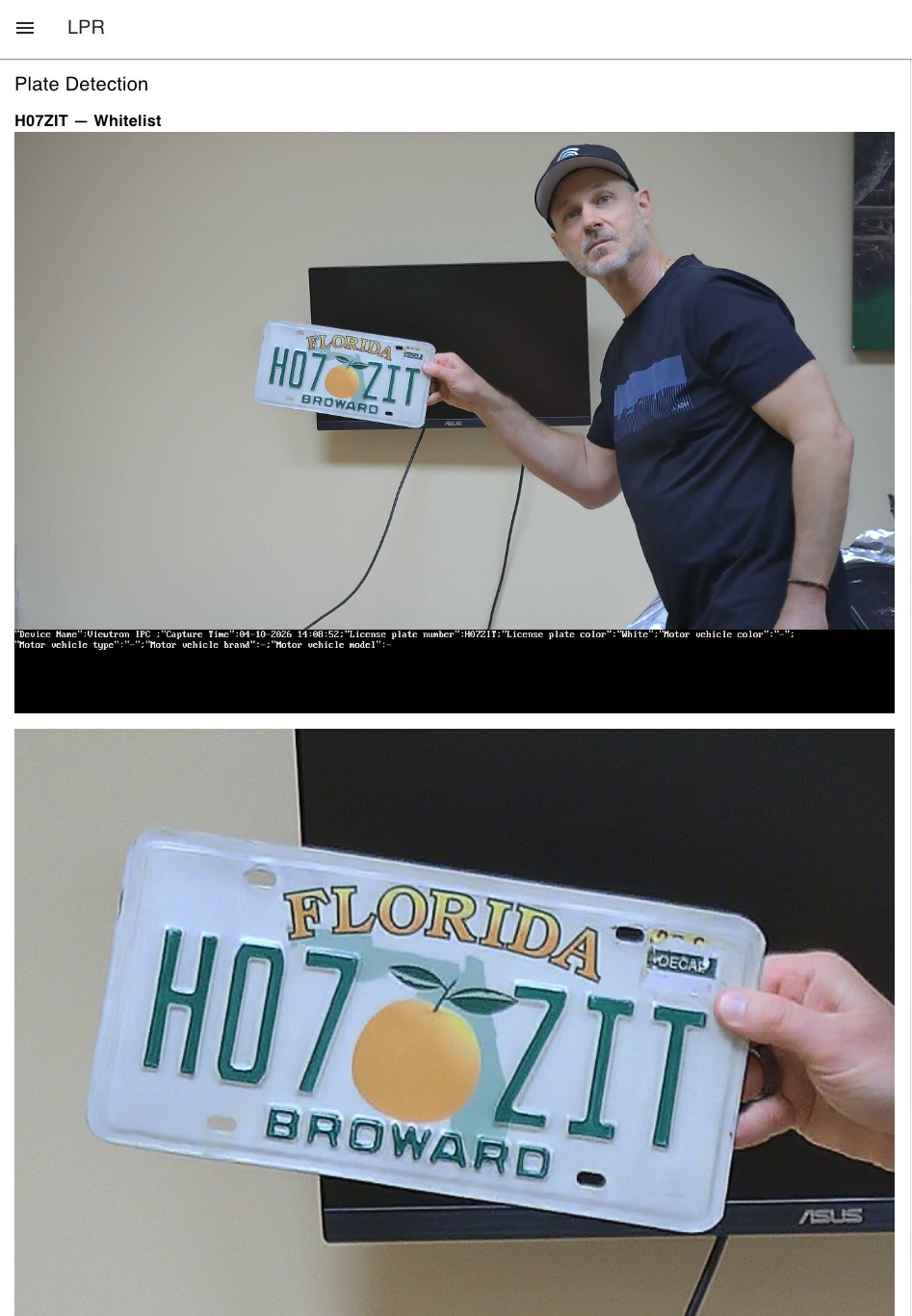
To display plate images in a Node-RED dashboard, wire the LPR output (output 1) to a ui-template node (requires Dashboard 2.0):
<div v-if="msg?.payload?.plateNumber">
  <h3>{{ msg.payload.plateNumber }} — {{ msg.payload.plateGroup || "unknown" }}</h3>
</div>
<div v-if="msg?.payload?.sourceImage" style="margin-bottom:10px">
  <img :src="'data:image/jpeg;base64,' + msg.payload.sourceImage" style="width:100%" />
</div>
<div v-if="msg?.payload?.targetImage">
  <img :src="'data:image/jpeg;base64,' + msg.payload.targetImage" style="width:100%" />
</div>
Direct Connection vs NVR
For the easiest filtering, connect IP cameras directly to your network and configure each camera's HTTP POST to send events to the Viewtron Server. Each camera connects from its own IP address, so you can filter events using msg.payload.cameraIp in a Switch node.
When cameras are connected to an NVR's PoE ports and the NVR forwards events, all events arrive from the NVR's IP address. Intrusion, face, and counting events include a msg.payload.channelId that identifies which camera on the NVR triggered the event. However, NVR license plate events do not include a channel ID, so there is no way to determine which LPR camera behind the NVR detected the plate.
For LPR cameras, always connect directly to the network so each camera has its own IP address for filtering. NVR-forwarded LPR events do not include a channel ID.
| IPC (Direct) | NVR (Forwarded) | |
|---|---|---|
| Connection | Camera -> Node-RED | Camera -> NVR -> Node-RED |
| XML Version | v1.x | v2.0 |
| Plate detection | Yes | Yes |
| Plate database groups | Fixed: whiteList, blackList, temporaryList | User-defined: any group name |
| Vehicle attributes | No | Yes (brand, color, type, model) |
| Owner from database | No | Yes |
| Channel ID | No | Yes (intrusion, face, counting only — not LPR) |
| Images | Yes (both) | Yes (both) |
Filtering by Camera
The node itself does not filter — it outputs every event from every connected camera. Use standard Node-RED Switch nodes after any output to route events.
Common filter fields:
| Field | Use Case |
|---|---|
msg.payload.cameraIp | Filter by camera IP address (best for direct connections) |
msg.payload.channelId | Filter by NVR channel number (intrusion, face, counting events only) |
msg.payload.source | Filter by IPC (direct) or NVR |
msg.payload.plateGroup | Route LPR events by plate database group |
msg.payload.targetType | Filter by person, car, motorcycle |
Example: filter LPR events from a specific camera. Wire the LPR output to a Switch node with property msg.payload.cameraIp equals 192.168.1.100.
What You Can Build
- Gate and parking access control — use plate groups to control access: "Residents" opens the gate, "Delivery" opens during business hours, "Banned" triggers security alerts
- Unknown vehicle alerts — send Telegram, email, or push notifications when a plate with no group (not in the database) is detected
- Person detection lighting — trigger smart lighting when a person is detected in a zone
- Intrusion alarms — wire to siren or alarm panel nodes when someone enters a restricted area
- LPR dashboards — display live plate reads with images using Dashboard 2.0 template widgets
- Vehicle counting dashboards — feed counting data to InfluxDB + Grafana for parking or traffic analytics
- MQTT republishing — forward structured events to an MQTT broker for consumption by Home Assistant, AWS IoT, or other subscribers
- Multi-camera routing — use Switch nodes to route events by camera IP, detection type, or plate group
Camera Setup
1. Add the Node to Your Flow
Drag the Viewtron AI Camera node from the palette onto the canvas. Select a Viewtron Server from the dropdown (or create one with the pencil icon). The default port is 5050.
2. Configure HTTP POST on the Camera
Open your camera's web interface and navigate to Network > Advanced > HTTP Notification.
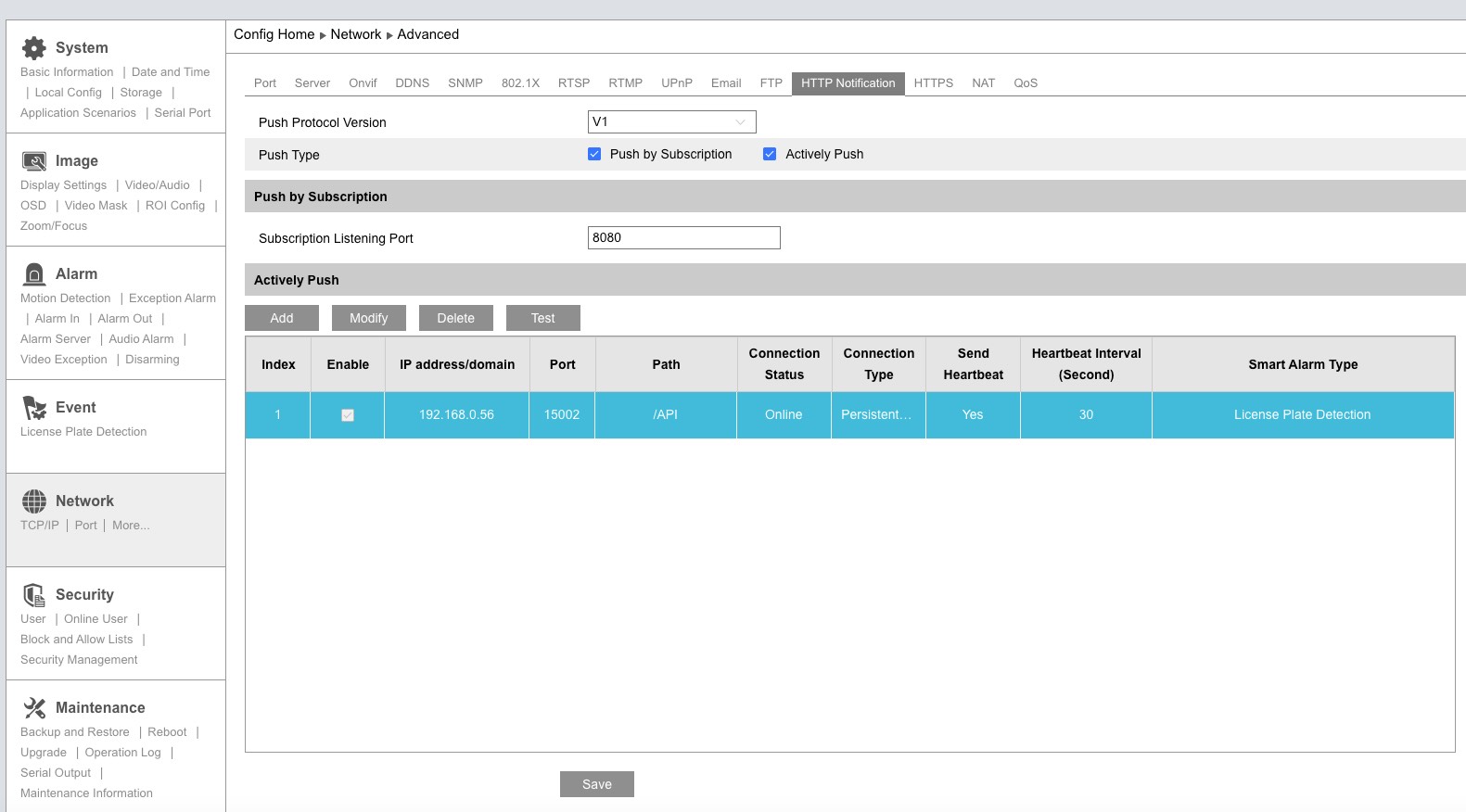
Set the Push Protocol Version to V1, then click Add to create a server entry.
The camera's HTTP POST settings have a Push Protocol Version dropdown. You must select V1. The V2 protocol sends alarm status events but images don't come through reliably.
3. Configure the Server Connection
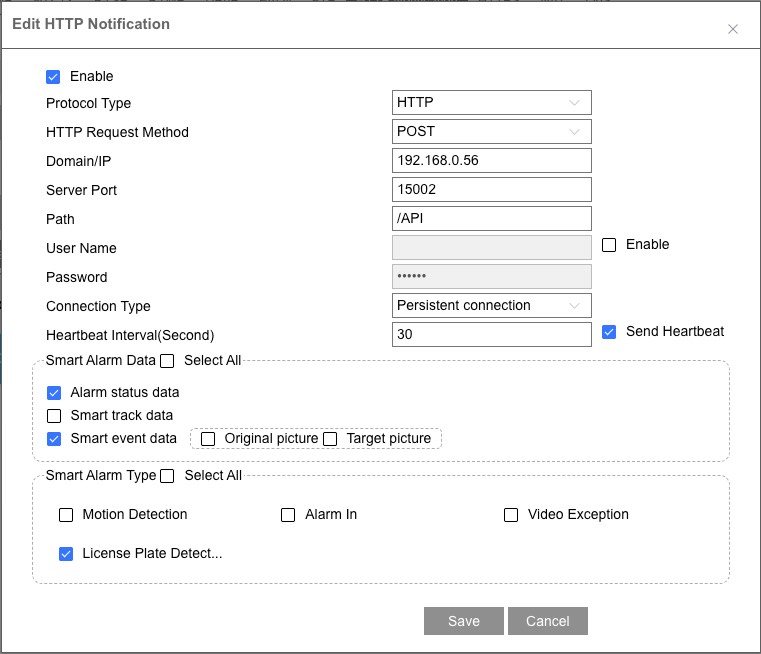
| Setting | Value |
|---|---|
| Enable | Checked |
| Domain/IP | Your Node-RED machine's IP address |
| Server Port | Port configured in the Viewtron Server config node (default: 5050) |
| Path | /API |
| Connection Type | Persistent connection |
| Send Heartbeat | Checked |
| Heartbeat Interval | 30 seconds |
| Smart Alarm Data | Check Smart event data |
| Original picture | Check to include full scene image in events |
| Target picture | Check to include cropped target image in events |
| Smart Alarm Type | Select the detection types you want (e.g., License Plate Detection) |
Click Save, then reboot the camera — required after changing HTTP POST settings. Deploy your flow in Node-RED and events will start arriving immediately.
Connection Status
The camera maintains a persistent HTTP connection and sends heartbeats to confirm the server is reachable. The node status shows a green ring when listening and updates with a green dot and the latest event data (e.g., plate number and group).
Plate Groups
The plateGroup field contains the raw value from the camera or NVR plate database. Your flow decides what each group means — this is how you implement access control policies with different actions for different groups.
IPC cameras use fixed group names (these are the raw XML values):
| plateGroup | Camera UI Label |
|---|---|
whiteList | Allow list |
blackList | Block list |
temporaryList | Temporary vehicle |
| (empty) | Not in database |
NVRs use user-defined group names — you create groups and name them whatever you want (e.g., "Residents", "Delivery", "Banned", "Temporary Visitor"). The plateGroup field shows the group name, or empty if the plate is not in the database.
Access control example: A gated community could set up NVR plate groups like "Residents", "Management", and "Delivery". In Node-RED, a Switch node routes each group to a different action — residents open the main gate, delivery opens the service entrance during business hours, and unrecognized plates trigger a notification to security.
Date range validation applies to all list types — not just temporary plates. An allow list or block list plate with an expired end date will have an empty plateGroup. The camera validates dates internally.
Plates are added to the camera's database through its web interface or programmatically via the Viewtron Python SDK or the Viewtron API.
Example: LPR Gate Access
Import this flow to get started with license plate gate access control. The Viewtron AI Camera node reads plates, and a Switch node routes plates based on their group.
[
    {
        "id": "server1",
        "type": "viewtron-server",
        "name": "Camera Server",
        "port": "5050"
    },
    {
        "id": "viewtron1",
        "type": "viewtron-camera",
        "name": "Gate Camera",
        "server": "server1",
        "wires": [["switch1"], [], [], [], []]
    },
    {
        "id": "switch1",
        "type": "switch",
        "name": "Check Group",
        "property": "payload.plateGroup",
        "rules": [
            {"t": "eq", "v": "whiteList"},
            {"t": "else"}
        ],
        "outputs": 2,
        "wires": [["gate_open"], ["notify"]]
    },
    {
        "id": "gate_open",
        "type": "debug",
        "name": "Open Gate"
    },
    {
        "id": "notify",
        "type": "debug",
        "name": "Alert: Unknown Vehicle"
    }
]
Replace the debug nodes with your actual gate control and notification nodes. For NVR setups, change "whiteList" to your group name (e.g., "Residents").
Supported Event Types
IPC v1.x (Direct from Camera)
| Alarm Type | Category | Detection |
|---|---|---|
VEHICE / VEHICLE | lpr | License plate recognition |
VFD | face | Face detection |
PEA | intrusion | Perimeter intrusion |
AOIENTRY | zone_entry | Zone entry |
AOILEAVE | zone_exit | Zone exit |
LOITER | loitering | Loitering detection |
VSD | metadata | Video metadata |
PASSLINECOUNT | counting | People/vehicle counting |
NVR v2.0 (Forwarded via NVR)
| Alarm Type | Category | Detection |
|---|---|---|
vehicle | lpr | LPR with vehicle brand, color, type, model |
videoFaceDetect | face | Face with age, sex, glasses, mask attributes |
regionIntrusion | intrusion | Perimeter intrusion |
lineCrossing | line_crossing | Tripwire line crossing |
targetCountingByLine | counting | Counting by line |
targetCountingByArea | counting | Counting by area |
videoMetadata | metadata | Continuous object detection |
Version detection is automatic — the SDK handles both formats.
Breaking Changes from v1
v2.0.0 is a full rewrite. Existing flows will need to be updated.
| Change | v1 | v2 |
|---|---|---|
| Architecture | Single node with embedded HTTP server | Config Node (Viewtron Server) + Listener Node (Viewtron AI Camera) |
| Server | Each node runs its own server | Shared server via config node — one port for all cameras |
| SDK | XML parsing built into the node | Uses viewtron-sdk npm package |
| Default port | 5002 | 5050 |
| Field names | snake_case (plate_number, plate_group, car_owner, camera_ip, event_type, source_image) | camelCase (plateNumber, plateGroup, carOwner, cameraIp, eventType, sourceImage) |
| Image Buffers | Not available | sourceImageBytes and targetImageBytes (decoded Buffer objects) |
source field | Not available | IPC or NVR — identifies connection type |
| Image toggle | includeImages checkbox on node | Always included when camera sends them (enable/disable on the camera) |
| Filtering | Not available | Use Switch nodes on cameraIp, channelId, plateGroup, targetType |
| Node settings | Port + Include images | Server dropdown only (port is on the config node) |
To migrate: Delete the old Viewtron AI Camera node, add a new one from the updated palette, create a Viewtron Server config node, and update any downstream nodes that reference payload field names from snake_case to camelCase.
Troubleshooting
Camera shows "Online" but no events appear: The camera's persistent connection is alive (heartbeats work) but alarm events may not be flowing. Try:
- Reboot the camera — required after changing HTTP POST settings
- Check that Smart event data and the correct Smart Alarm Type are enabled
- For NVR: ensure License Plate Detection is enabled in the HTTP Post settings
Port conflict ("port in use" status): Another process is already listening on the configured port. Either stop the other process or change the port in the Viewtron Server config node. Only one Viewtron Server config node should use a given port.
Debug tool: A standalone debug server is included in the GitHub repo for diagnosing connection issues:
node debug-server.js 5050
This logs every HTTP POST with full headers, body preview, and post classification (keepalive, alarm data, etc.) — no filtering. Raw XML is saved to raw_posts/ for inspection.
Node-RED vs. Home Assistant
Both integrations receive the same camera events. Choose based on your use case:
| Node-RED | Home Assistant | |
|---|---|---|
| Architecture | Camera -> Node-RED (direct) | Camera -> Bridge -> MQTT -> HA |
| Best for | Custom logic, industrial automation, dashboards, multi-system integration | Smart home automations, mobile notifications, device control |
| Setup | npm install, drag node | Docker container + MQTT broker |
| Programming | Visual flow editor | YAML automations or HA UI |
| MQTT | Optional (can republish) | Required |
You can run both — point the camera's HTTP POST at Node-RED, then use Node-RED's MQTT output to also feed events into Home Assistant.
Compatible Cameras
Any Viewtron IP camera or NVR with HTTP POST support works with this node. Recommended models:
| Model | Detection Types | Best For |
|---|---|---|
| LPR-IP4 | License plate recognition | Driveways, gates, parking entrances |
| AI security cameras | Human, vehicle, face detection | Perimeter security, access control |
| NVRs | All types (forwarded from cameras) | Multi-camera systems |
All Viewtron products are NDAA compliant.
Resources
- npm: node-red-contrib-viewtron
- GitHub: node-red-contrib-viewtron — source code, example flows, debug tools, issue tracker
- Node.js SDK: viewtron-sdk —
npm install viewtron-sdkfor standalone Node.js projects - Python SDK: viewtron on PyPI —
pip install viewtronfor Python projects - Home Assistant: viewtron-home-assistant — MQTT bridge for Home Assistant
Related Documentation
- Home Assistant Integration — MQTT-based integration for smart home automations
- Viewtron Python SDK — Python SDK for direct camera API access
- Node.js SDK Reference — ViewtronServer class documentation
- License Plate Recognition — LPR application guide with plate database API
- Human Detection — person and vehicle detection events
- Face Detection — face detection and recognition
- HTTP POST Setup — camera webhook configuration guide
- Webhook Overview — event data format reference
Video Guides & Blog Posts
- LPR Camera API Setup and Demo — video walkthrough of configuring LPR webhooks and viewing live plate reads
- ANPR / LPR Camera System Overview — camera installation, plate capture zones, and system design
- LPR Camera for Home Use — residential driveway and garage setup with the LPR-IP4
Questions & Development Inquiries
- Email: mike@viewtron.com
- Phone: 561-433-8488
- Forum: IP Camera API Webhooks Setup
Mike Haldas is available for questions, consultation, and custom software development for Viewtron API related projects. Email details about your project to mike@viewtron.com.