LPR Camera for Home: Viewtron LPR-IP4 Surpasses Expectations
After years of telling customers not to use LPR cameras for home installations, I put the Viewtron LPR-IP4 to the test at my own house and the results changed my mind.
Introduction: Challenging Conventional LPR Camera Wisdom
Over the years, countless homeowners have asked me if they can use our license plate recognition (LPR) cameras to record license plates on cars passing by the front of their house. These customers wanted to mount the LPR camera on the front of their house, as you would a traditional security camera that is monitoring your property. My answer, over and over again, has always been no – and for good reason. LPR cameras have much more strict installation requirements than traditional cameras, and most houses just can’t meet them.
I decided to put our Viewtron LPR-IP4 to the home-use test myself. Can license plate capture and / or automatic license plate recognition actually work if the camera is installed on the front of a house? The results genuinely surprised me, and I think they’ll surprise you too.
Viewtron LPR Camera System with NVR
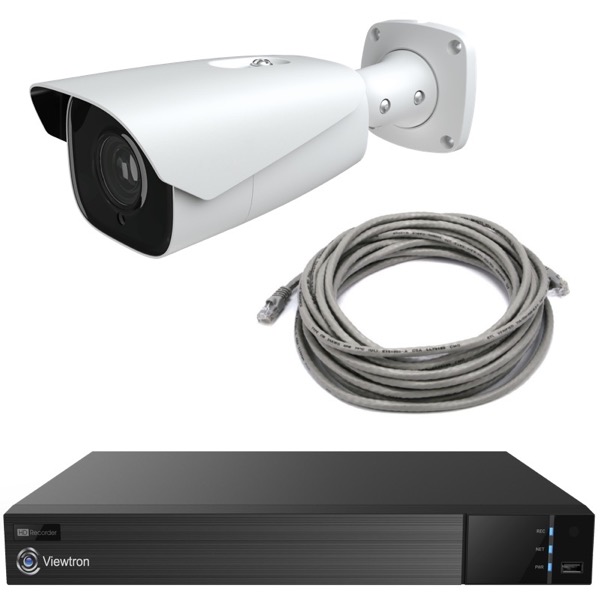
This is the license plate capture system that I used in my testing at home. Please note that I have an 8ch Viewtron NVR installed at my house because I have additional Viewtron AI security cameras installed to monitor my entire yard. I have a total of six security cameras installed on my house.
Challenges With LPR Camera Installation
First, a little background. LPR cameras have strict installation requirements when compared to typical “overview security cameras”. In order to work well, the following guidelines should be followed:
- Mount as low as possible – ideally level with the height of a typical license plate on a car which is typically 24 to 36 inches from ground level.
- Minimal both horizontal and vertical angles – in addition to mounting low to the ground, the offset to the side of the road should also be minimized. The smaller the horizontal and vertical angle to the plate detection area, the more accurate license plate capture and automatic license plate recognition is.
- Proximity to the detection area – check the maximum effective distance of your LPR camera. Our Viewtron LPR-IP4 is effective up to 100 feet. Though we have tested further than that and it still works in some cases for license plate capture, but not automatic license plate recognition. You can learn about the difference between license plate capture vs automatic license plate recognition here.
When homeowners ask to mount an LPR camera on their house, it’s usually much higher and set far from the road – conditions I always considered a non-starter for LPR technology. Until now, we’ve told folks they’d be disappointed with the results and recommended against it.
These have always been tough requirements for a home installation unless you do not live in an association and can install a pole close to the road that you live on. Then, even if you can install a pole, running cable to the pole is a whole other challenge.
Putting the Viewtron LPR-IP4 to the Test
Determined to prove (or disprove) my own advice, I temporarily installed the Viewtron LPR-IP4 on the front of my house. This testing allowed for evaluation of the camera’s performance in a typical home environment. Here’s how:
- I mounted the LPR camera on the front of my house above the garage door, 9 feet, 4 inches above the ground – much higher than ideal for an LPR application.
- My home sits 35 feet back from the road. This creates a horizontal angle much greater than what is recommended for LPR.
- The road itself isn’t perfectly straight; it curves gently in front of the house, but not dramatically. However, the plate detection area is setup before the road curves.
- I angled the camera as far down the road as possible to minimize the angle between the camera and the license plate detection area, and then zoomed the lens in as far as possible. The Viewtron LPR-IP4 has an 8-32mm motorized zoom lens.
- The actual detection zone was 110 feet away from the camera – beyond our typical recommendations for the Viewtron automatic license plate recognition software.
Honestly, my whole plan was to show everyone exactly why you shouldn’t do this. I thought it would be a perfect demonstration of poor LPR performance. But to my surprise, the camera performed exceptionally well!
LPR Camera Home Installation
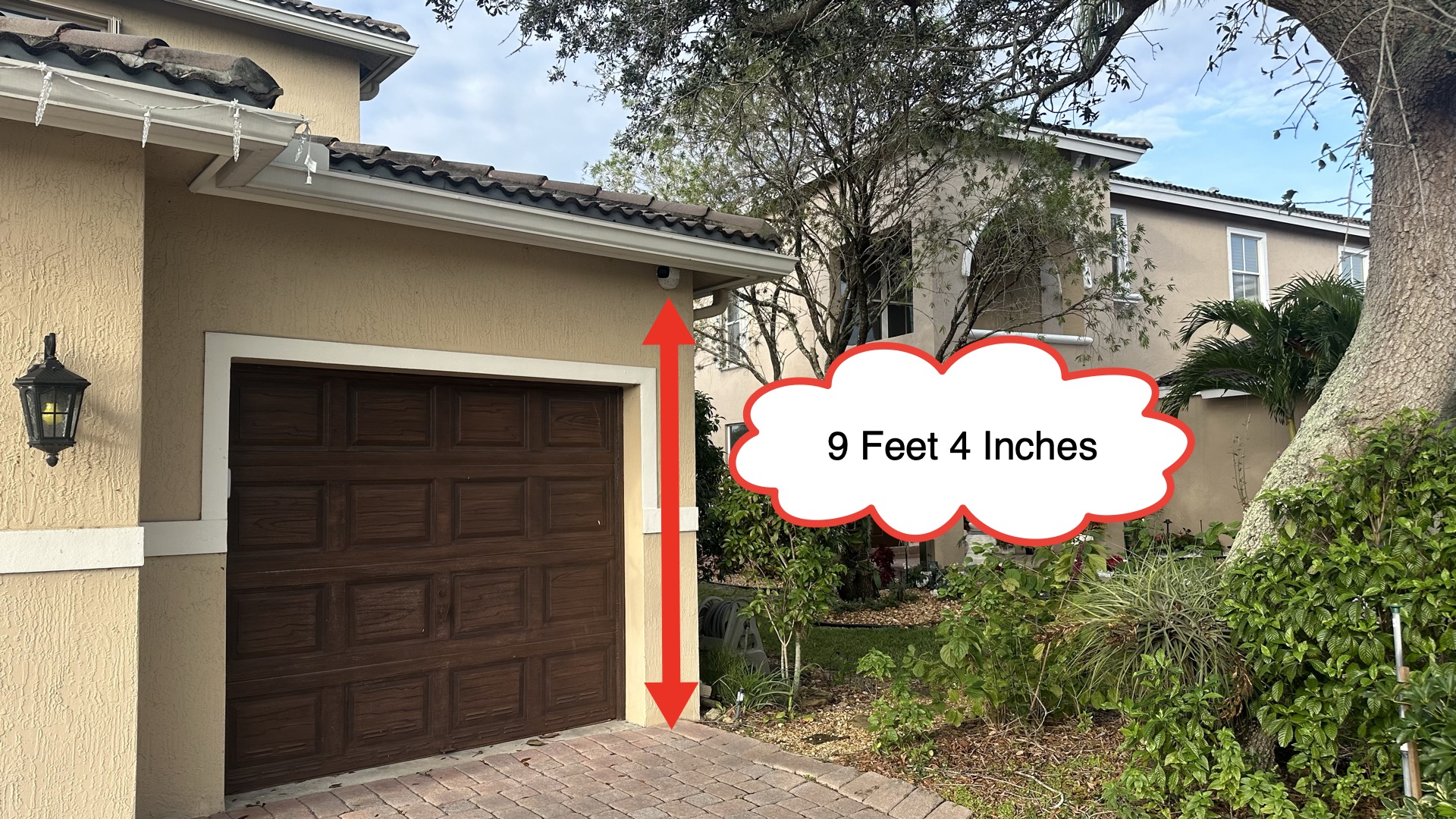
This is the location where I installed the Viewtron LPR camera above my garage door.
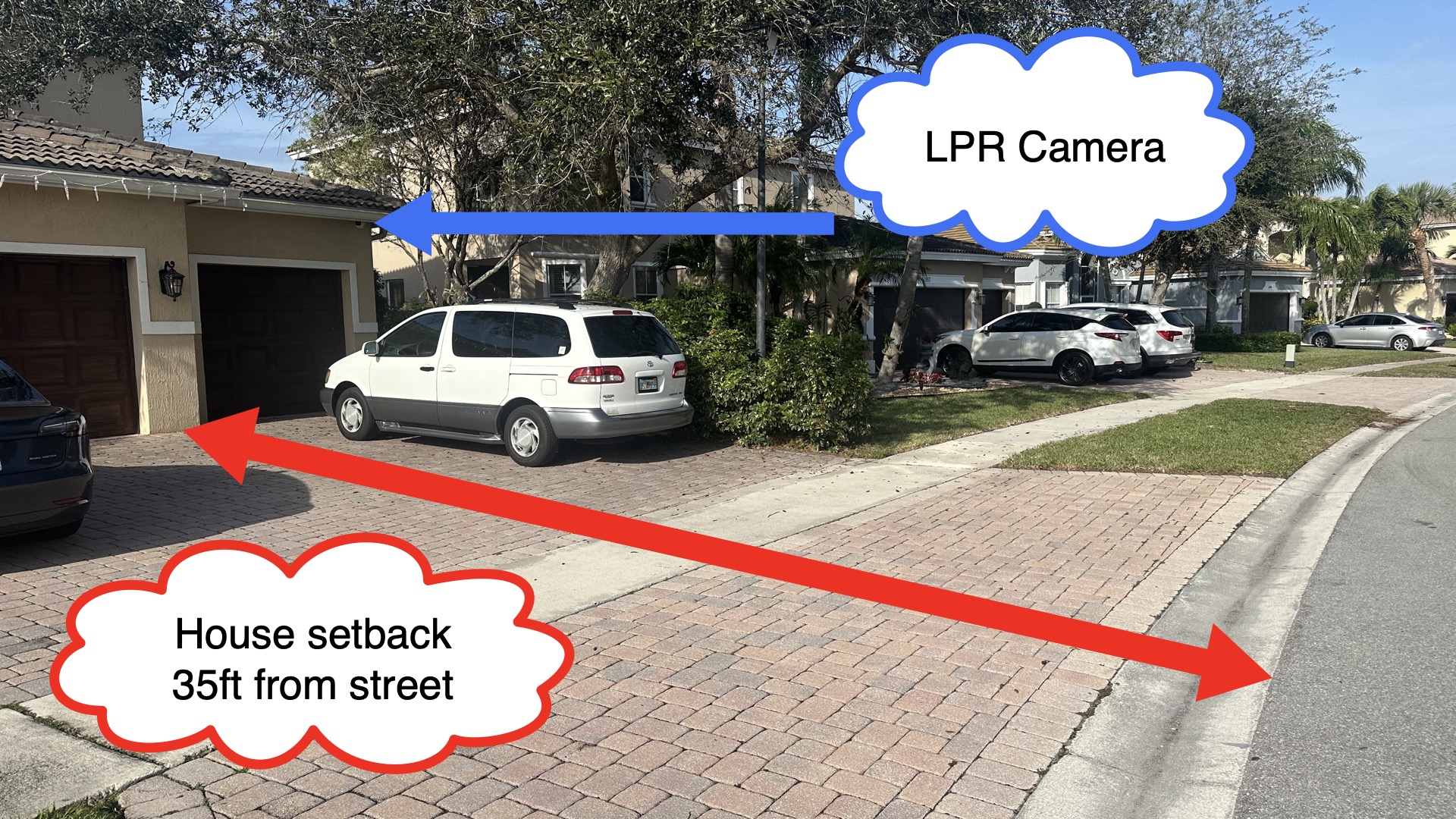
My house sits 35 feet back from the edge of the road.
LPR Detection Area
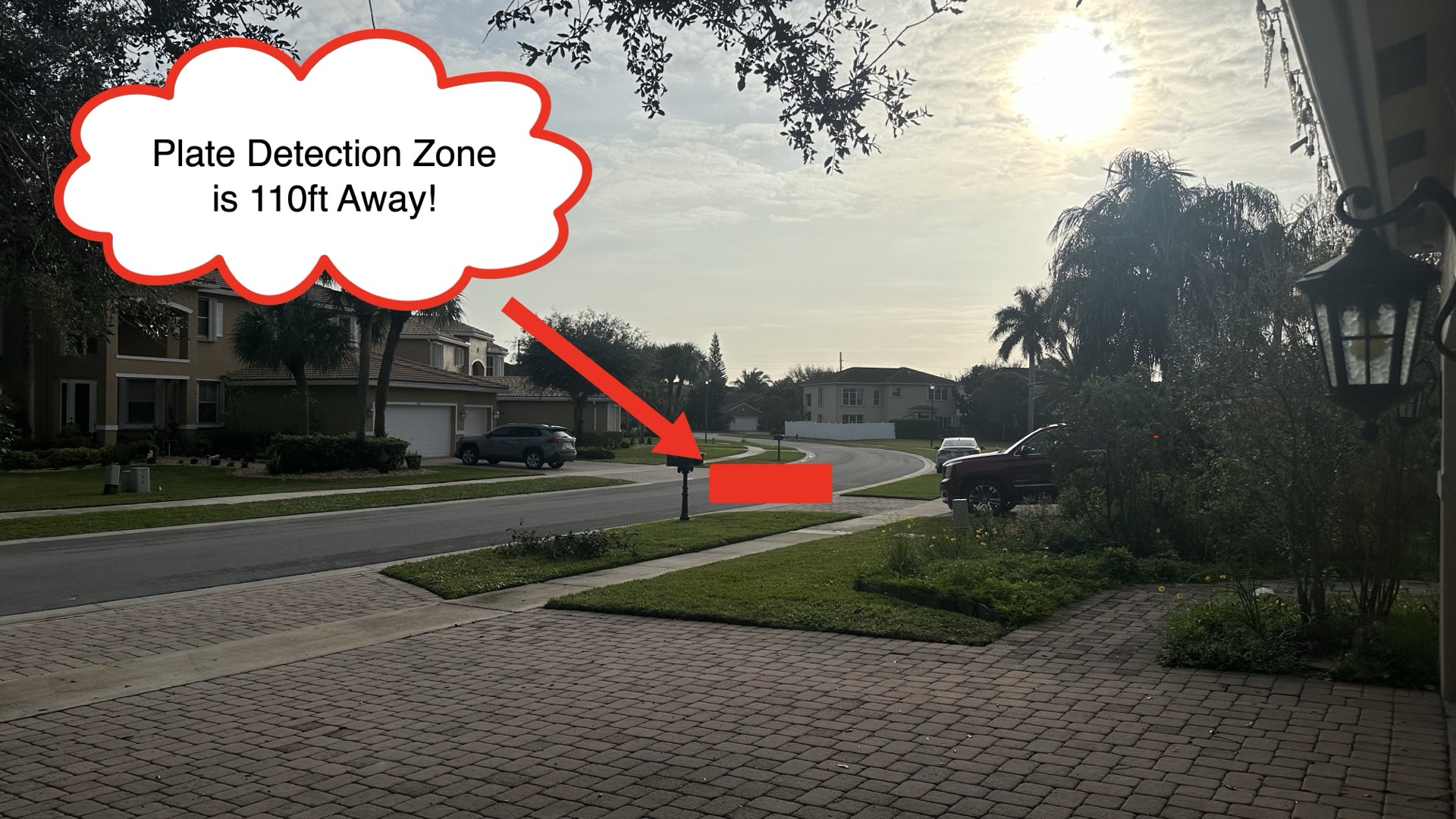
To minimize the horizontal angle to the license plate detection area as much as possible, I angled the camera down the street, to the right. Florida license plates are only required on the rear of vehicles, so my best chance at capturing plates was on the lane on the right (closest to the house).
Please also note that the road in front of my house does start to turn shortly after my detection zone. I believe this helped with the angle of view a bit. Though, we do have customers now that have Viewtron LPR cameras installed on their house and the road is 100% parallel to the front of their house (no curve).
The Surprising – and Successful – Test Results
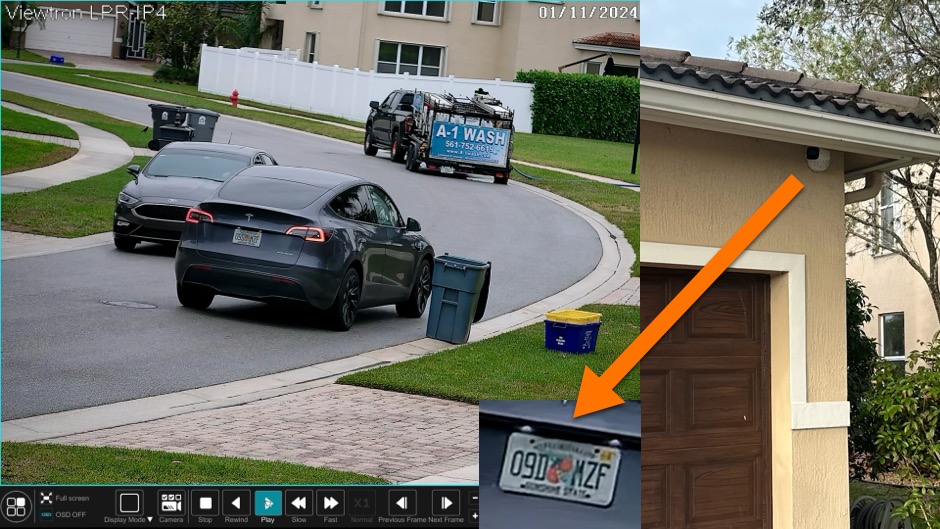
When I started reviewing the surveillance footage on the Viewtron network video recorder (NVR), the results really surprised me. Both daytime and nighttime license plate capture was crystal clear. The numbers and characters on the plates were easy to read. AND, the ALPR software was detecting plates a lot of the time. ALPR stands for automatic license plate recognition.
Daytime License Plate Recognition
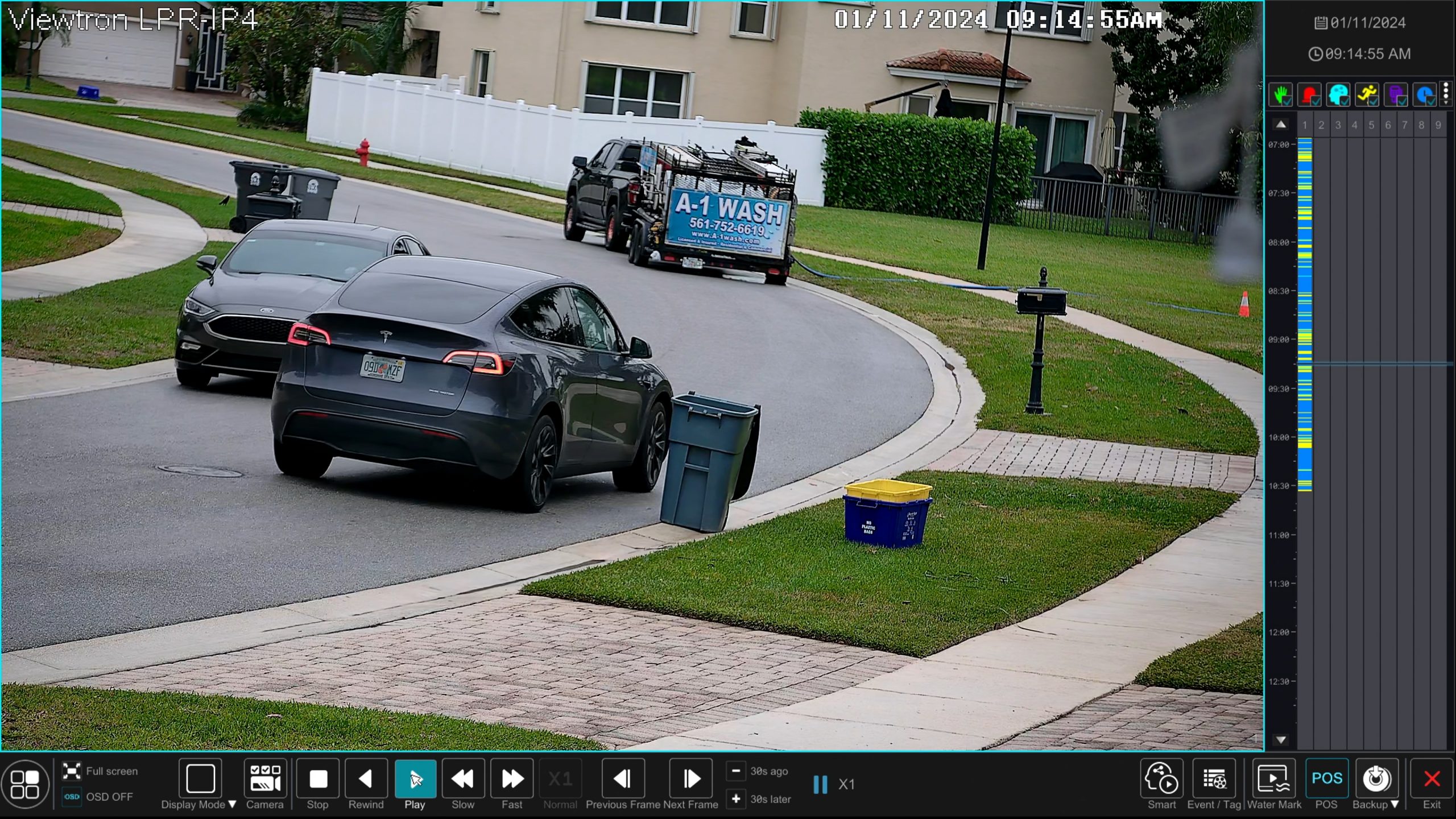
Here is a screenshot of one of the license plate recognition events from daytime recording. You can click on the above image to open a higher resolution screenshot so that you can see the license plate better.
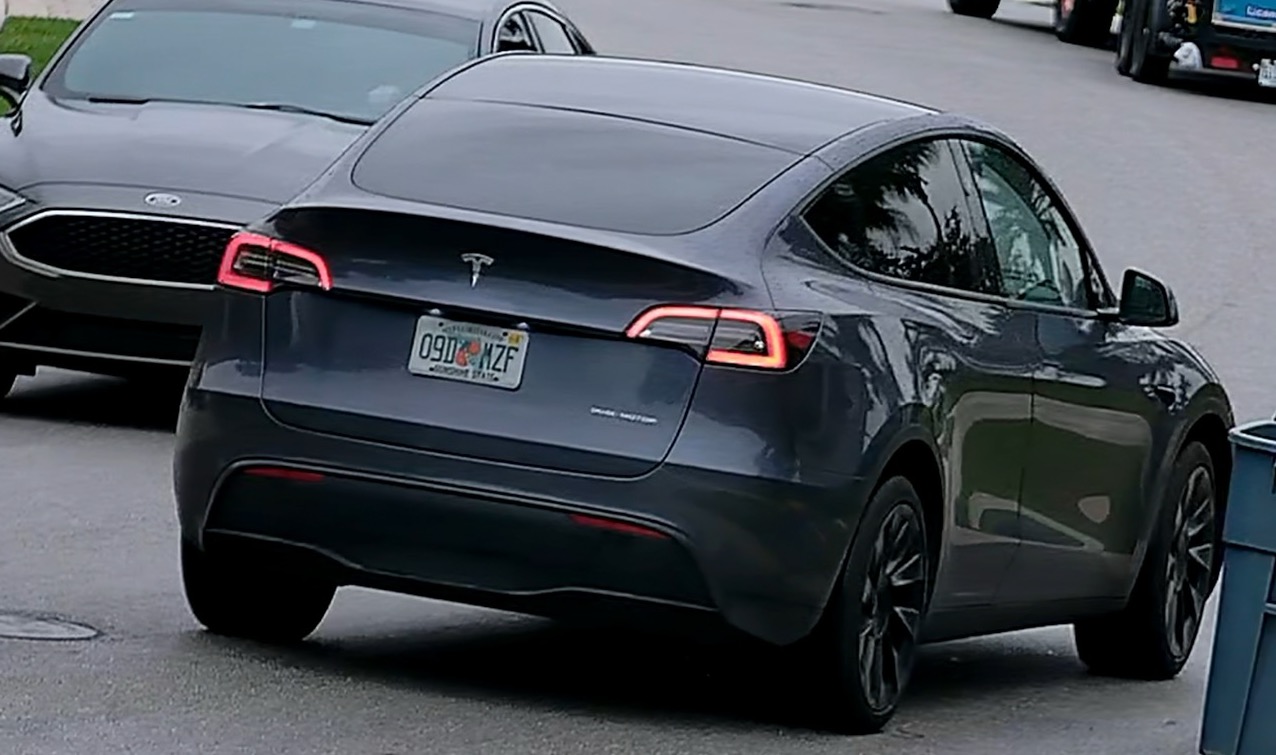
Here is a close-up view of the day time license plate capture.
Night Time License Plate Recognition
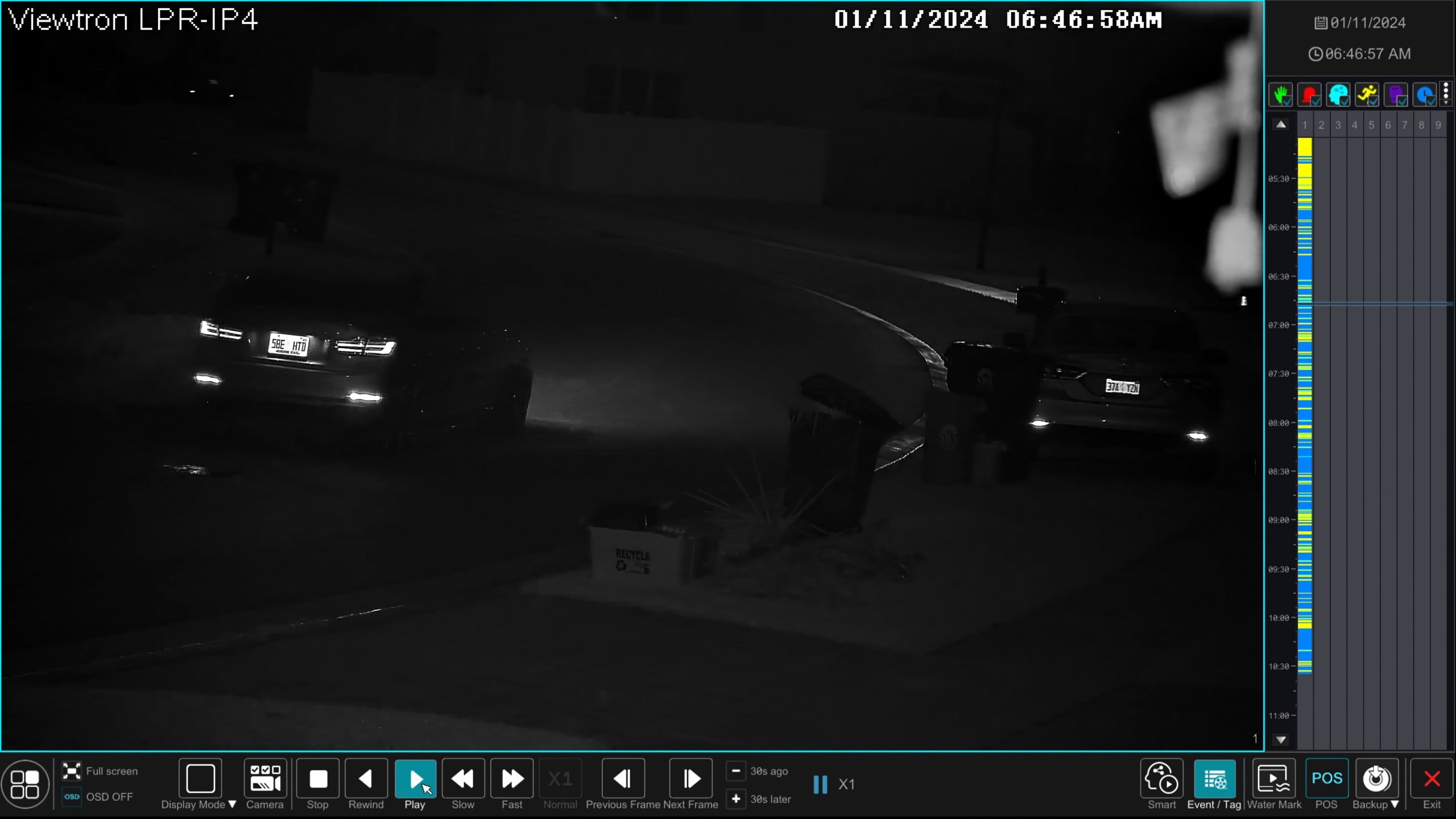
Here is a screenshot of the night time license plate recording. Please also notice the timeline on the right hand side of the video playback screen. All of the license plate recognition events are notated with a light blue color so that you can easily jump to other LPR events on the video playback screen.
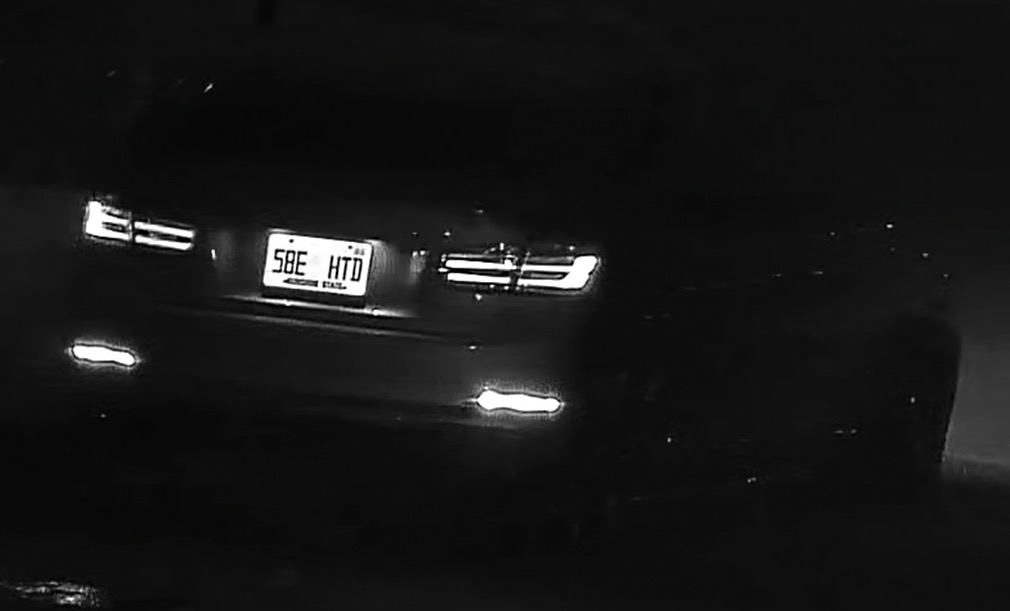
Here is a zoomed in view of the night time plate capture.
Automatic License Plate Recognition Software Integration with NVR
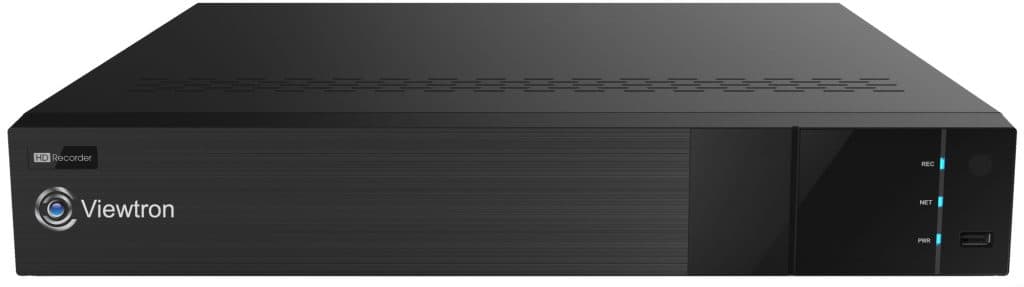
Viewtron NVRs are 100% integrated with the ALPR software on these Viewtron LPR cameras. Setting up the plate detection zone and adjusting the motorized zoom lens of the camera can all be done from the NVR.
One of the strengths of our Viewtron system I want to highlight is how easy it is to review LPR footage. With the analytics, I can pull up every plate detected, jump straight to recorded video, and scrub through events by color-coded markers. It’s simple and intuitive, a feature every homeowner will appreciate if they need to look back at an incident quickly. The user interface allows you to:
- Filter for just license plate recognition events.
- See thumbnail previews of plates that were captured.
- Click on an event, jump straight to playback, and zoom in on the plate in question.
- License plate recognition events are color coded on the video player timeline.
A Few Caveats and Words of Caution Regarding Home LPR
Now, does this mean everyone can mount an LPR camera on their house and expect flawless results? Not quite:
- The slight curve in my road may have helped minimize the detection angle. If your street is perfectly straight and perpendicular to your home, your results may vary.
- Every property is different. Factors like distance, height, mounting options, and road layout all impact the final outcome.
- It pays to test your specific scenario. If you’re thinking about this for your own home, try before you buy if possible – or at least consult with us.
Updating My Recommendations: Home LPR Is Now Worth Considering
After this real-world test, the team at CCTV Camera Pros modified the advice that we give to homeowners regarding LPR cameras. Clearly, the new capabilities of the Viewtron LPR-IP4 make it practical for a lot more residential installs than I thought possible.
We used to push back on these requests because the tech just wasn’t there. But with this test, we have revisited our guidelines. Is it going to work in every home scenario? No. But if you’ve got a setup similar to mine, there’s a good chance you’ll be pleased.
Additional LPR Video Demos
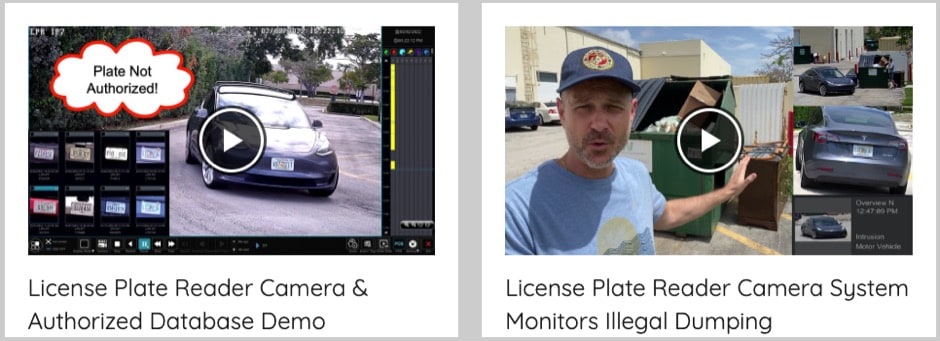
You can check out all of our license plate capture and LPR camera videos here.
Video Transcript
Hey, guys. Mike from CCTV Camera Pros here. In this video, I’m going to discuss the challenges around using an LPR camera for home use. And then I’m going to show you the amazing results that I’ve had with our Viewtron LPR camera that I installed on my house last year with capturing license plates on cars passing in front of my house. We’re going to discuss a lot of concepts in this video, so it might be a bit long, but stay with me. You’re going to learn everything you’ll need to know if you’re considering installing a license plate recognition camera at your house. Actually, the concepts in this video are applicable to commercial use as well. So let’s start with some basics here.
So that’s one of our Viewtron LPR cameras behind me, and I’m at the office right now. We have this mounted on a pole behind our warehouse. And you’ll notice that the camera is mounted very low to the ground. And you’ll also notice that the offset from the road here is. Is not that great. It’s mounted pretty close to the road. So with license plate recognition cameras, ideally, you want to mount them as level to the license plate detection zone as possible. License plates on cars and trucks are typically between 24 and 36 inches off the ground.
And that camera’s mounted about 4ft off the ground, so just a little bit higher than the top of that range. And then you don’t want the horizontal axis to be offset too much. That’s why it’s mounted close to the road. And that’s challenging in a home installation setting. Right? Because for a home security camera system, you’re almost always mounting the cameras on your house. Your house is set back from the road, and the front of your house is parallel to the road. So the angle is terrible, typically. And we’ve been telling people for years that you really can’t use license plate recognition cameras on homes.
And that was true for many years. We’ve been selling LPR Cameras for almost 20 years at CCTV Camera Pros. And until the advent of these more modern cameras like this 4 megapixel Viewtron LPR, it just wasn’t possible. And I didn’t think it was possible. Even last year when I first installed it on my house, I actually made that video to show people that it wouldn’t work. And it did. Here’s why.
So first of all, on my house, the front of my house is set back through 35ft from the road, not even close to Ideal for license plate recognition. And then of course, I don’t want to mount the camera low on my house. It’s mounted 9 feet, 4 inches off the ground, like a typical height that you’d put above your garage door that you see here. And again, you can’t just point the camera straight out to the road because the plates are not going to be visible. So with the, with the motorized zoom lens on the Viewtron LPR-IP4, it has an 8-32 millimeter lens. So what I did was I pointed the camera down the street, I angled it way down the street and then zoomed in the lens. The license plate detection zone is about 110ft from where the camera is mounted on my house. And then I zoom the lens in to minimize that horizontal angle.
But again, at 9 feet 4 inches, the vertical angle is not good either. And I didn’t expect the results to be good. Watch this video that I’m going to. I’m going to switch now to the playback on the Viewtron NVR to show you the daytime and the nighttime license plate recognition that this camera was able to get on my house. And, and I did this like a year and a half ago. And since then, we’ve sold these Viewtron LPR systems to a lot of homeowners whose house is all from their home, is also parallel to the road, and they’ve had amazing success. So we’re very confident now that this can work for homeowners as long as you have a clear view down your street and you can angle the camera like I did on my house. But check out these results.
Stay with me because I’m going to go over some other important things to consider after this demo. Take a look. Here’s the live view on the Viewtron NVR that the LPR camera and my other IP cameras are connected to. This is the Viewtron LPR camera right here. So I want to search for all the license plate recognition events. I do that by selecting Intelligent analytics from this menu on the left. And then on the Intelligent analytics screen, I’m going to select Vehicle. I’ll leave the date as today. And I only want to search the Viewtron LPR camera for events. So I’ll select that.
And then the type of event is plate detection and license plate recognition. When I’m done, I click on this search button and now it’s querying the database for all the license plate detection and license plate recognition events. So it shows a thumbnail image of the plates that were captured. And. And then you’ll see down below the number plate recognition. So if I check off one of these events and select playback, that’ll start the video surveillance recording at that moment in time. And I’ll zoom into the license plate here and you can see it’s crystal clear. So when I’m done, I’m going to click exit and I’ll go back to the event search screen again.
And I want to pull up an event now that was when it was dark out. So I’ll go to like very early this morning when before the sun was up. And I’ll select one of the nighttime license plate recognition events by checking the box on the thumbnail and then selecting playback again. Went a little too far there. So I’m going to back that up. You could use these video controls down here, obviously to go in forward and reverse and then speed up the video. So I’ll pause it again and zoom in. You can see that the nighttime license plate recognition is even better than the daytime.
That is crystal clear. Another thing I want to show you is when you have the playback screen open, you can jump to any of the license plate recognition events by using this timeline over here. The license plate recognition events are annotated in that like light aqua blue color. So I’ll just pull up one more here and pause it again and zoom in on the plate. And you could see another excellent nighttime license plate recognition event captured right there. When I’m done, I can exit out of the video playback screen down here and I’ll close that search screen and I’m back at the live view of the LPR camera and we’ll go back to that six camera view that we started out. Here’s the live view of my home system.
Guys, as you just saw, the results of the license plate recognition that I was doing at my house are pretty amazing. Although my house is set back 35ft from the road and I mounted the camera over 9ft high by angling this Viewtron LPR down the street, zooming that lens in. It really works great. But here’s some other important concepts to consider. So let’s talk about license plate capture versus license plate recognition. The term license plate capture is the ability of the camera to record video clear enough so that when you go back and review footage, you can read the plate clearly. A human can review footage and see the license plate.
That’s license plate capture, OK. And then there’s automated license plate recognition (ALPR) software, which is what’s built into these Viewtron LPR cameras. That’s what can automatically detect the node numbers and letters on the plate, compare them to a database of plates if you want, and you could do access control and all kinds of other things. Not typically applicable both to a home installation, but very applicable to commercial homeowners associations with gate access control and those types of things. And the automatic license plate recognition could also just log all those plates to a database. So you can very easily, like you saw in the video, see a thumbnail image of all the plates that were captured. Now, license plate capture is easier than automatic license plate recognition. So for LPR for home use, it’s much more realistic to capture the plates than it is to automatically log all of the alphanumeric characters automatically. I want to set reasonable expectation here.
Don’t expect the automatic license plate recognition software in these Cameras to work 100% when you install this on a home like mine. Like this, it’s work as good as this one in a more ideal installation with it mounted low and not too far offset from the road. But most homeowners don’t need the automatic license plate recognition. They just need to be able to go back and see clearly what plates were passing by their house. So that’s usually not an issue. License plate capture is, is extremely reliable when installing these on a home. Like I was showing here in this video. I just don’t want people to think they’re going to capture every plate automatically and log to a database when you install this way.
That that’s not realistic. It works a lot. It’s working good at my home, but it’s not nearly, you know, the 99-100% that we get in these commercial applications when it’s installed way more ideally. Guys, I want to mention a couple other things before we wrap up. I was just about ready to publish this video and thought let me get with James and pick his brain a little bit just to make sure I’m not over simplifying this and making it seem easier than it is. James is my nephew. He’s been doing tech support with us for over 15 years and he does a lot of our license plate recognition tech support. So he deals with this stuff every day.
And so first off, you’ll notice in the video that, that the front of my house is parallel to the road I’m on, like a typical single family home. But there is a slight curve just after that license plate detection zone and that might be helping me a little bit. Although the detection zone is 110ft out and the road doesn’t really start curving yet. It just barely does right there. That probably is helping me a little bit in my situation. Also, some states have both rear and front license plates and some just have rear plates. So James mentioned that we’ve had a lot more success.
Like for example, the way I pointed my camera to the right. Getting rear license plates because they’re on the side of the street, close from my house. That would be much easier than getting a front plate that’s on the other side of the street because you’re just creating more distance and more angle. So he wanted me to add a bit of caution there. Also, the setbacks of homes is different. So my house is set back 35ft from where I mounted the camera to the edge of the road. Not the middle of the road, but. But where the road starts is 35ft away.
Some houses are less because there’s no sidewalk. So your house might be set back 30 feet, you’ll be in better shape than me for license plate recognition. But some houses are more. If your house is set back 45, 50, 60ft, that’s going to become more and more difficult. So you may want to measure from where you’re going to mount the camera on your house to where the road begins and let us know. We can, we can help you with this.
If you want to get front and rear plates, you. You may need two LPR cameras, one going in one direction and, the other in the other direction. You may want to try one first because maybe you can get both front and rear plates on both lanes with one LPR camera. There could be some trial and error with this, so I just want to mention it’s not a slam dunk. These are not ideal situations for license plate recognition to mount an LPR camera on a home. But the Viewtron LPR is a great solution. And along with our outstanding technical support that we provide for free with all the equipment that we supply, I believe we can give you your best chance at successful license plate recognition in a home installation. Guys, if you have any question about license plate cameras for your home, business or government, we’ve helped thousands of customers over the years with our Viewtron LPR camera system.
You can reach out to me anytime for questions. I can be reached at mike@viewtron.com. You can bounce your entire scenario off me. The setback of your house, you know, if it’s front plates and rear plates, making sure there’s no obstructions where you need to angle the camera down.I can log into Google Maps and take a look. We do this every day. It’s not a problem. Email me anytime. mike@viewtron.com. If you want to see additional video demos of our Viewtron LPR camera in action.
I go over all the operations of it. Playback, daytime recording, nighttime recording. I’ve been making videos using this system for quite a while now. Just go to www.viewtron.com/LPR. Thank you for watching!
Have Questions / Want to have a Free Phone Consultation?
If you have any questions or want to schedule a phone consultation, please email me at mike@viewtron.com.





