LPR Camera API for Entry Gate License Plate Automation

Home Forums Viewtron Security Camera Systems Support IP Camera API LPR Camera API for Entry Gate License Plate Automation

  • Here are some questions I recently answered for an integrator about using the Viewtron LPR-IP4 in a project to automate a vehicle gate based on license plate recognition.

    1. Direct event POST without an NVR. Can the LPR-IP4 POST its ANPR/plate-read events (license plate text, confidence, capture timestamp, and a snapshot image or image URL) directly to an external HTTPS endpoint via HTTP POST / webhook — with NO NVR or VMS required in the path? If yes, what is the exact payload format (XML or JSON) and can I configure the destination URL and headers in the camera’s web UI?

    Yes. The Viewtron LPR-IP4 can send an HTTP Post to an endpoint URL that you specify. It can do this with or without using a Viewtron NVR. You can find the HTTP Post and LPR detection setup instructions here. https://videos.cctvcamerapros.com/v/lpr-camera-api.html

    The payload that the Post sends is XML. You can see the raw XML payload as well as Python and Node SDK examples here.
    https://videos.cctvcamerapros.com/developer/docs/applications/license-plate-recognition-camera-api

    2. If an NVR IS required? If the camera cannot send the events standalone and needs an NVR (or VMS) to forward ANPR events, please confirm that, and tell me which NVR model is required and whether that NVR can forward plate events to an external HTTPS endpoint.

    The NVR is not required, but for most customers, a Viewtron NVR makes managing the LPR camera easier because the NVR’s UI is fully integrated with setting up and managing all license plate recognition functions. For a developer that wants to use the API, you do not need the NVR unless you want to use it as your storage for recordings. But again, the user interface of the NVR make it very easy to manage your license plate database and to setup the license plate detection and recognition functions.

    3. Payload contents. For each plate read, does the event include: plate number, confidence score, direction or lane ID, timestamp, and an image (attached or as a URL)? A sample event payload would be extremely helpful.

    There is no confidence score and no vehicle direction attributes. The license plate number, timestamp, image, and cropped image of the license plate are all included in the XML payload. You can find the XML post here. https://videos.cctvcamerapros.com/developer/docs/applications/license-plate-recognition-camera-api

    4. Software-triggered gate/door output. Can the camera (or its API) trigger a relay / dry-contact output, or accept an API command, to open a gate or door based on a software decision from my backend? If so, is that an on-camera relay or does it require additional hardware?

    Yes. The Viewtron LPR-IP4 has a built-in dry contact relay. The relay can be triggered based on the built-in automatic license plate recognition / license plate database. You can also manually trigger the relay output via an API call from your software. Please note that Viewtron NVRs also have a dry contact alarm relay panel on the back of them. The LPR camera can trigger any of the NVR’s relay output ports when an authorized license plate is recognized.

    5. Network requirements. Does the camera need any inbound ports open, or does it only make outbound HTTPS connections? (Outbound-only is strongly preferred for my deployment.)

    There is no internet connection or reliance on an cloud service. All of the license plate detection and automatic license plate recognition inference software runs locally on the LPR camera itself. So only outbound HTTP Post / webhook calls are required for a software integration like you are designing.

    6. Current pricing and lead time for 2x LPR-IP4, plus any required NVR or accessories based on your answers above.

    Current pricing for the LPR-IP4 is $699.99 each. You can find the Viewtron LPR camera on this page.
    https://www.cctvcamerapros.com/LPR-Camera-p/lpr-ip4.htm

    The only accessories you need are a PoE switch or PoE injectors, and network cable. These PoE injectors work.
    https://www.cctvcamerapros.com/POE-Injector-Kit-p/poe-12v48.htm

    This PoE switch works.
    https://www.cctvcamerapros.com/IP-Camera-PoE-Switch-p/poe-sw54.htm

    And, and I mentioned, it is not required but I do highly recommend using a Viewtron IP camera NVR with the LPR camera because it makes it much easier to setup and manage. You can find all of our Viewtron NVRs on this page. All of them are integrated with the Viewtron LPR functions and all other AI security camera functions.
    https://www.cctvcamerapros.com/IP-Camera-NVRs-s/1472.htm

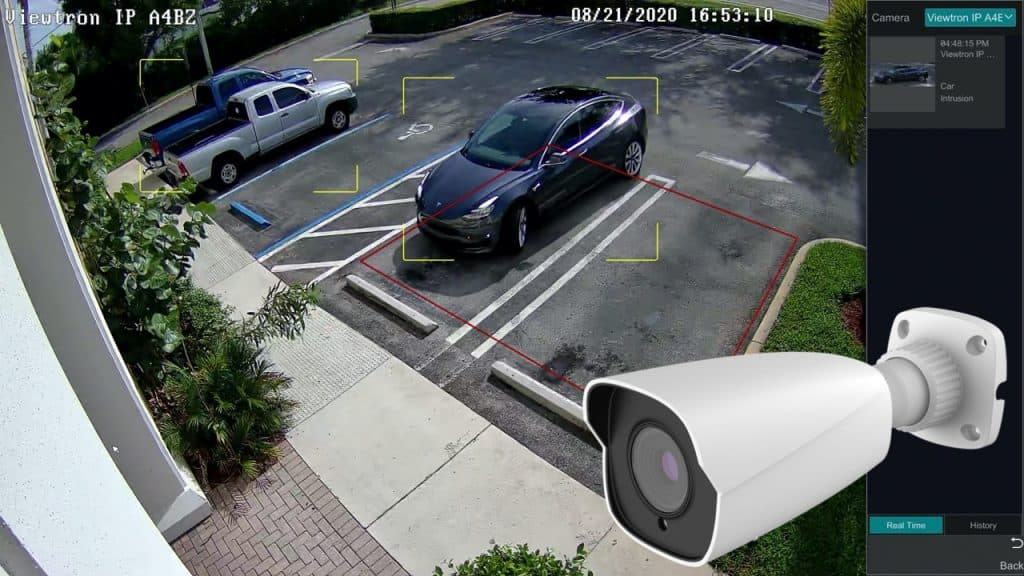
    One last thing that you should consider. Viewtron LPR cameras are highly specialized are excellent at detecting license plates and automatically recognizing the plate numbers / letters. However, they are not designed to record the best overview of the vehicle and surrounding area. They are focused in on the plate detection zone. So, I almost always recommend using at least one “overview camera” with each LPR camera. You can see that we include a Viewtron AI camera (human detection / vehicle detection) with our license plate recognition systems.

    Here are some of the most popular Viewtron AI cameras that we use when designing an LPR system for customers.
    https://www.cctvcamerapros.com/4mp-IP-bullet-camera-p/ip-a4bz.htm
    https://www.cctvcamerapros.com/4K-IP-Camera-p/ip-a8bz.htm

    7. Electrical relay output trigger call. The exact endpoint + request payload our backend sends to fire the camera’s dry-contact relay (software-decided gate open). I believe this is in the “Relay & IoT Control” API reference — a sample request/response would be ideal.
    You can find that here: https://videos.cctvcamerapros.com/developer/docs/api-reference/alarm/alarm-input-output-config/

    8. AddLicensePlates call. The exact request format to push a plate onto the camera’s on-board whitelist, including the owner-info and date-range fields. Also the matching Modify and Delete plate calls, since we’ll be managing the list (add/update/remove) as monthly permits change.

    You can find the complete LPR camera API reference here: https://videos.cctvcamerapros.com/developer/docs/applications/license-plate-recognition-camera-api

    9. Plate-event image. Does the standalone IPC’s plate-event POST include the cropped-plate image (targetBase64Data) by default, or does that need to be enabled in config? Rough size is helpful too.

    You can enable fill sizes image snapshot and / or the cropped license plate image to be included in the HTTP Post setup. You can see the setup instructions here.

    LPR Camera API for Software Development Integration and Apps

    10. smartType value on current firmware. Our parser matches the “VEHICE” value for IP camera events — can you confirm that’s what your current shipping firmware sends (vs. “vehicle” or a corrected spelling)? Just want to match what the units actually emit.
    If you go through the NVR, it will be the 2.0 API which uses “vehicle”.
    https://videos.cctvcamerapros.com/developer/docs/applications/license-plate-recognition-camera-api

    11. Auth on the relay/whitelist API calls. Do those calls require the camera’s username/password (digest auth?), a token, or are they open on the local network?
    You can use basic auth for the API authentication.
    https://videos.cctvcamerapros.com/developer/docs/getting-started/authentication

    LPR Camera Videos

    You can watch many video demos using our Viewtron LPR cameras here.

    If you have any questions about using the Viewtron LPR camera API / SDK or need help with a complete security camera system design, please email me at mike@viewtron.com.