Connecting Remote IP Cameras with Long Range Wireless Bridge
Watch this video to learn how to use an outdoor wireless bridge system to centrally record video from IP cameras installed across multiple structures. Point-to-point WIFI and point-to-multipoint WIFI bridges will be discussed.
Problem Overview
Securing large properties that have multiple structures can be challenging, especially when it comes to installing and connecting security cameras. Running cables between buildings is not always feasible or cost-effective. This is where long range wireless bridge systems come into play. These systems allow you to connect IP cameras installed on remote structures back to a centralized network video recorder (NVR) without the need for physical cabling. In this blog post and in the above video, we will explore how CCTV Camera Pros designs point-to-point and point-to-multipoint wireless bridge solutions for residential, commercial, and government security camera installations.
Here are a few of the most common scenarios that we see from our customers.
- House with a detached garage
- Farmhouse with one or more detected barns
- Residential or commercial property with a gated entrance
- Commercial parking lot with light poles
- Commercial property with multiple buildings
- Self storage facility with many buildings
Important Notes
- There MUST be a power source at the remote locations. If you want to integrate solar and battery power options with our wireless bridge systems, you can do that, however, CCTV Camera Pros does not design or supply solar or battery powered solutions at this time.
- There MUST be a direct line of sight between the transmitter and receiver antennas. NO obstructions. Not even trees or bushes can block the view of the WIFI antennas. Installers should conduct a site survey to ensure this.
- All IP camera functions work normal over a wireless bridge, the same is if they were hard wired to the network. When applicable to the camera model you are using, this includes AI camera software functions, PTZ camera controls, license plate recognition, external alarm input / output, alarm light and alarm siren functions.
Understanding Wireless Bridges
Before diving into the specifics of long range wireless bridge systems, it’s essential to understand what a wireless bridge is and how it differs from a wireless network. A wireless bridge is a direct Wi-Fi connection between two antennas and a transmitter and a receiver. It is used to provide a network connection between two physical structures, allowing non-wireless IP devices to transmit data over the wireless link by connecting them to a network switch.
On the other hand, a wireless network or wireless access point (WAP) is a device that enables wireless devices to connect to a wired network, which requires IP cameras with built-in WIFI. Wireless networks can typically only be used for certain indoor security camera applications, and is something that CCTV Camera Pros rarely recommends.
This article ONLY discusses long range outdoor wireless bridge systems for IP cameras.
Point-to-Point Wireless Bridge Systems
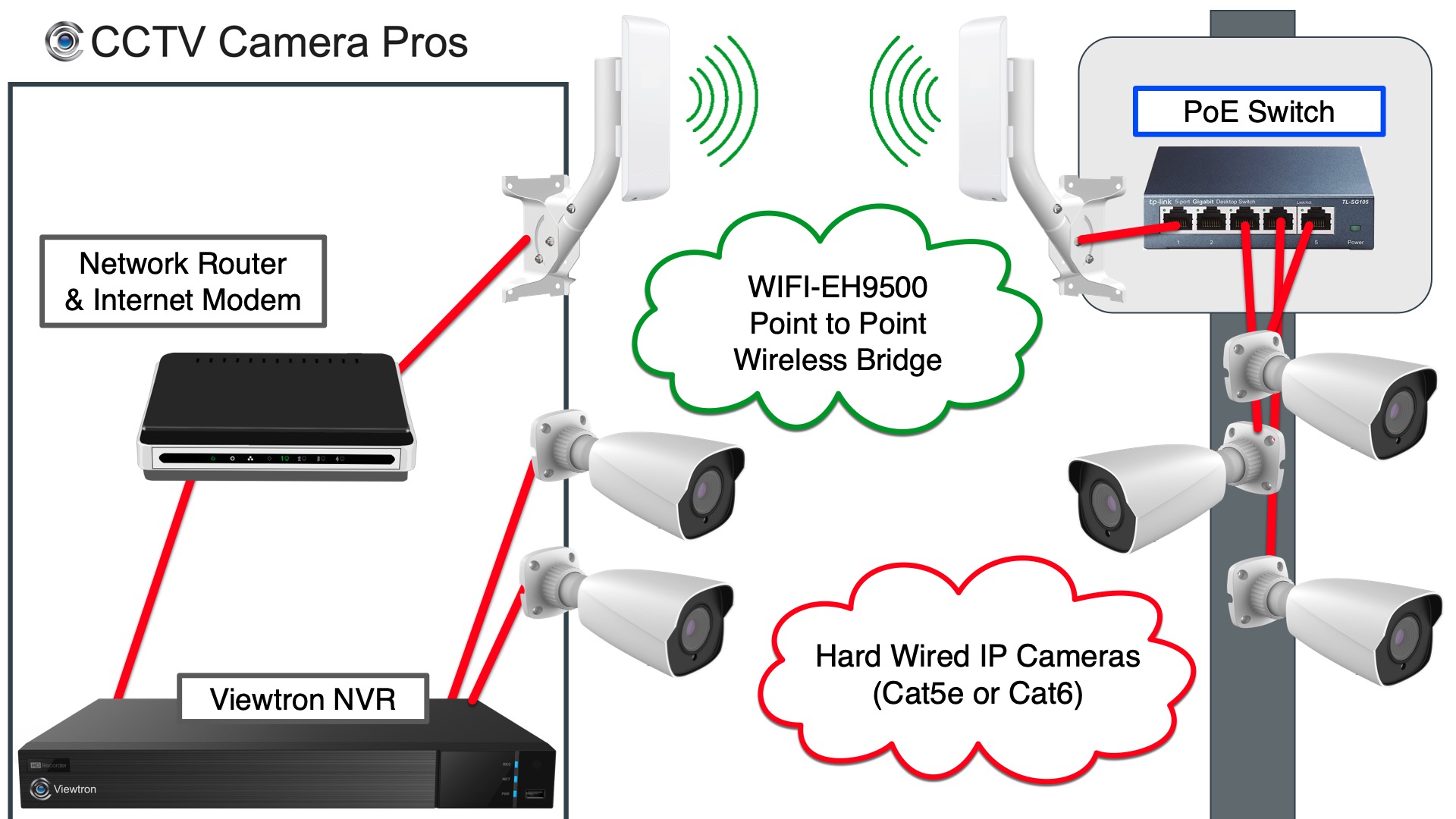
The WIFI-EH9500 point-to-point wireless bridge system consists of one transmitting antenna and one receiving antenna. Multiple IP cameras can be connected to the transmitting antenna via a network switch, and the entire network data from that switch is transmitted to the receiving antenna. The receiving antenna at the main building is then connected to the network router. The Viewtron IP camera NVR is also connected to the network router. The Viewtron NVR also has 2 IP cameras hard wired directly to the PoE ports on the back of the NVR. The Viewtron NVR records video surveillance from all of the cameras. All of the AI software, alarm functions, and recording features work exactly the same for the hard wired and wireless IP cameras.
Key features of this point-to-point wireless bridge systems:
- Long-distance capability: Up to 3 miles with direct line of sight
- 45-degree beam spread between antennas
- 150 Mbps bandwidth capacity, sufficient for up to (16) 4K IP cameras at 10 Mbps each
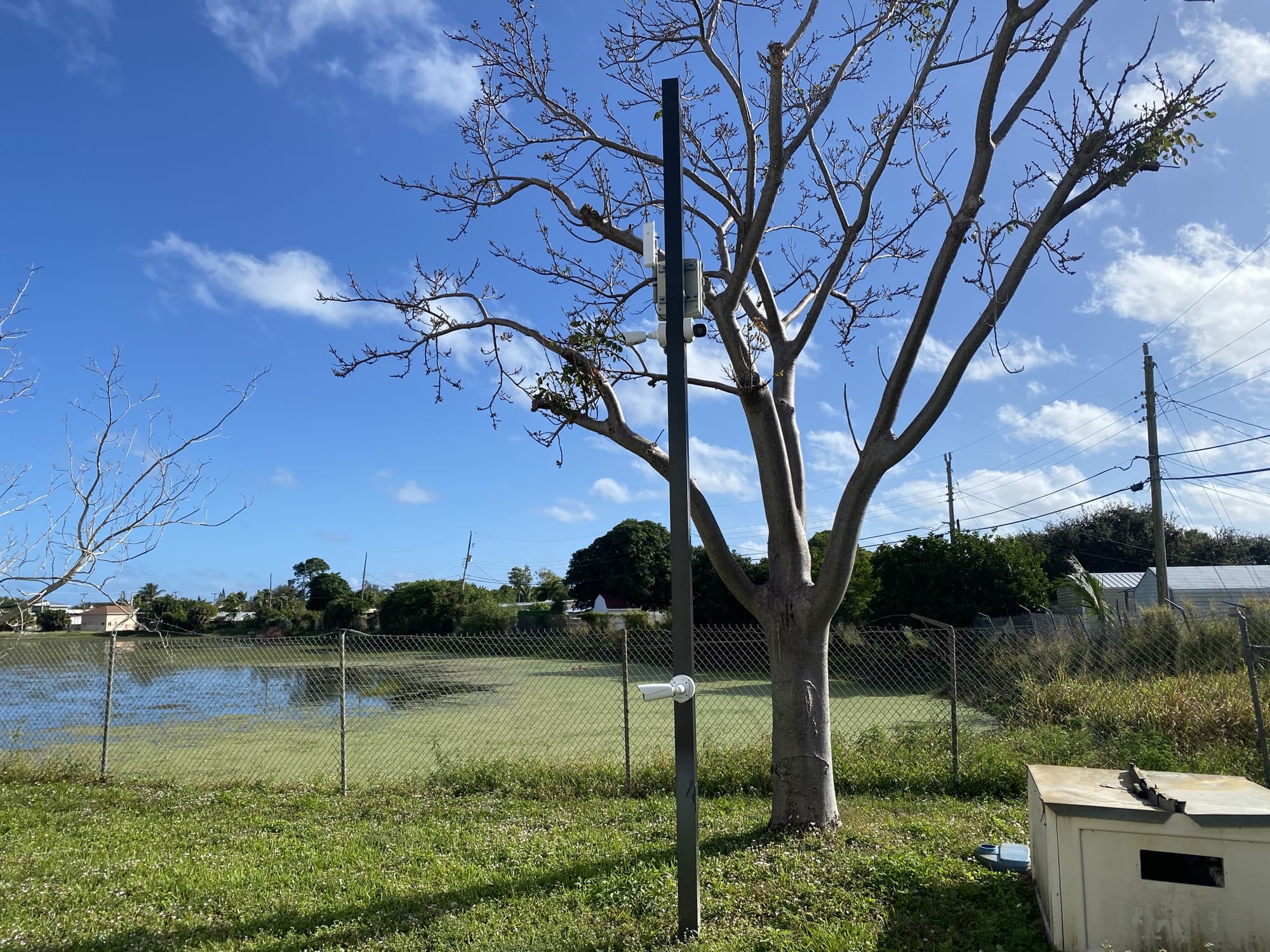
CCTV Camera Pros uses this point-to-point WIFI bridge at our warehouse. We use it to connect the 3 IP cameras installed on a light pole across the street from their office to the Viewtron 16 channel NVR that is recording at our warehouse. The camera mounted down low is a Viewtron LPR camera and the two cameras up high are Viewtron 4K AI security cameras. The cameras and the transmitting antenna are connected to a PoE switch the weatherproof NEMA box that you see mounted ear the top of the pole. The transmitter antenna is mounted to the side of the NEMA box. This is the NEMA weatherproof enclosure with power.
You can learn more about our setup at CCTV Camera Pros in this article and video: Wireless Outdoor Security Camera System.
Point-to-Multipoint Wireless Bridge Systems
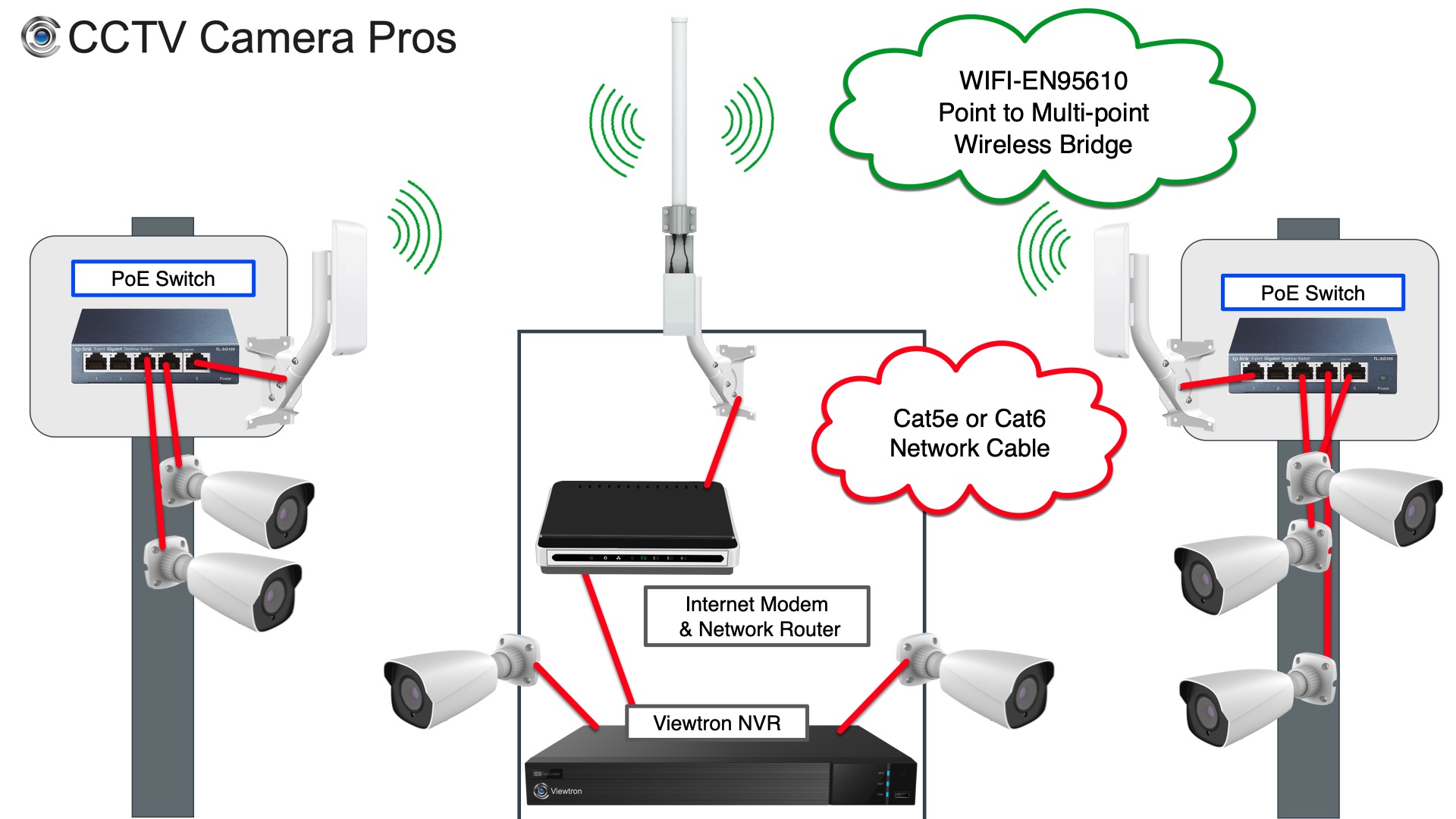
For customers with multiple remote structures that need security cameras to be connected to a central NVR, the WIFI-EN95610 point-to-multipoint wireless bridge system is the solution we recommend. In this setup, multiple transmitting antennas send data to a single omnidirectional (360-degree) receiving antenna. A different radio is used at the receiving end to handle the increased bandwidth from multiple transmitters. CCTV Camera Pros’ WIFI-EN95610 system comes with the omnidirectional receiving antenna and two transmitting antennas.
Key features of point-to-multipoint wireless bridge system:
- Multiple transmission sites connected to a single receiver antenna
- 360 degree omni-directional antenna on the receiver radio
- 450 Mbps Bandwidth Receiver Antenna
- 150 Mpbs Bandwidth Transmitter Antennas
- Receiver bandwidth sufficient for up to (45) 4K IP cameras at 10 Mbps each
- Reduced transmission distance compared to point-to-point systems (limited to about 1,500 feet – direct line of site)
Customers have the option to add additional transmitter WIFI antennas if they have more than 2 remote camera areas.
Wireless Bridge Systems Design for IP Camera Systems
The team at CCTV Camera Pros designs wireless bridge systems for customers. We can help ensure a seamless integration with the customer’s IP camera system and existing network infrastructure. When designing a wireless bridge system, it’s crucial to consider factors discussed in the above article and video. Our team can help guide you through this process and design a solution for you. We can pre-configure all of the wireless radios that we supply before we ship them out so that the installation is a plug and play as possible. We can support any electrician or low voltage cable installer that you hire, or you can do it your self with our help in many cases.

Request a free quote and consultation from CCTV Camera Pros.
Conclusion
Long range wireless bridge systems offer a reliable and cost-effective solution for connecting IP cameras across multiple structures without the need for physical cabling. By understanding the differences between point-to-point and point-to-multipoint setups and their respective capabilities, customers can choose the best solution for their specific needs. CCTV Camera Pros hopes this article helps answer any questions you have. Please contact us if you would like our help.
Video Transcript
Hey guys. Mike from CCTV Camera Pros here. In this video, I want to tell you about how the team here designs long range wireless bridge systems to connect security cameras at remote structures back to a centralized building and centralized recorder. So for example, for some large residential installations, if someone has a detached garage or a detached barn, or maybe they have a gate entrance to their property, and they want to record those cameras back at their house, back at the main structure, and there’s no wired connectivity run to those other structures, you can use these point-to-point or point-to-multipoint wireless bridges to connect those cameras back to the recorder. So let me explain a couple things. First of all, the kind of difference between what a wireless bridge is versus a wireless network or wireless access point. So a wireless bridge is meant to connect two structures together, and the IP cameras in this case, but they could be other IP devices are hardwired to a network switch, and then that switch is also connected to a transmitting antenna. And that transmitting antenna transmit via direct line of sight back to a receiving antenna. It’s really like a last resort option for people that cannot run cable, either network cable or fiber, between structures or buildings.
So, we’ve also helped a lot of commercial customers with multiple buildings on a single property connect cameras on the remote buildings back to their main building. So again, one recorder can record all of the IP cameras on their property. Now, this is just for network IP cameras. You can’t use this with coax closed circuit cameras. These are basically to connect an IP network. So only IP cameras. And first, I’m going to talk about a point-to-point wireless bridge. So I’m going to refer to this diagram here.
And a point-to-point wireless bridge consists of a transmitting antenna or a transmitting radio and a receiving radio or an access point. And the transmitting antenna can have multiple IP cameras transmitting over it. Again, those are hardwired to a network switch. That switch is also wired to the transmitting antenna, and the entire contents of the network data that’s on that switch gets transmitted back to the receiving antenna or access point. So we use this here at the office. We have a pole across the street from us where we have a LPR camera and two overview cameras. And just like this diagram, all three of those cameras are hardwired to a Poe switch that’s in a weatherproof NEMA box. And the transmitting antenna of the point-to-point wireless system is also hardwired to that network switch.
So then on the receiving end of our building, we have the receiving antenna or the access point. And that’s hardwired to our network router, as is the viewtron NVR that’s recording all the cameras. Now, also on our building, we have hardwired cameras, IP cameras that are hardwired back to the NVR, because the Viewtron NVRs have power over Ethernet. So the main building can have cameras hardwired directly to the NVR Poe provided by the NVR. And that NVR is connected to the network router that can also be a modem for Internet access. If you want to access your system remotely, that’s, that’s very typical. And then the receiving antenna is connected also to that router. There can be a switch in between those two.
But I wanted to make this as simple as possible. So that’s how a point-to-point wireless bridge works. So, a couple other notes about that point-to-point. Our point-to-point wireless bridge system is super long distance capable. This can go up to 3 miles with a direct line of sight. There can be no obstructions in between the two radios or antennas. I use those terms interchangeably. Antennas and radios mean the same thing for wireless bridge systems.
But there has to be a direct line of sight. Definitely no buildings in between, not even trees in between. Literally direct line of sight between the antennas. And with the point-to-point system, the transmitter antenna and the receiving antenna have a 45 degree beam spread, basically 45 degree field of view wirelessly that you connect to. And the more direct that is, the more strong the signal is going to be. 150 megabits is the, is the bandwidth that can be handled on that system. So what does that mean in practice? Well, a typical 4K IP camera is going to use somewhere between five and twelve megabits of data. If you have it pumped up all the way to 30 frames a second at full 4k resolution.
Let’s just say for simplicity, that’s going to use ten megabits of data. So in practice, you could have (15) 4K IP cameras transmitting over a single wireless bridge, a single transmitter back to a receiver. Now, that’s if the setup is perfect. I mean, a perfect direct line of sight. There’s not a bunch of Wi Fi interference from the surrounding area, there’s no trees obstructing the view. It’s absolutely perfect. That’s best case scenario. That is a point-to-point wireless bridge.
Again, just one single structure or point pointing back to the access point or receiving antenna. Now, let’s also talk about Point-to-Multipoint wireless bridge systems, and we’ll refer to this next diagram. The difference here is you can have multiple transmitting antenna sites transmitting back to a omnidirectional, a 360 degree receiving antenna. And we use a different radio connected to that antenna that can handle 450 megabits of transfer. So that’s so you can handle multiple transmitters back to it. So for example, if you want to have a one building that has five IP cameras transmitting back and another that has five or seven and even a third, that omnidirectional receiving antenna and radio can handle all that bandwidth. So point is the access point, and multi point are the structures transmitting back or the antennas rather transmitting back to the access point. So the diagram is similar, except there’s multiple transmission stations.
So I have two poles on this diagram. One with (3) IP cameras going back to a network switch and one with (2) IP cameras going back to a network switch. Both of them are using the same transmitting antenna from our WIFI-EN95610 system, which comes with the receiving antenna and a 360 omnidirectional antenna, and two transmitting antennas. And we can add additional transmitting antennas onto that system. If you have more than two transmission sites coming back to the access point, and again back at the omnidirectional or the receiving side, you can also have hardwired cameras there going directly back to the NVR, hardwired power over Ethernet. So locally at the main building, everything’s hardwired back to the NVR. At all the transmission sites, those are going through network switches and then transmitting antennas back to the omnidirectional antenna. In the end, this is all seamless.
It’s all seen as just part of your network. And the team at CCTV camera pros designs these and pre configures them for customers before we even ship them out. So let me talk about a couple other things. So, in regards to the point-to-multipoint network, the one thing that you do lose is distance. So while the point-to-point system, you could go up to 3 miles, the point-to-multipoint with the omnidirectional antenna is really limited to about 1500 feet. So, the transmission distance goes down drastically. But most of the customers we’re working with, it’s a single property and you’re not going distance of miles and miles. I mean, we have a few customers that use it that way, installers that do this professionally, but most of our customers, it’s just a large property with multiple structures on it.
What else did I want to mention? So I mentioned the receiving side on the omnidirectional is 450 megabits. So again, let’s just do some simple math. If you have 4k IP cameras, each transmitting ten megabit, roughly 10 times 45 is 450. So you could have 45 4K IP cameras on the Point-to-Multipoint bridge system. Now, again, that’s best case scenario. Absolute direct line of sight, no interference, no trees, no obstructions whatsoever. Guys, if you have any questions about anything I talked about here or anything in regards to video surveillance equipment, you could always email me directly at mike@cctvcamerapros.net. if you want to learn more about how we use these point-to-point and point-to-multipoint wireless bridge systems with our Viewtron IP camera systems and see more demo videos, you could request a quote.
You can request a free consultation. Please visit www.cctvcamerapros.com/wireless. Thank you for watching.





