
30fps vs 8fps Security Camera Video Recording Comparison
Viewtron IP camera NVRs are capable of recording 4K IP cameras at 30 frames per second. Viewtron hybrid BNC DVRs are limited to 8 frames per second recording on 4K BNC cameras. Here is a video that compares video surveillance recorded at 30fps vs 8fps.
I hope that this will help customers who are deciding between keeping their coax cable in place and upgrading their old DVR to a Viewtron hybrid DVR vs replacing their coax cable with CAT5 or CAT6 network cable and upgrading to an all IP camera system with a Viewtron NVR. If you are installing a new system and do not have cable in place yet, the choice is obvious, install CAT6 network cable and go with the Viewtron NVR with IP cameras.
For customers that have good quality coax cable in place already, the choice is not as simple, especially if you have some cable runs that are expensive and hard to replace. Th lower frame rate of recording at ultra high resolution is one of the limiting factors of BNC DVRs, however, as you can see in the above video demo, 8fps still delivers very good video quality. The video resolution is not impacted, the lower frame rate only impacts the clarity of fast moving objects. For customers that are not recording fast moving objects, the lower frame rate may acceptable.
Viewtron Analog to IP Video Encoder
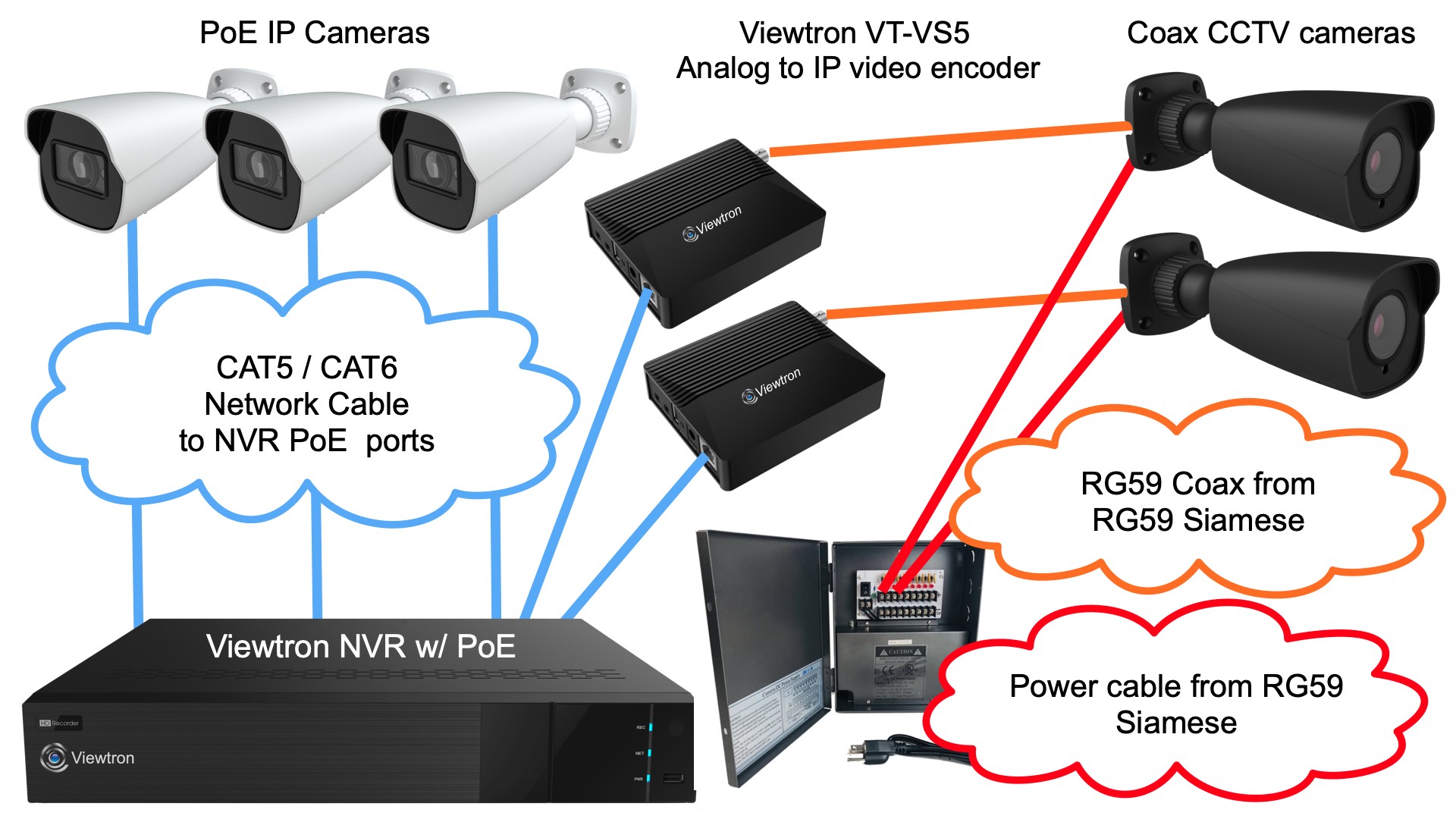
For customers that are upgrading their old CCTV camera system and want to replace it with a Viewtron NVR IP camera system, but they have a few cable runs that are too difficult to get to, the new Viewtron VT-VS5 IP video encoder is a great solution. The VT-VS5 converts any analog BNC camera up to 5mp resolution into a Viewtron IP camera with AI software features. This allows customers to upgrade to a Viewtron NVR and keep some of their coax cable in place with existing or new BNC cameras.
This is how it works in the above diagram.
- There are two coax cable runs that the customer does not want to replace because they are very hard to get to. The existing coaxial cable is left in place for the two analog CCTV cameras on the right (gray cameras).
- The customer uses their existing power supply box to power the analog cameras
- The BNC connector ends of the two coax cable runs are plugged into the BNC input of a video encoder.
- The RJ-45 Ethernet connection of each the video converters is plugged into a PoE port on the Viewtron NVR.
- The Viewtron analog to IP converter is powered by the NVR’s Power over Ethernet port.
- The analog cameras are now seen as a Viewtron AI security camera on the NVR. All of the IP camera and AI functions work exactly the same as the native AI security cameras.
- All of the new camera locations and areas where the coax cable makes sense to replace use CAT5 / CAT6 cable, and the IP cameras are hard wired to the PoE ports on the NVR (white cameras on the left).
The Viewtron analog to IP video converter is compatible with analog CVBS, AHD, HD-TVI, and HD-CVI video formats. It does not work with HD-SDI format cameras, but those are rare.
More Viewtron IP Camera System Advantages
Besides the ability to record at a much higher frame rate at 4K resolution, there are some other advantages of a Viewtron NVR system vs the hybrid BNC DVR.
- AI Software Integration – The biggest advantage of Viewtron NVRs over DVRs is the AI software integration with Viewtron IP cameras. Although you can use Viewtron IP cameras on a Viewtron hybrid DVR, the human detection, car detection, facial recognition, and license plate recognition AI functions are not integrated into the DVRs. One Viewtron NVRs you can setup all of the Viewtron AI software functions and use them to trigger video recording and other alarm events.
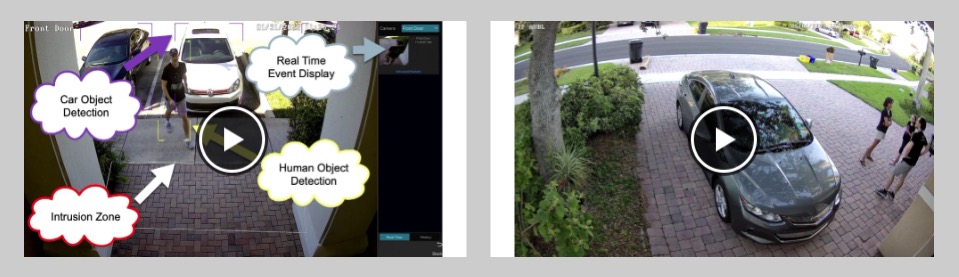
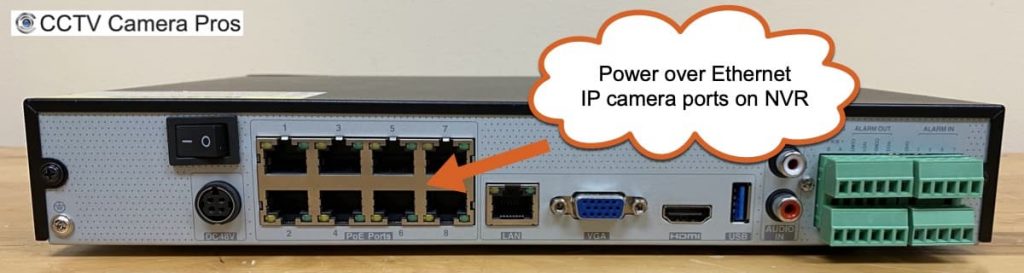
You can watch video demos of the Viewtron AI software functions here. - Built-in PoE Ports – Viewtron NVRs have built-in PoE ports. Simply run CAT5 or CAT6v network cable from each camera to a port on the back of the NVR and the setup is plug and play. The Power over Ethernet ports power the camera and automatically connect the camera’s video and AI functions to the NVR. Please note that the 32 channel NVR only has 16 PoE ports and the 64 channel NVR does not have PoE ports. The 4ch, 8ch, and 16ch support PoE for all cameras.
Have Questions / Need Help?
If you have any questions about anything, need a quote, or want to have a phone call to discuss your security camera requirements further, please email or at mike@cctvcamerapros.net. You can also call or text me and the team at 1-561-433-8488.





