AI Security Camera Triggers Alarm Light via Wireless Relay
Viewtron IP camera NVRs are now integrated with Shelly wireless smart relays. This means that you can use any of the AI software alarms supported by Viewtron AI security cameras to open or close or an electrical relay on an IP network over WIFI. Viewtron IP cameras support human detection, car detection, face detection / facial recognition, and license plate detection / license plate recognition.
In this example, I configure the human detection / perimeter intrusion event to trigger (close) the relay port on a Shelly One over the WIFI at our office.
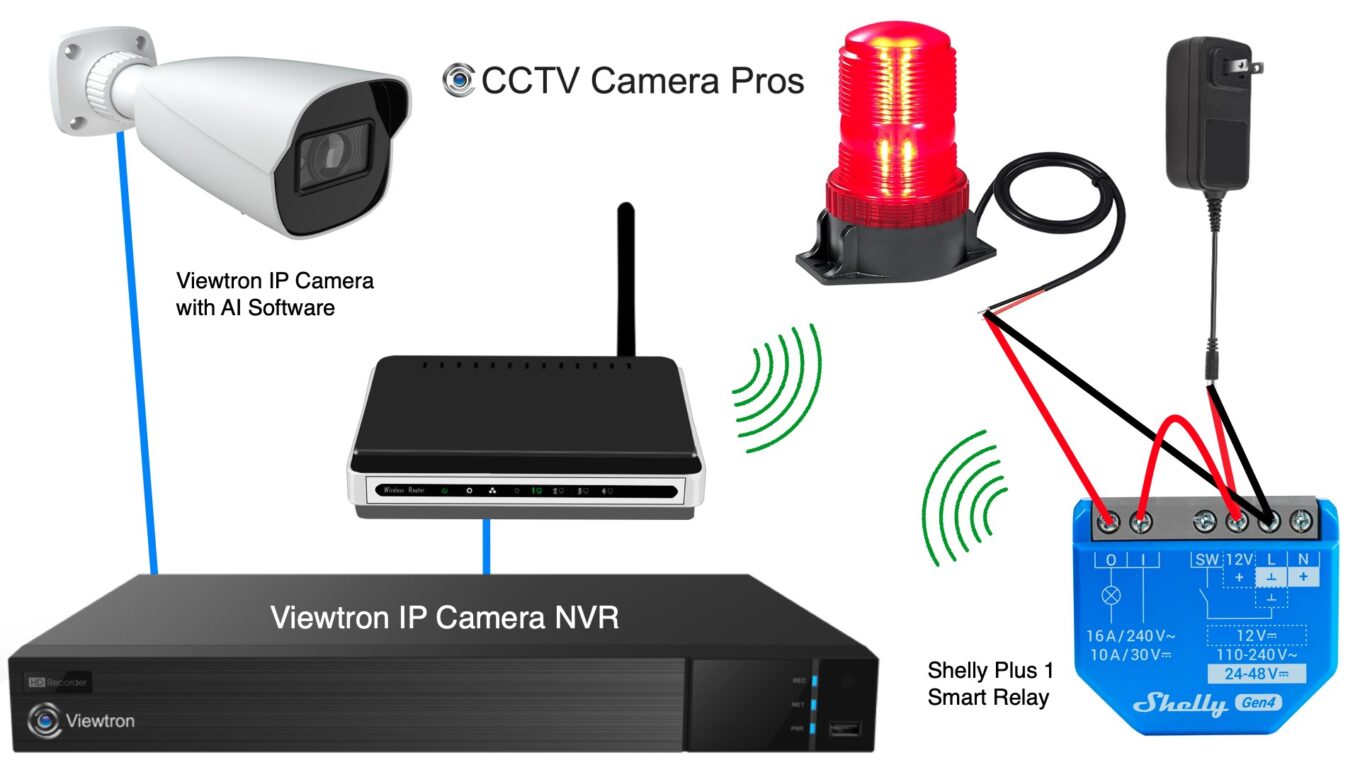
Here is an overview of how this works.
- The Viewtron AI camera is hard wired to one of the Viewtron NVR’s PoE ports using network cable (CAT5 or CAT6).
- The Viewtron NVR is hard wired to network router with network cable. The router has built-in WIFI.
- The Shelly smart relay is setup to connect to the wireless network. In this project we are using a Shelly Plus 1, which supports 12V DC.
- A 12V DC power supply is connected to the Shelly 1 to provide power to the Shelly.
- The 12V DC power supply is also wired in-line with the relay output port so that it will provide power to our alarm light when the relay circuit is closed.
- The normal state of the relay is open (NO).
- Human detection and an intrusion detection zone are setup on the Viewtron NVR for the AI camera.
- When intrusion detection by a human is detected, the NVR sends an alarm signal to the Shelly Plus 1 to close the relay.
- When the Shelly One closes the relay, the alarm light receives 12V DC power and turns on.
- After 20 seconds, the NVR sends a signal to the Shelly to open the relay and the alarm light turns off.
Shelly One 12V DC Alarm Light Wiring Diagram
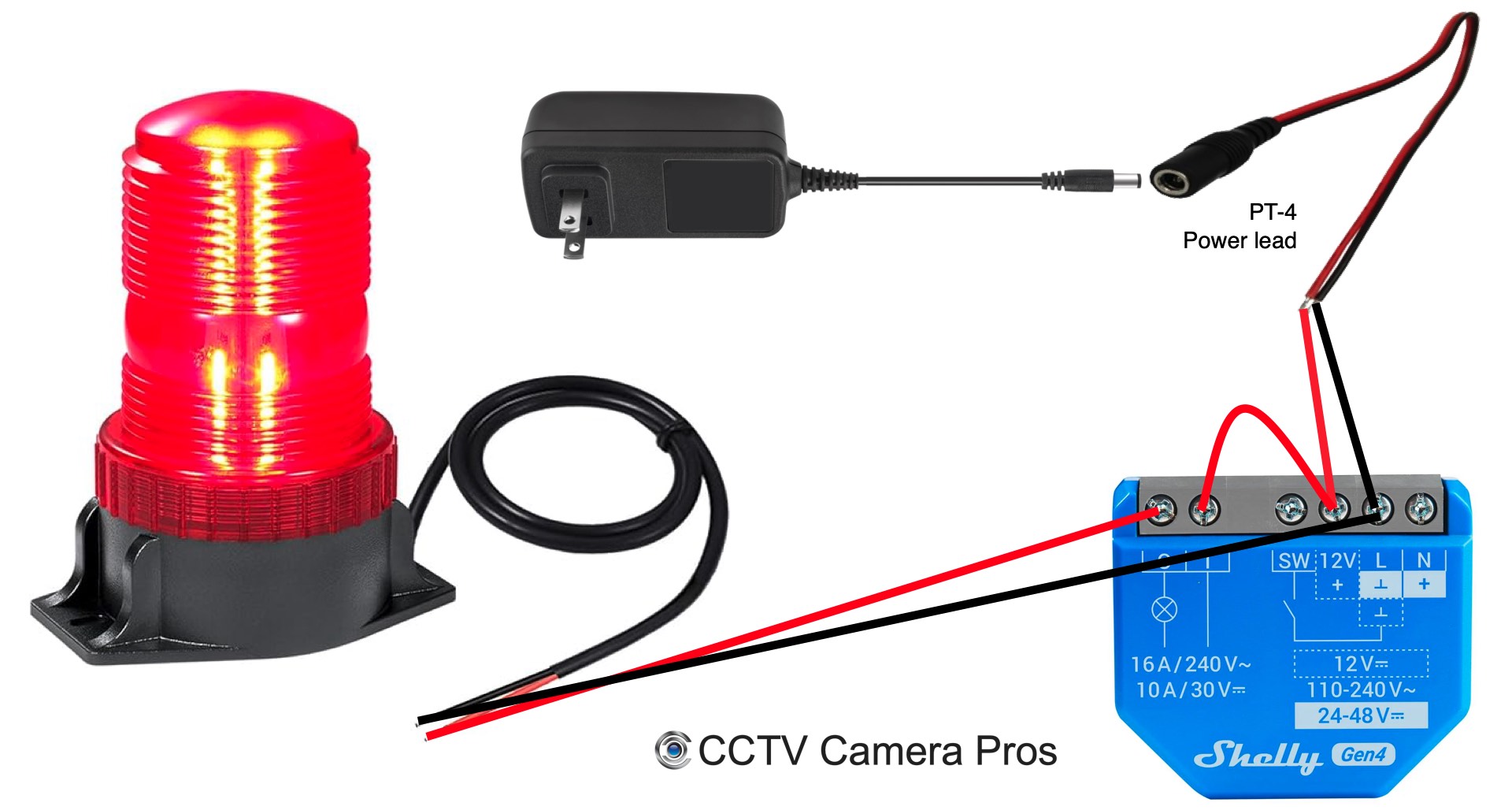
This is how a wired the Shelly Plus 1 to the power supply and alarm light.
- Powering the Shelly – I use one of these PT-4 pigtail power leads to connect the 12V DC power supply to the Shelly. I connect the red wire from the PT-4 to the 12V+ terminal on the Shelly and the black wire from the PT-4 to the L terminal.
- Relay / Load Side (dry contacts) – I use 20 gauge power cable to connect the O (output) to one power terminal on the alarm light. I connect the other power terminal on the alarm light to L (ground) on the Shelly. I use a short jumper wire to connect the | (common) on the relay to the 12V + terminal.
Connecting the Shelly Smart Relay to Wireless Network
One of the things I really love about Shelly relays is how simple they are to setup. When you first power a new Shelly One on, its built-in bluetooth is turned on. This allows you to connect directly to via the Shelly mobile app.
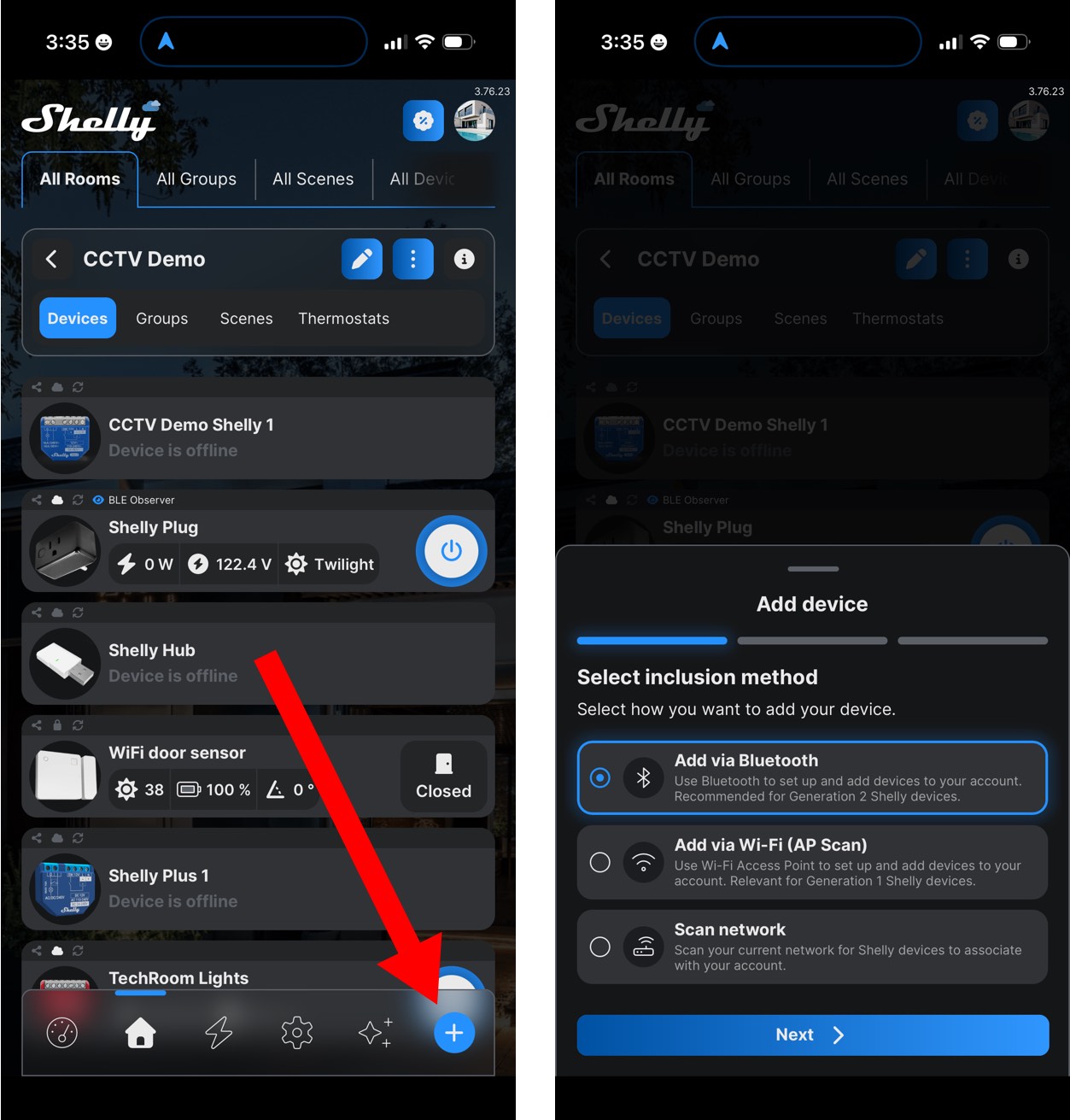
After you power your Shelly device on, open the Shelly mobile app and tap on the Add Device + icon. That will bring you to the screen on the right where you can select to Add via Bluetooth. Once the app connects to the device via Bluetooth, you can configure the Shelly device to connect to your wireless network by entering your WIFI SSID and password.
Once your Shelly relay is connected via WIFI, you should setup a static IP address for it on your local area network. You can do this via DHCP reservation on your router. If you are not familiar with how to setup a static IP address on your router, please take a look at these static IP address setup instructions for our IP cameras. The concepts are the same.
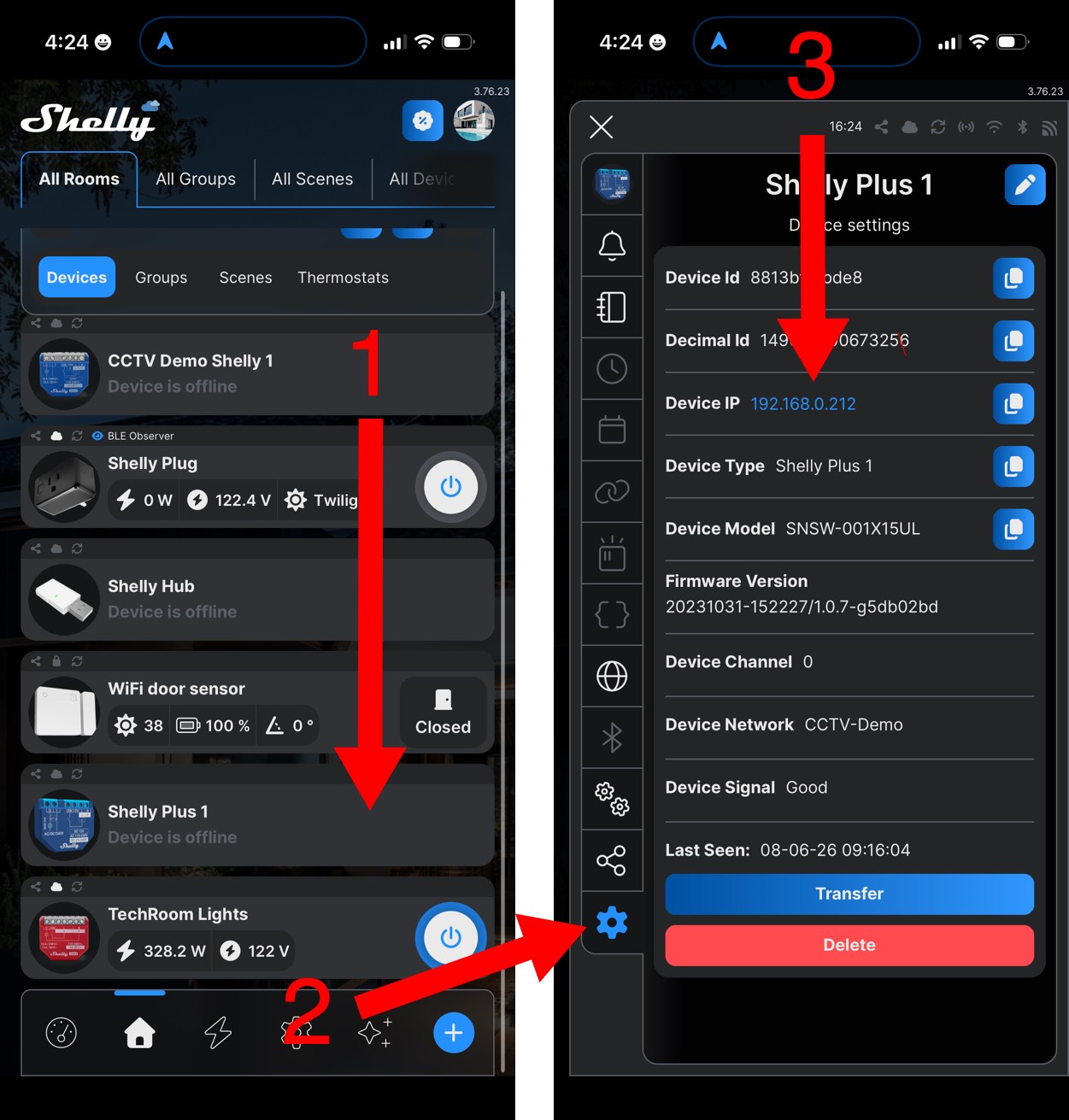
You can find the IP address of your Shelly Plus 1 in the mobile app by 1) taping on the Shelly Plus 1 device in the Devices section, then 2) tapping on the gear icon. 3) You can see the IP address here.
Configure to Shelly Wireless Alarm Relay on Viewtron NVR
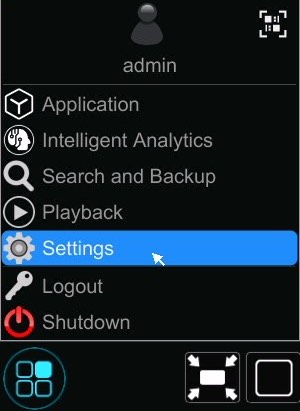
To connect the Viewtron IP camera NVR to the Shelly wireless relay, click on Settings from the main menu.
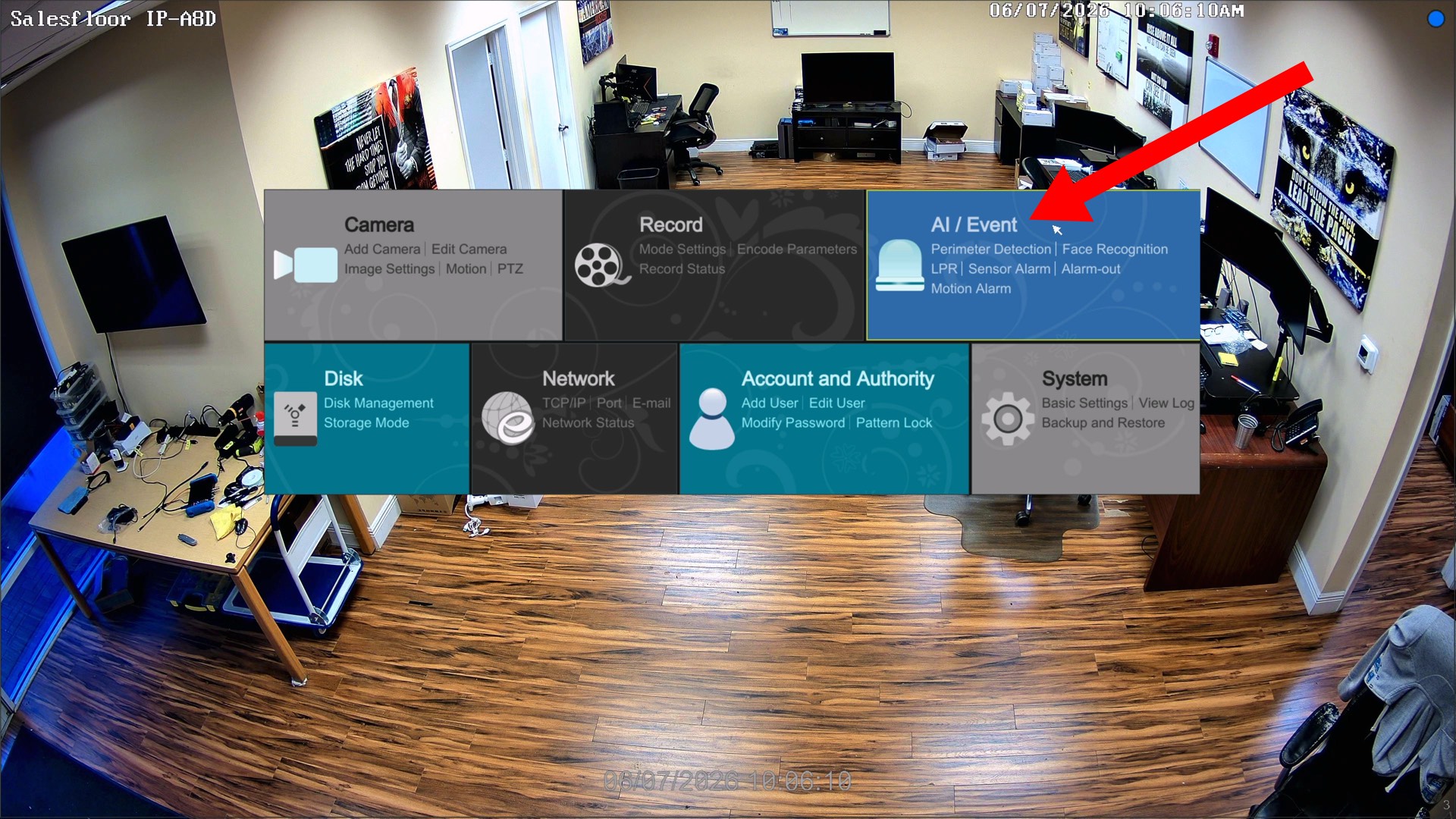
On the menu, click on the AI / Event link.
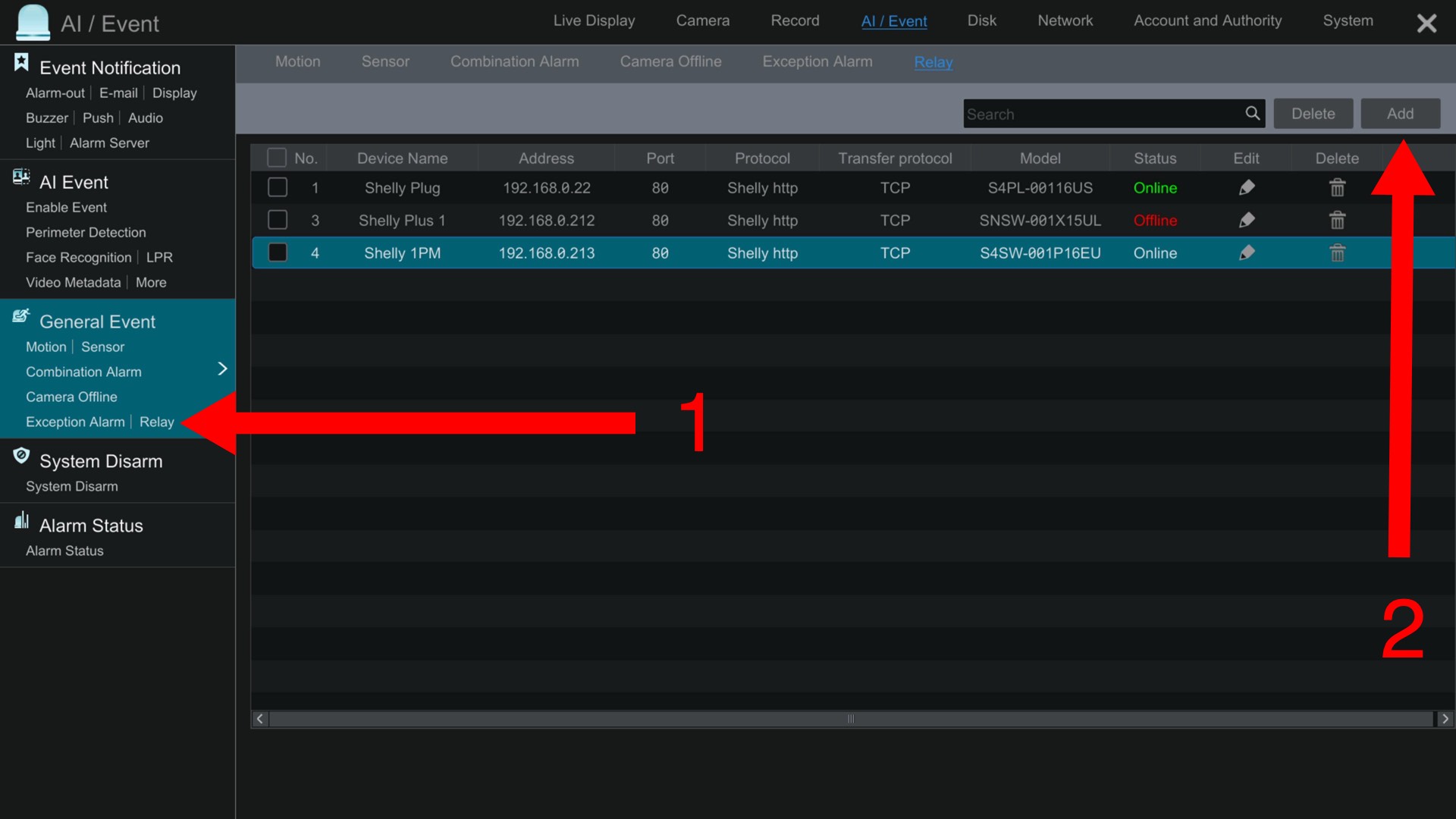
- Click on the Relay link.
- Click on the Add button.
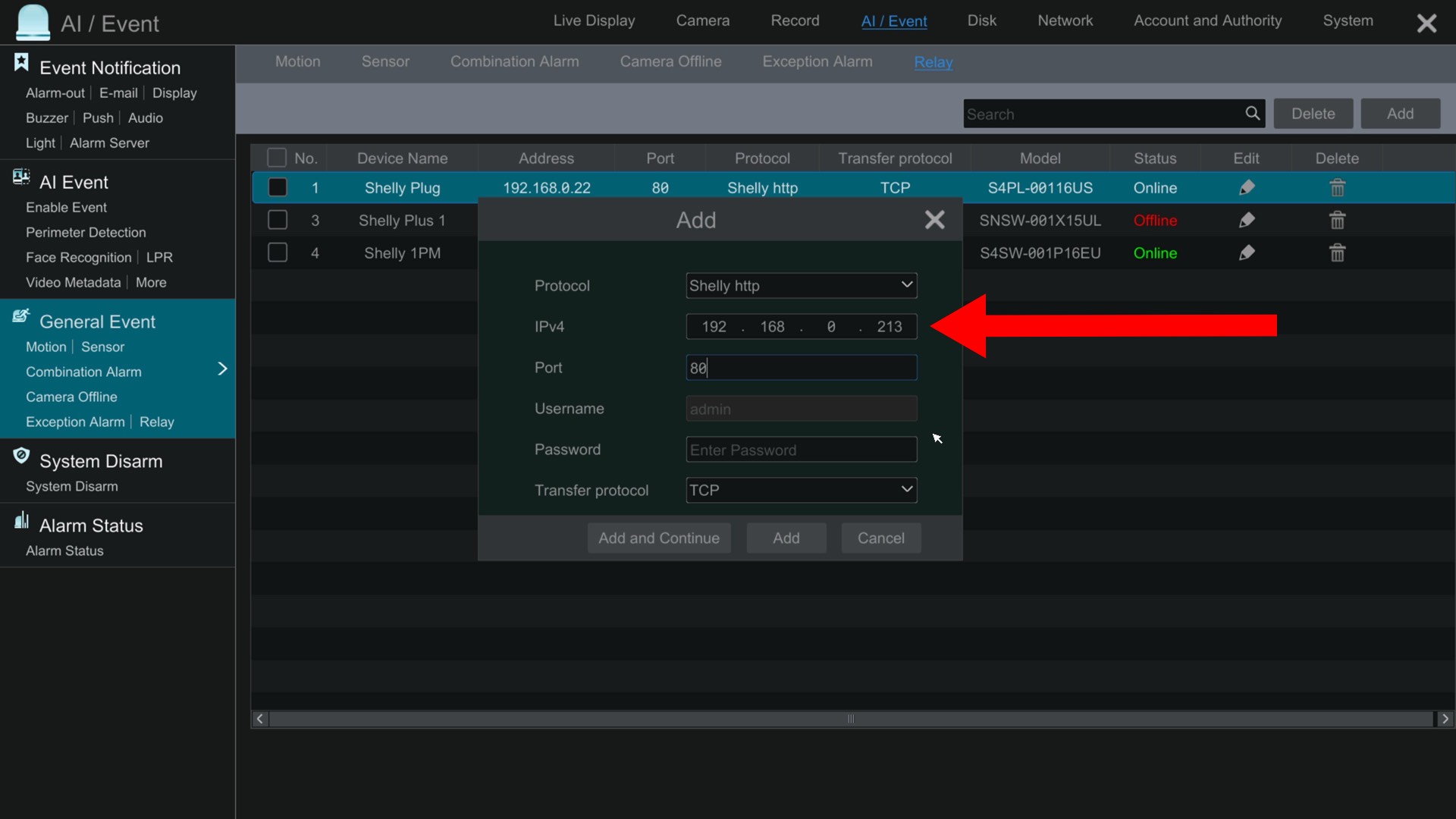
The add dialog box will open. Select Shelly http for the Protocol. Enter the IP address of your Shelly relay in the IPv4 field, 80 in the port field. You can leave the Username and Password empty unless you password protected your Shelly device.
Click the Add button when done.
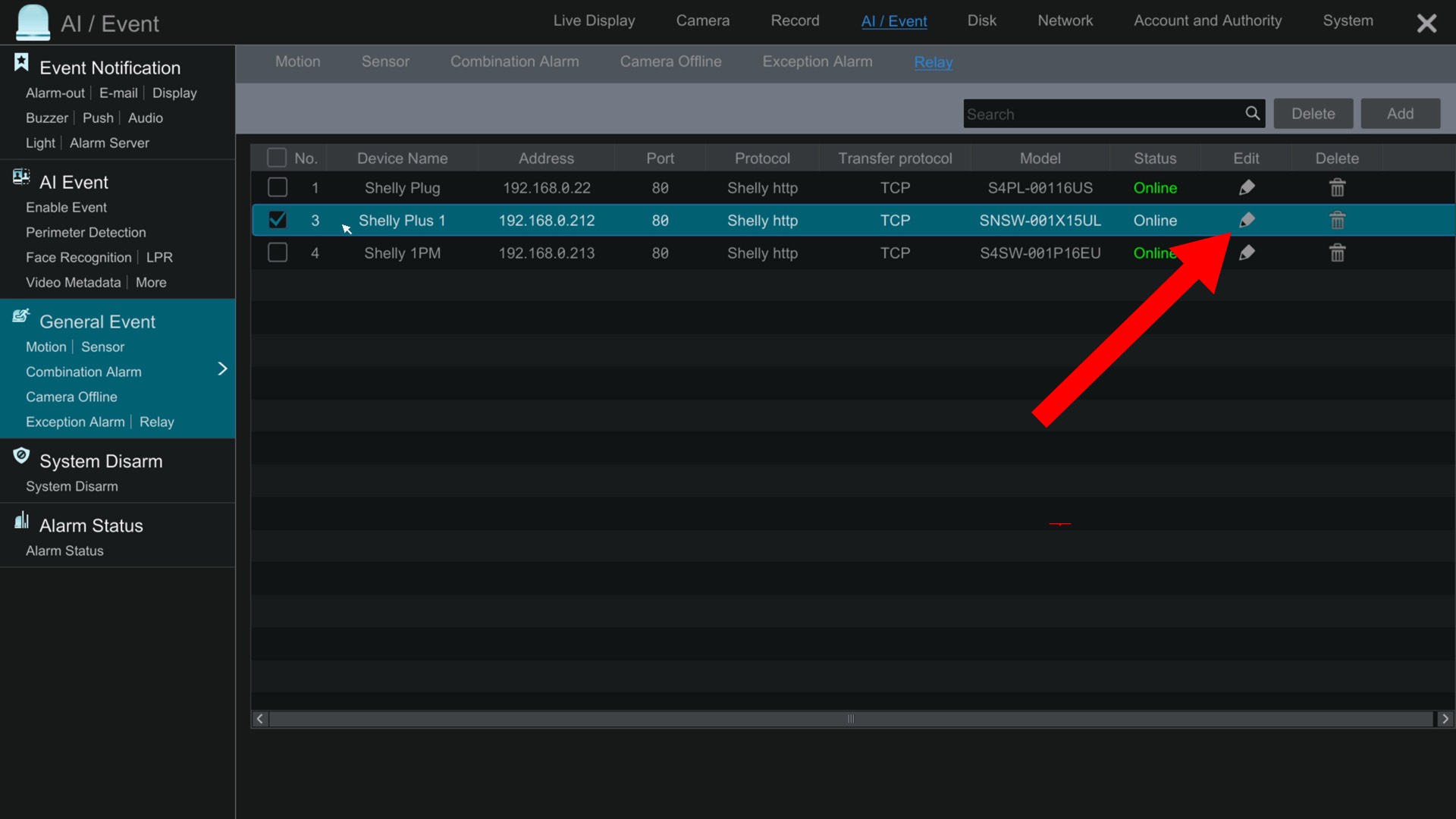
You will see the relay added to the device list, and the status should change to Online once the NVR confirms that the Shelly is online and reachable over the network. If you want to change the name of your relay, you can click on the Edit icon and rename your Shelly device.
Configure Human Detection / Intrusion Detection
Now that the Shelly wireless relay has been added to the Viewtron NVR’s list of relays, you may configure any of the alarm input that the NVR supports to trigger it. In this example, I am going to configure human detection / perimeter intrusion detection. Please note, it is just as easy to setup a line crossing detection alarm to trigger the Shelly relay.
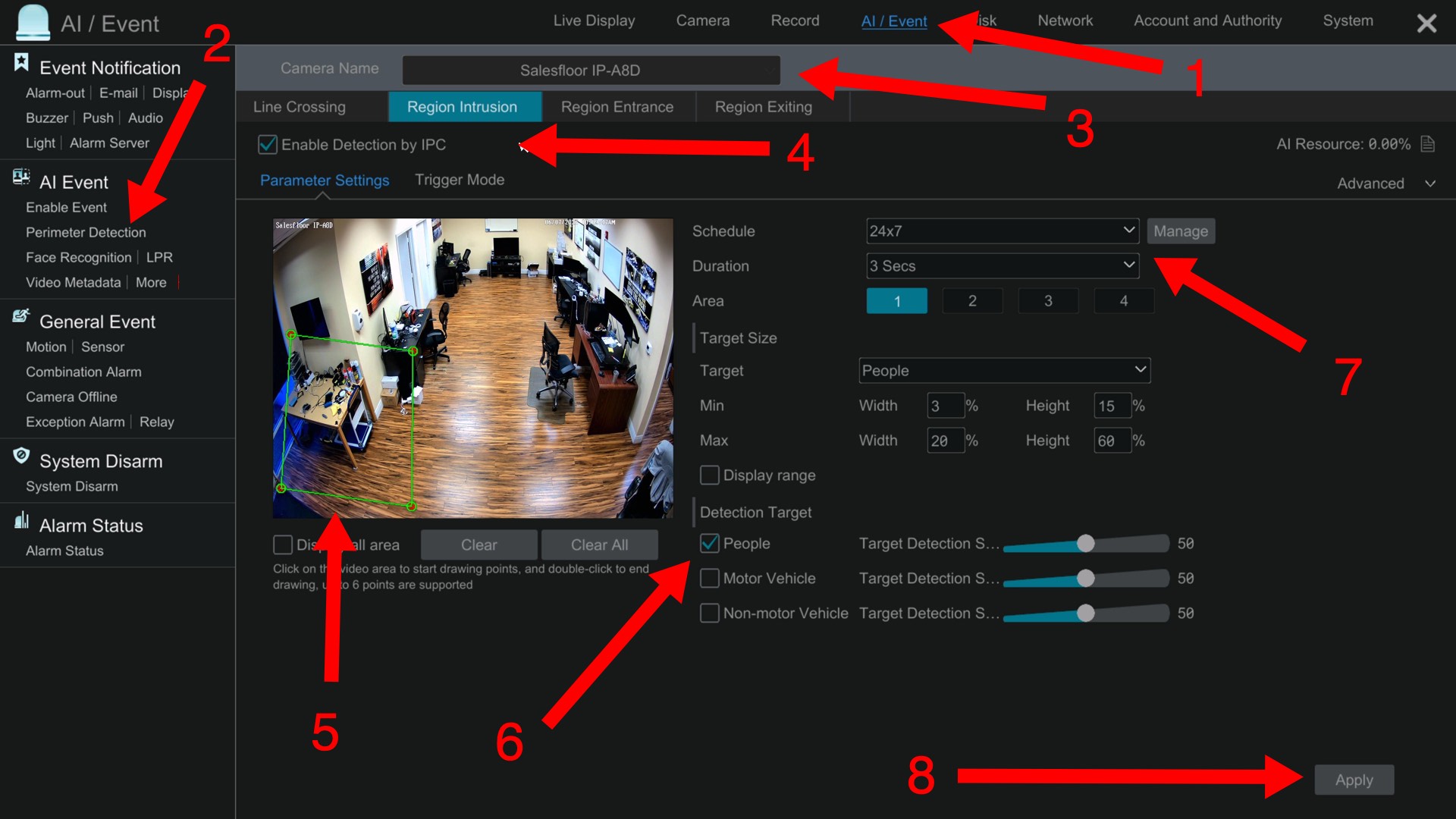
To setup the human detection / perimeter intrusion detection on the NVR, do the following.
- Click on the AI / Event link.
- Click on the Perimeter Detection link.
- Choose the camera that you are configuring.
- Click on the Region Intrusion tab and check the Enable Detection by IPC checkbox.
- Draw the perimeter intrusion zone.
- Select People, Motor Vehicle, Non-motor Vehicle depending on the object type(s) that you want to detect.
- Choose a schedule for the detection.
- Click Apply.
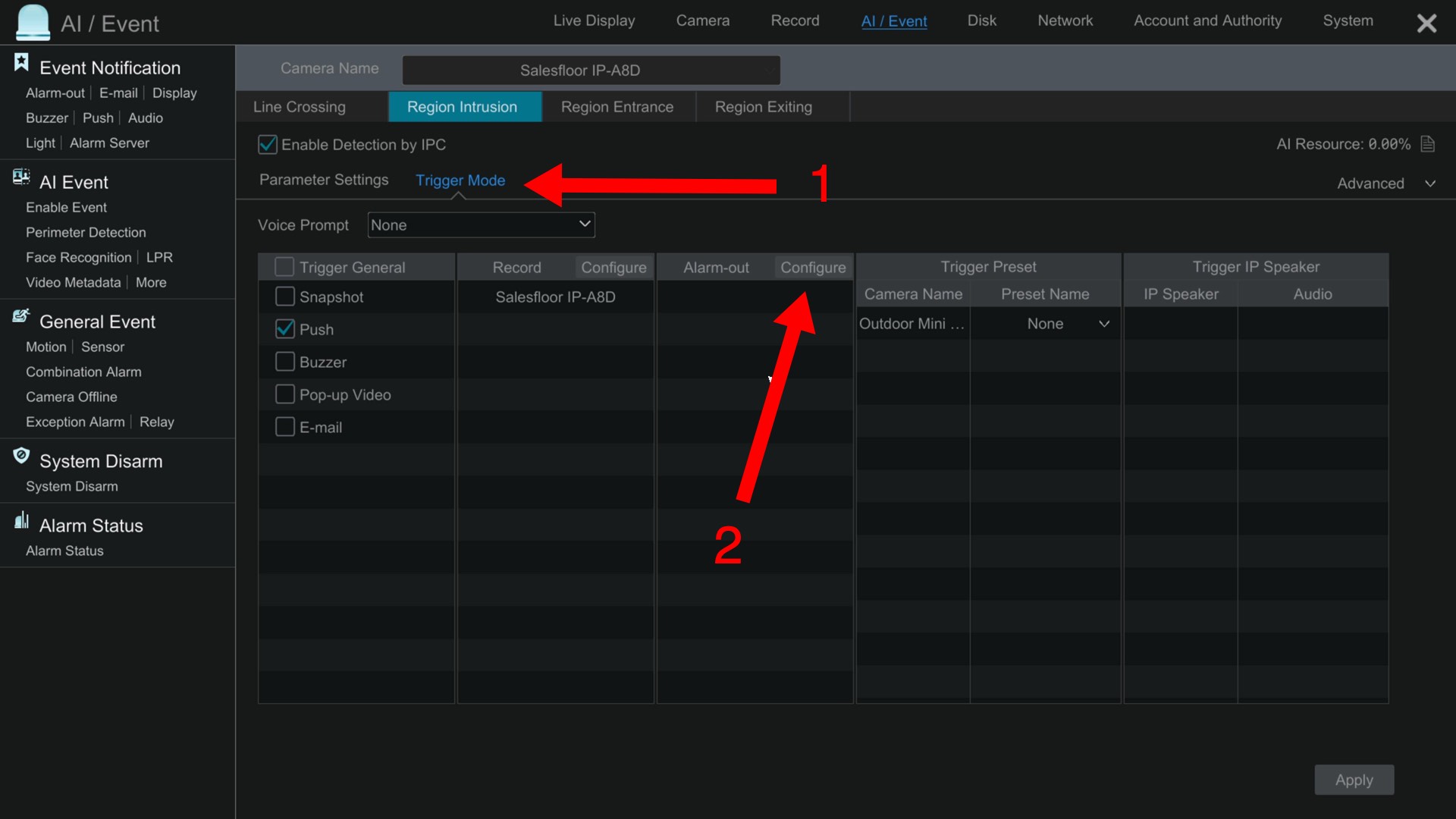
Next we will setup the Shelly smart relay to be triggered by the human detection alarm.
- Click on the Trigger Mode link.
- In the Alarm-out section, click on the Configure button.
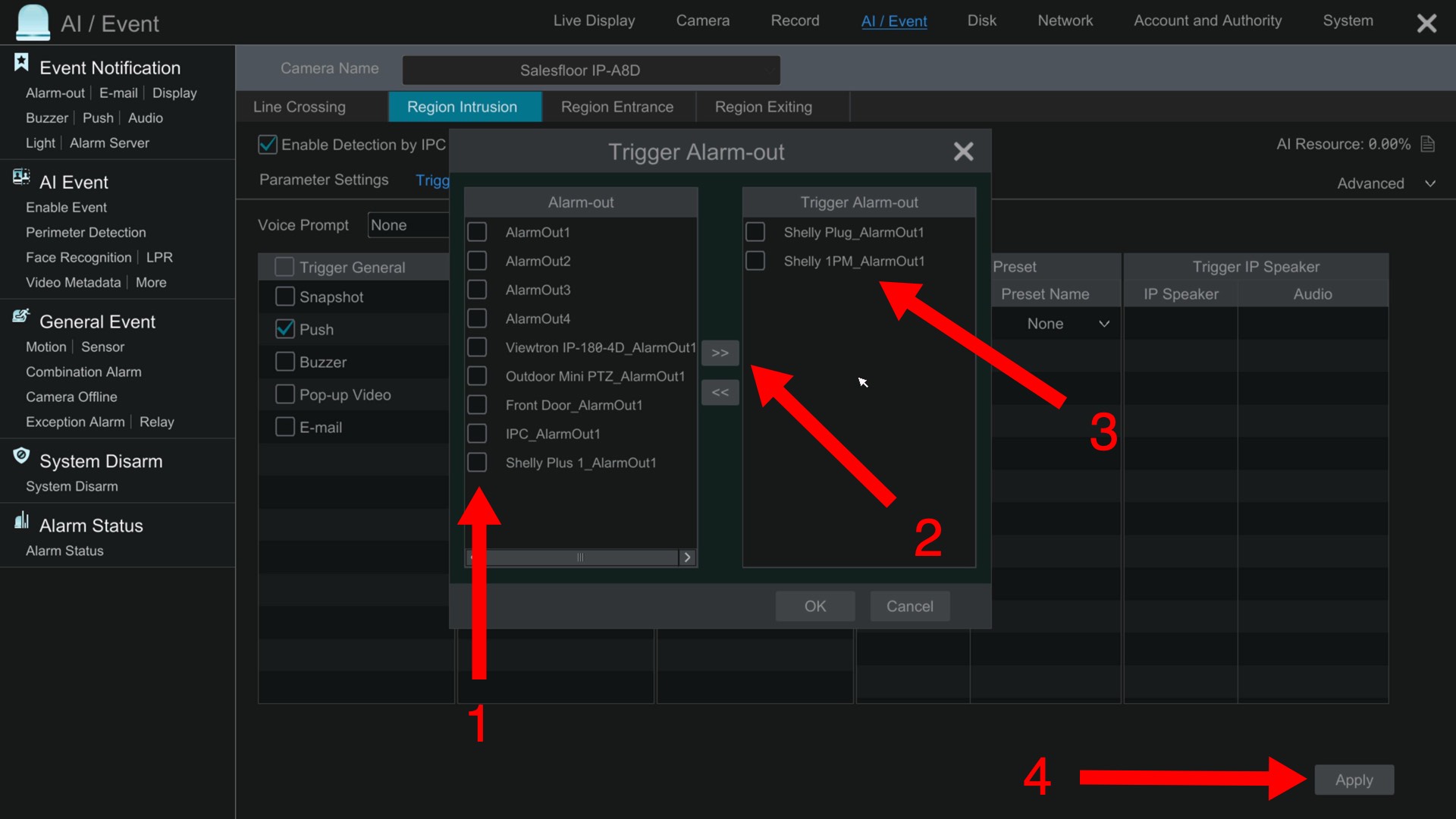
The Trigger Alarm-out box will open.
- Select the Shelly smart relay(s) that you want the alarm to trigger by checking the boxes on the left.
- Click the right arrow.
- The Shelly smart relays that will be triggered by the alarm will appear on the right under “Trigger Alarm-out”. Click on the OK button.
- Click the Apply button.
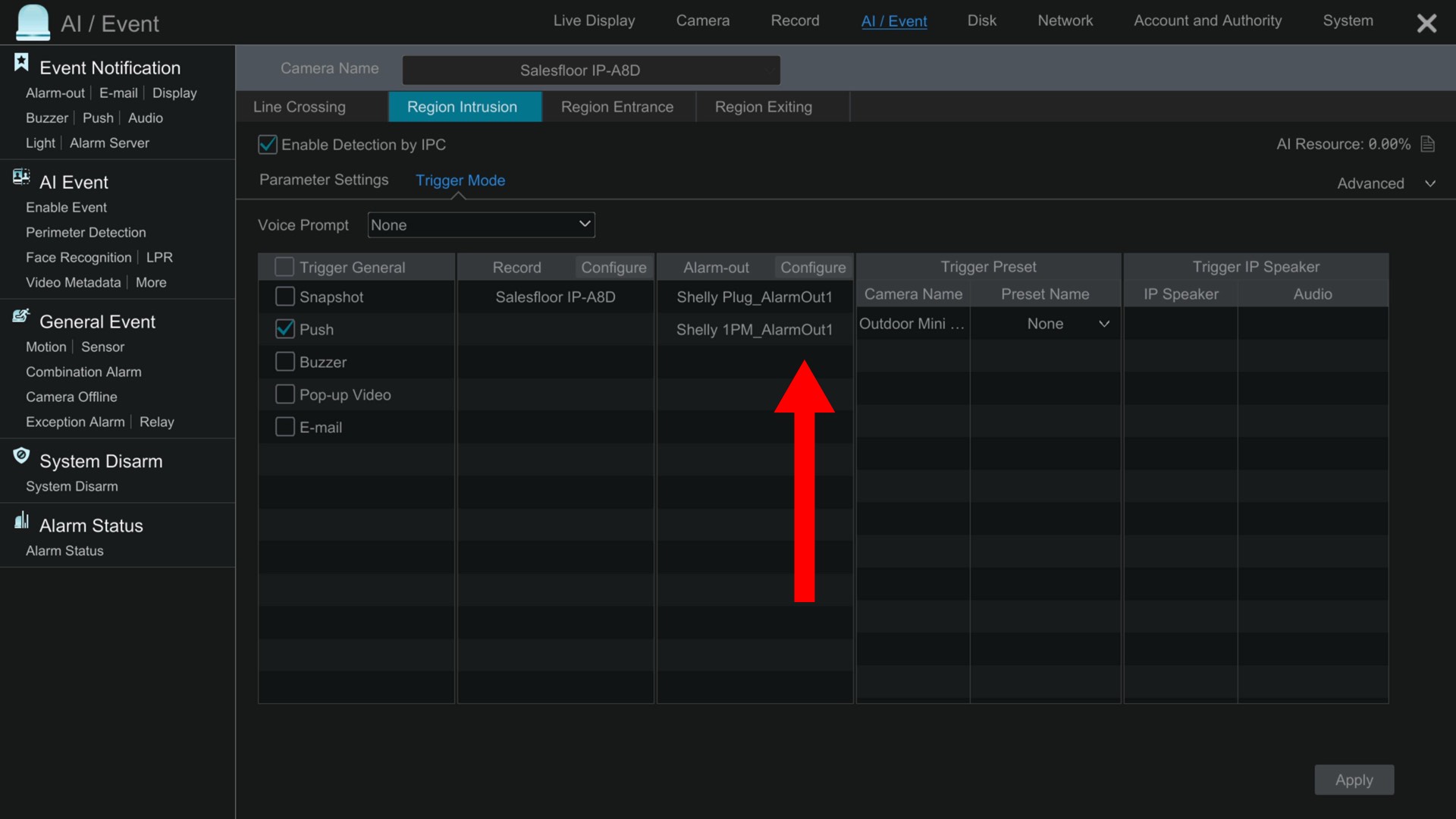
Now you will see all of the Shelly smart relay(s) that are configured to be triggered in the Alarm-out section of the Trigger mode screen.
Click Apply in the lower right. Click the X button in the upper right to close the settings screen.
The Viewtron IP camera system is now setup to close the Shelly smart relay and turn the alarm light on whenever the human detection / perimeter intrusion detection alarms occur.
Products Used in this Project
- 16 Channel Viewtron IP Camera NVR
- Viewtron 4K Dome IP Camera with AI Software
- Shelly One Smart Relay
Human Detection / Perimeter Detection Demo
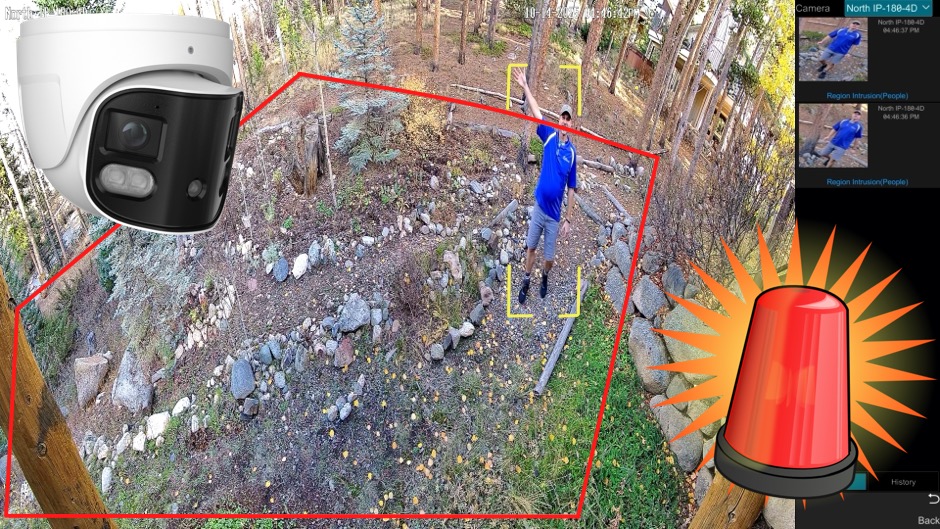
Watch the above video demo to see how the human detection / perimeter detection works on a Viewtron IP camera system. In addition to triggering video recording, a push notification to the mobile app, and the alarm buzzer, you can also setup the Viewtron NVR to trigger Shelly smart relays. Please note that although the perimeter intrusion detection is only being applied to humans in the video demo, perimeter intrusion detection can also be applied to cars and non-motor vehicles in addition to or instead of human detection.
Line Crossing Detection / Human Detection
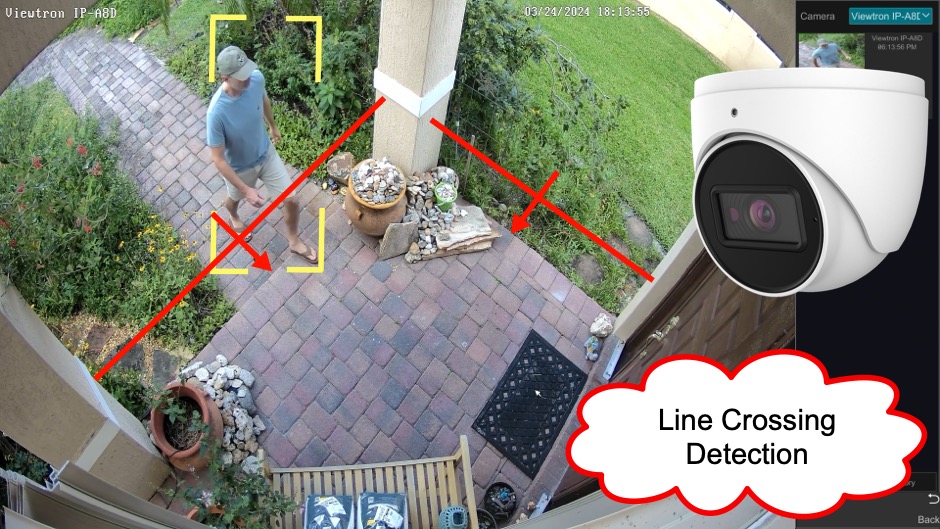
Watch the above video demo to see how the human detection / line crossing detection on a Viewtron IP camera system. In addition to line crossing detection events triggering video recording, a push notification to the mobile app, and the alarm buzzer on the NVR, you can also setup the Viewtron NVR to trigger Shelly smart relays. Please note that although the line crossing detection is only being applied to humans in the video demo, it can also be applied to cars and non-motor vehicles in addition to or instead of human detection.
Viewtron AI Camera Video Demos
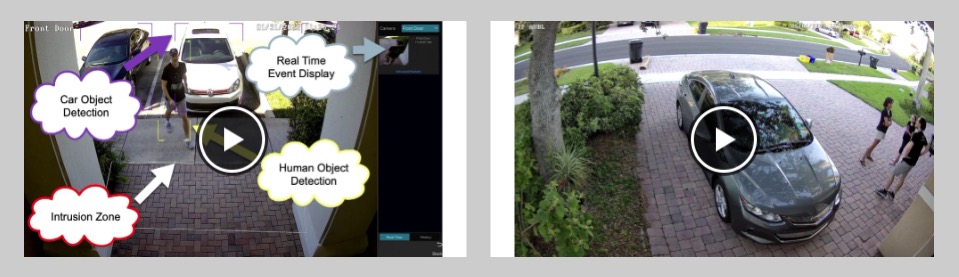
You can watch additional video demos of Viewtron AI cameras here.
Shelly Smart Relays work with High Voltage Devices
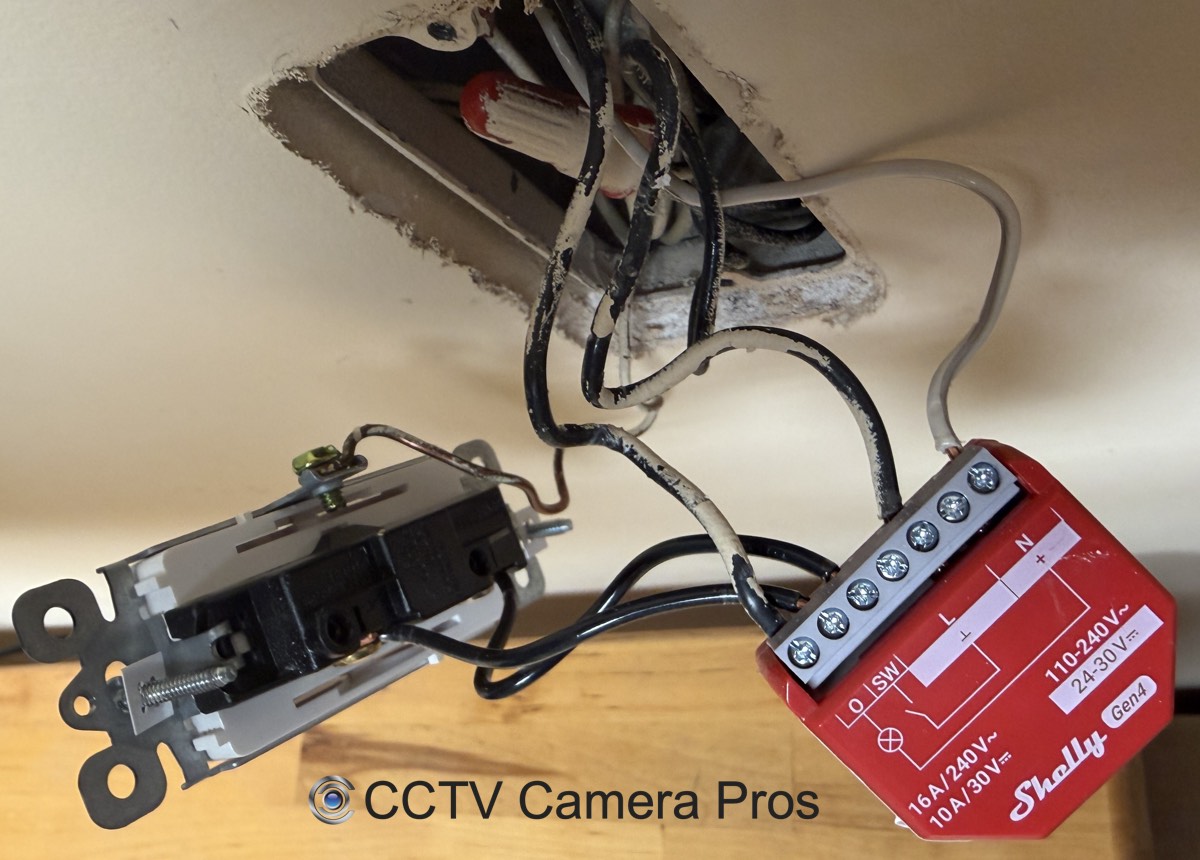
In addition to the 12V DC alarm light, I also wired on of the light switches at CCTV Camera Pros office to a Shelly 1 PM Gen 4 smart switch. I setup the same human detection event on the VIewtron NVR to turn the lights on in our tech room.
The integration possibilities are endless being that Shelly makes smart relays that work with low voltage and high voltage devices.
Alarm Output Ports on Viewtron DVRs / NVRs
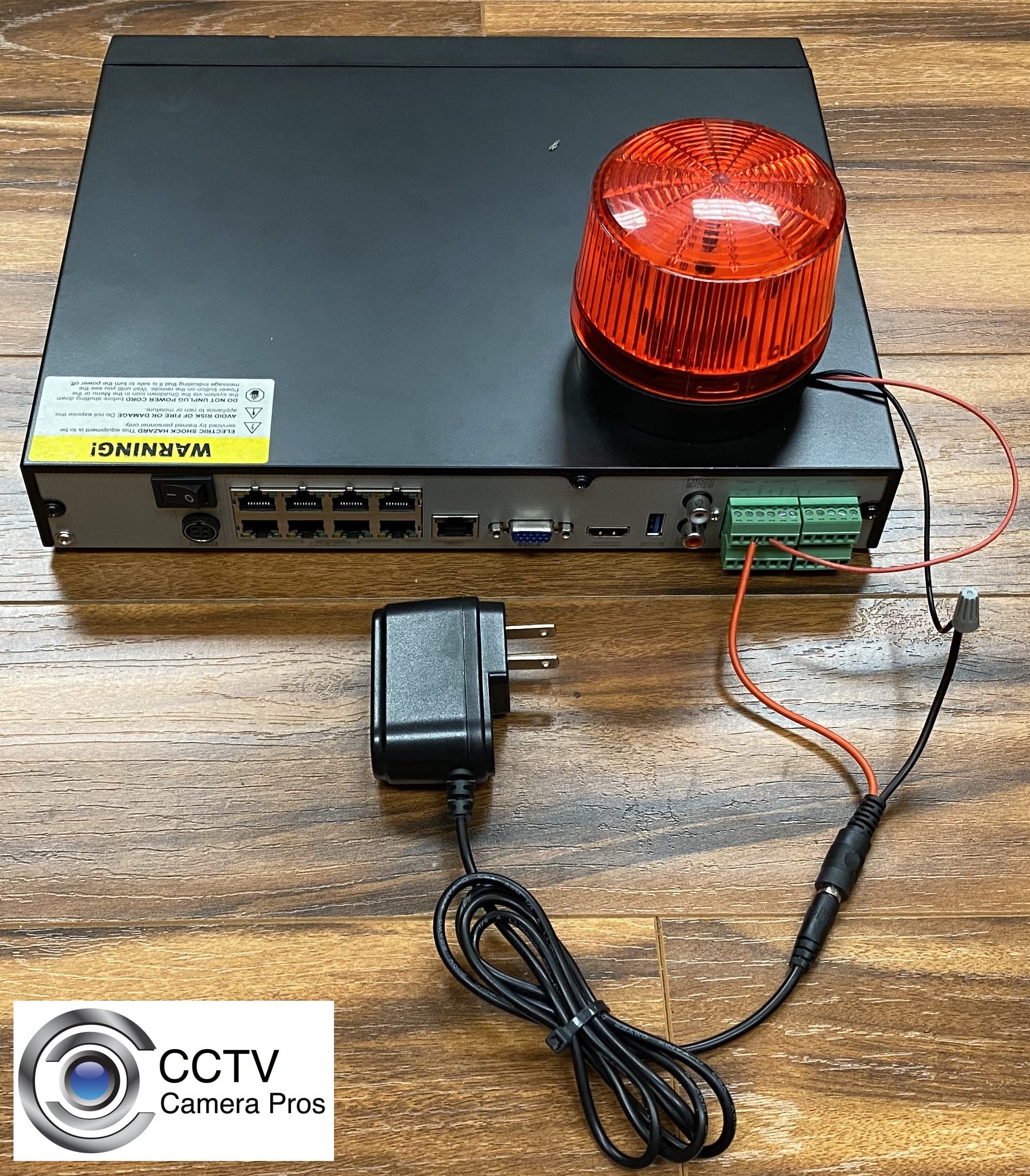
Shelly smart relays are a great solution if you need to trigger a relay over an IP network because the device is too far to hard wire to the alarm relays that are built into your Viewtron DVR / NVR. However, you can also follow these instructions to hard wire alarm devices to the alarm relays directly on the Viewtron DVR.
Please note that another reason that installers and electricians may want to use Shelly smarty relays with Viewtron recorders instead of the built in alarm relay ports is because the maximum current rating of 1A for DC power and 0.5A for AC power, with voltage ratings of 30VDC or 125VAC. The maximum power rating is 30 watts for DC powered alarm devices and 62.5 watts for AC powered alarm devices. Shelly smart relays can handle higher electrical loads.
Other Alarm Relay Application Examples
In this article, I demonstrated using human detection at our office to trigger an alarm light, but the Viewtron IP camera + NVR + Shelly integration can be used for many other applications. Here are some examples that work well for residential, commercial, and remote / outdoor properties.
Property Protection at Remote Buildings and Outdoor Sites
- Barn or detached workshop intrusion – Trigger a siren and flood light at the building itself when human detection or perimeter intrusion is detected. Because the Shelly relay can be anywhere on the WIFI network, the alarm fires at the barn or workshop, not back at the NVR. This works even if the building is 200+ feet from the NVR, as long as it has WIFI coverage.
- Marina, boat slip, or waterfront motion – Trigger an audible alarm and light at the owner’s slip when motion is detected on the water side of the dock.
- Equipment yard or construction site human detection at night – Trigger high-output flood lights the moment a person is detected in the yard after hours.
- Greenhouse, kennel, or livestock area intrusion – Trigger a warning siren when motion is detected in an outbuilding or fenced area.
Home / Residential
- Driveway human detection – Trigger the porch light automatically when someone walks up the driveway at night. The Viewtron AI is more accurate than a traditional PIR motion sensor because it distinguishes people from animals, blowing leaves, and cars driving by.
- Backyard perimeter intrusion – Trigger a flood light and audible chime to alert you indoors and act as a deterrent.
- Pool fence line crossing – Trigger an indoor chime the moment a child or pet approaches the pool area.
- LPR allowed plate triggers a garage door – Use the Shelly relay to simulate the wall-button press on your garage door opener. When the LPR camera recognizes your plate, the garage opens automatically.
Business / Commercial
- After-hours storefront line crossing – Trigger a siren or strobe inside the store the moment someone crosses an after-hours line crossing zone.
- LPR + authorized employee plate – Trigger the gate strike at the parking lot entrance for touchless entry when an authorized employee’s plate is recognized.
- Loading dock human detection – Trigger a warning light or audible horn that alerts forklift operators when a person is in the loading dock area, an OSHA workplace safety application.
- Restricted area intrusion – Trigger a silent strobe at the security guard station as a covert alert that doesn’t alarm the intruder.
The key advantage to all of these applications is that the Shelly relay can be anywhere on the WIFI network. The alarm device fires where you actually need it – at the building, at the perimeter, or even on a different floor of your house – without running alarm cable back to the NVR.
Have Questions / Need Help?
If you have any questions on how-to setup electrical relays with your VIewtron security camera system, please contact me at mike@viewtron.com.





