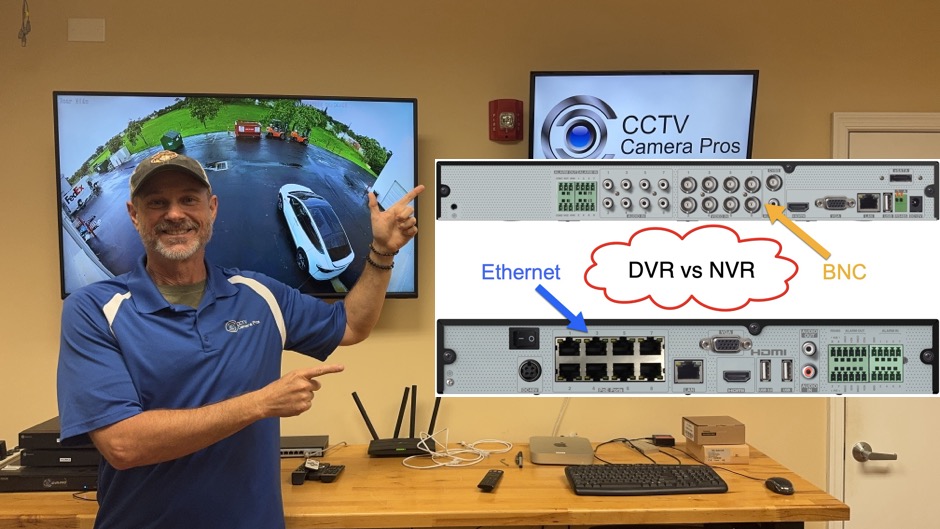
DVR vs NVR: Which is Best for your Security Camera System?
If you are deciding whether to purchase a security camera DVR or NVR, you should watch his video first to understand the differences. Please note that the concepts discussed in this video apply to most other DVRs and NVRs on the market, however the video was made to help CCTV Camera Pros customers that are deciding between a Viewtron hybrid DVR and Viewtron IP camera NVR.
If you have an existing DVR camera system with coax cable in place, this article will help you deciding whether you should upgrade to a Viewtron hybrid DVR and continue to use your existing coax cable and cameras, or if you should pull new network cable and migrate to an all IP camera system with a Viewtron NVR.
What is the Difference Between a DVR and NVR?
Let’s get some basics out of the way first and understand the difference between a DVR and NVR. To make an informed choice between DVR and NVR systems, it’s important to understand what each acronym means and the type of cameras and cables each system uses.
What is a DVR?
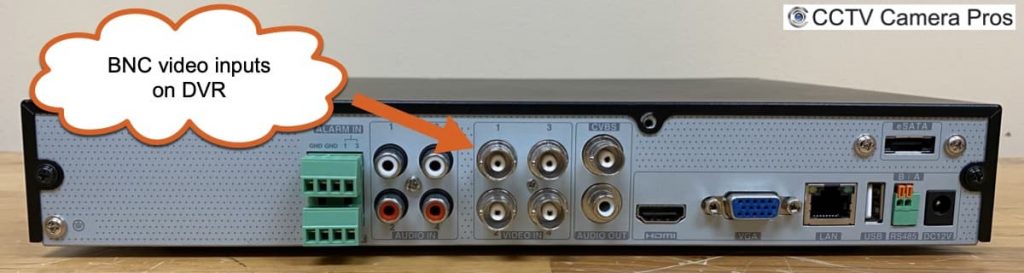
DVR stands for Digital Video Recorder. These systems are almost always associated with CCTV cameras (also called BNC cameras). DVRs connect to cameras using coaxial cables (commonly called coax cable) with BNC connectors. Each camera is wired directly to the DVR via a dedicated coax line. Cameras receive power from a separate power cable such as 18/2 conductor, and with an external power supply or a power supply box. RG59 Siamese coax cable is commonly used.
What is an NVR?
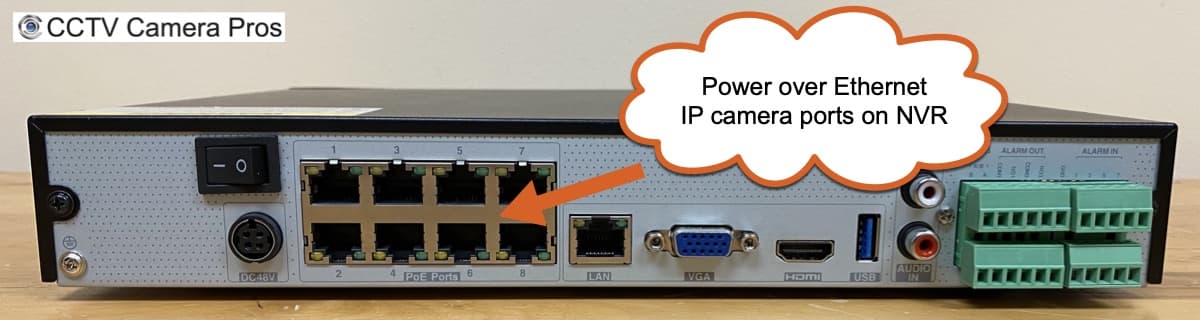
NVR stands for Network Video Recorder. NVRs are designed to work with IP (Internet Protocol) cameras, which connect using network (Ethernet) cables like Cat5e or Cat6. What sets NVRs (like the Viewtron models) apart is their Power over Ethernet (PoE) ports, which allow a single network cable to supply both power and data connectivity making installation more streamlined and reducing cable clutter. For example, you can find our 8 channel NVR model and 16 channel NVR model on these pages.
What is a “Hybrid DVR”?
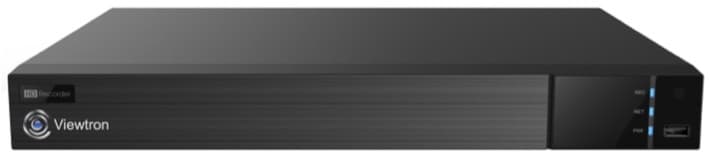
Hybrid DVRs work with multiple types of security cameras. Viewtron hybrid DVRs work with just about all security camera types, including the following.
- Analog CCTV Cameras – CIF, D1, 960H Resolutions Supported
- AHD Cameras (Analog High Definition) – 720p / 1mp, 1080p / 2mp, 4mp, 8mp / 4K Resolutions Supported
- HD-TVI Cameras – 720p / 1mp, 1080p / 2mp, 4mp, 8mp / 4K Resolutions Supported
- HD-CVI Cameras – 720p / 1mp, 1080p / 2mp, 4mp, 8mp / 4K Resolutions Supported
The ONLY type of BNC camera not supported by Viewtron hybrid DVRs is HD-SDI and these are very rare because they were only prevalent in the surveillance industry for a short period of time.
Viewtron Hybrid DVRs also work with IP cameras! Yes. You can also use any Viewtron IP camera with Viewtron hybrid DVR. This makes them an excellent choice for customers that want to upgrade their DVR and some cameras, but also use their legacy CCTV cameras.
Viewtron hybrid DVRs are available in 4 channel, 8 channel, 16 channel, and 32 channel DVR configurations.
Choosing a Security Camera Recorder for New Installations
If you are installing a completely new security camera setup and have no pre-existing cable infrastructure, the choice is clear: go with IP cameras and an NVR. IP camera systems are the newer technology and there is a number of advantages to them such as the integration with AI software and the ability to update the camera’s firmware and improve functionality over time. My top recommendation is to go with a Viewtron NVR and IP cameras and definitely consider going with the Viewtron IP cameras with AI software.
NVR systems with PoE IP cameras offer a simpler, plug-and-play installation process because one cable per camera is all that’s needed. You simply run the cable from each IP camera to the NVR, and power and video connectivity travel through the same line using Internet protocol.
Upgrading an Existing System: Coaxial Cables and Hybrid DVRs
The decision gets a little more nuanced if you are upgrading an older DVR setup that already uses coaxial cable throughout your property. Maybe you have invested heavily in your coax cable infrastructure and pulling new network cables isn’t practical.
This is where hybrid DVRs, like the Viewtron hybrid DVR models from CCTV Camera Pros, shine. These hybrid DVRs bridge the old and the new by supporting both legacy analog/BNC cameras and newer HD-over-coax models (2MP, 4MP, 4K). They also support IP cameras. Hybrid DVRs allow you to slowly upgrade your camera system. You can swap out older cameras for new ones one by one, and in some cases use all of your existing cable. If you have RG59 Siamese cable in place, you can upgrade to the latest 4K BNC cameras using that same cable. For new cameras, you can run network cable for IP cameras.
There are some caveats: if you wish to add IP cameras to a hybrid DVR, you’ll need an external PoE switch. Unlike NVRs, hybrid DVRs don’t provide built-in PoE ports for direct plug and play with IP cameras. And, the AI software functions of Viewtron AI cameras are only integrated with the Viewtron NVRs. So you can not take advantage of the advanced object detection and intrusion detection functions.
Advanced Features: AI Cameras, Object Detection, and False Alarm Reduction
One of the most significant advantages of moving to an all-IP camera and NVR system is the ability to take advantage of artificial intelligence features.
- AI (Artificial Intelligence) Cameras: Viewtron IP cameras with AI software can detect humans, vehicles (cars and trucks), as well as non-motorized vehicles (like bicycles).
- Facial Recognition and License Plate Recognition: Some AI cameras support these advanced analytics natively. You can find Viewtron face recognition cameras her. You can find our Viewtron LPR cameras here.
- Full Integration with NVRs: Viewtron NVRs can fully interact with these AI features; for example, you can set up custom intrusion zones and receive push notifications or trigger alarms only when specific objects (e.g., people or cars) are detected.
Why is this important? Traditional motion-detection systems on older CCTV setups are notorious for false alarms when the wind blows, a tree moves, or a squirrel runs past, and you get a false alert. AI object detection solves this, giving 99% accuracy detecting actual threats, drastically cutting down on false alarms and missed events.
Hybrid DVRs, on the other hand, do not fully integrate with AI features, meaning you won’t get the advanced false alarm filtering or recognition functions.
AI Security Camera Video Demos
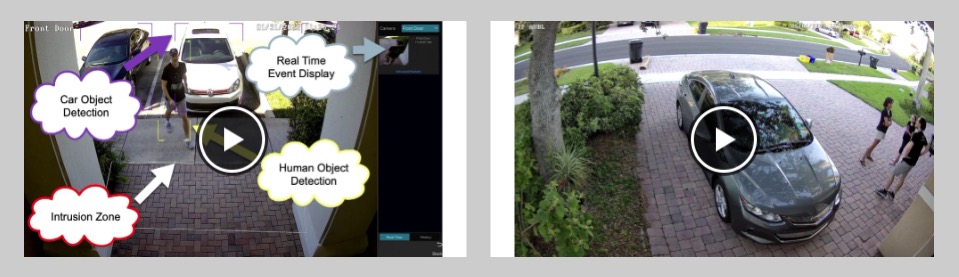
Click here to view CCTV Camera Pros video demo library using Viewtron AI cameras.
Facial Recognition Camera Video Demos

Click here to view our face recognition camera video demos.
License Plate Recognition Cameras Video Demos

Click here to view our Viewtron LPR camera video demos.
System Capacity: Channel Limitations and Maximum Bandwidth
Another key difference between DVRS and NVRs lies in how each system handles video processing and how many cameras you can use at high resolutions.
- DVR Processing Limitations: A hybrid DVR, for example, might support sixteen BNC/coax cameras and an additional eight IP cameras. However, the total bandwidth from IP cameras is capped at 36 Mbps; this means you can’t record as many 4K/30fps streams at full quality compared to an NVR. This is because all of the video processing for CCTV cameras happens on the DVR, so there is not as much processing power available for IP camera recording.
- NVR Bandwidth: A similarly sized NVR can support up to 160 Mbps (more than five times the hybrid DVR capacity). This allows you to have multiple high-resolution, high-frame-rate IP cameras running simultaneously without sacrificing quality. IP cameras process video on the camera which streamlines the processing on the NVR and frees it up for other things like AI inference.
So, although adding IP cameras is possible with a hybrid DVR, the number and resolution of such cameras will be limited. If you want to scale up with a large number of high-resolution cameras, NVR is the clear choice.
Installation Simplified: The Plug-and-Play Advantage
Plug-and-play installation is at the core of NVR IP camera systems. The built-in PoE ports on Viewtron NVRs let you connect each camera with just a single Cat5e or Cat6 cable, making setup fast, tidy, and reliable. No separate power supplies or adapters-just run one cable per camera, and you’re good to go.
Conclusion: Which System Is Right for You?
- New installations? Pick Viewtron NVRs with IP cameras. You’ll benefit from future-proofing, advanced AI features, higher capacity, and simpler installation.
- Upgrading an old system with existing coax cables? A Viewtron hybrid DVR lets you reuse your infrastructure, mix old and new cameras, and transition gradually. If you want full AI functions, facial/plate recognition, or high-resolution video everywhere, it may be worth the investment to upgrade your wiring and switch to an NVR-based system.
If you have further questions about whether a DVR or NVR is the best choice, please reach out to me anytime at mike@viewtron.com. You an email me questions and / or we can schedule a free phone consultation.
Video Transcript
What is the difference between a DVR and NVR for security camera recording? Hey everyone, Mike from CCTV Camera Pros here and in this video I’m going to talk you through some of the difference between a security camera DVR and NVR. And I’m in some cases talking specifically about our Viewtron DVRs and NVRs that we supply. So let’s talk about some basics here. DVR stands for digital video recorder and almost always refers to CCTV cameras, otherwise known as BNC cameras that run over coax cable. A BNC connector plugs into the camera and a coax cable runs back to the DVR BNC connector into the back of the DVR and then there’s a separate power supply, sometimes a power supply box, but that power supply is supplied externally from the DVR. A NVR stands for network video recorder and is used for IP cameras. IP cameras use network cable, Cat5e, Cat6 cable. And on the back of our Viewtron NVR there’s power over ethernet ports. So you can plug that network cable from the camera into the back of the NVR and that one cable is providing both the connectivity as well as the power between the NVR and the IP camera.
If you are installing a new system and you don’t have any in cable in place, it’s a no brainer to go with IP cameras. They’re the newer technology. There’s a number of advantages to them and, and there’s not a lot to consider in the way of going with a coax DVR system. Now where some questions and trade offs come into place is if you’re replacing an old DVR and upgrading your system and you have coax cable in place. And let me just mention, our Viewtron DVRs are hybrid. They work with all of the old CCTV cameras as well as the latest 2 megapixel, 4 megapixel and 4K BNC cameras. So you can go HD over coax. And our Viewtron Hybrid DVRs also support IP cameras.
So why would you go with an NVR? The Viewtron Hybrid DVR supports all the coax cameras as well as IP cameras. Why wouldn’t you just go with one of those? There’s several reasons. So number one, our Viewtron NVRs are fully integrated with our Viewtron AI cameras. Our AI cameras are all IP cameras and AI cameras support object detection. These cameras can detect human objects, vehicle objects, cars, trucks and other non motorized vehicles like bicycles. They can do facial recognition and some of them can do Automatic license plate recognition. Those are our AI IP cameras. And all of those functions are fully integrated into the Viewtron NVRs, meaning from the NVR interface you could do things like create intrusion zones so that when a human or a car enters that area, it triggers recording, it can send you a push notification, it can trigger external alarms.
That’s fully integrated with the NVR. However, it’s not fully integrated with our DVR. So you don’t get to take advantage of the AI software. And that AI object detection, it solves a huge problem with that legacy that you see in legacy CCTV camera systems. And that’s false positives from motion detection. If you’ve ever had one of these systems and you have motion detection set up, especially with an outdoor camera, you’ll know that it’ll drive you crazy with false alarms because it doesn’t know the difference between a person intruding in an area and a tree blowing in the wind in the background. So that solves the problem. It’s, you know, 99 plus percent accurate in detecting those types of objects and it solves the false alarm problem.
Another reason why you would go with the NVR over the DVR if you plan on using IP cameras is because with IP cameras the video processing happens on the camera. You can put a lot more cameras on an NVR and you can record at the max resolution and max frame rate. Whereas the DVR is limited because it’s doing all kinds of processing for the coax cameras. So it can’t handle quite as many IP cameras. It’s basically limited by the bandwidth, the traffic coming into the DVR from the cameras. For example, our 16 channel hybrid DVR can support 16 BNC cameras. And in addition you can add 8 IP cameras. However, it only supports 30 Mbps total of traffic coming from IP cameras into the recorder.
Whereas our 16 channel NVR supports 160 Mbps. What does that mean in practice? Basically, the higher resolution the camera, the higher frame rate and the higher quality you’re recording at, the more bandwidth that’s required. So for a 4K camera at 30 frames requires a lot more bandwidth than like a 720p camera at 15 frames. So although you can add IP cameras to our DVRs, you can’t load them up with a whole bunch of 4K cameras at max frame rate and max resolution, whereas on the NVRs you can. The POE ports on the NVR make for a very simple plug and play installation. You Simply run a Cat5 or Cat6 network cable from the IP camera back to the NVR, plug it in and it powers up. It’s plug and play. Very simple to set up.
So in summary, if you’re installing a new system, I highly recommend you go with the Viewtron IP camera system. If you’re upgrading an old system and you have coax cable in place, you’ll have to weigh the benefits. So if you invested a whole bunch of money in cable infrastructure in that coax cable and you just can’t invest in replacing it with network cable, the Viewtron hybrid DVR is an excellent choice because you can use your existing legacy cameras. You can upgrade cameras over time one by one because you can mix and match old analog cameras with the latest 4K over coax cameras. And then if you did want to add a couple of IP cameras for the new cameras, you could do that. You just, you have to use an external POE switch. There’s no POE ports built into the hybrid DVRs like there is the NVR. If you want to take advantage of the AI software. If human object detection or vehicle object detection is important to you and you had a whole bunch of false positives on your legacy system and you want to address that issue, then you may want to upgrade your cable to network cable and go with the NVR and upgrade all of your cameras and upgrade the cable.
If you want to add license plate recognition or facial recognition again, you’re going to need to replace your cable and go with the IP cameras with the NVR and get rid of your old coax cable and don’t bother with a DVR. What else? Guys, if you have any questions about any of this, if you have questions about whether you should upgrade your old DVR, if you should leave your coax cable in place, if you’re having trouble deciding if you should upgrade to network cable and get the NVR with the Viewtron IP cameras. If you want to bounce anything off me, you can email me anytime. I can be reached at mike@viewtron.com. We could also set up a free phone consultation. Just, just email me your questions and if you want to have a phone call, just let me know. If you want to learn more about our Viewtron IP camera systems or the Hybrid DVRs, you could see all of our Viewtron products at www.viewtron.com. Thank you for watching.
You can check out the entire line of Viewtron video surveillance products at www.viewtron.com.





