<?xml version="1.0" encoding="UTF-8"?><!-- generator="bbPress" -->

<rss version="2.0"
	xmlns:content="http://purl.org/rss/1.0/modules/content/"
	xmlns:dc="http://purl.org/dc/elements/1.1/"
>

<channel>
<title>Security Camera &amp; Surveillance System Support Forum &#187; Tag: geovision - Recent Posts</title>
<link>http://videos.cctvcamerapros.com/support/</link>
<description>Security Camera &amp; Surveillance System Support Forum</description>
<language>en</language>
<pubDate>Thu, 09 Feb 2012 06:52:53 +0000</pubDate>

<item>
<title>sevendogzero on "HTTP vs HTTPS"</title>
<link>http://videos.cctvcamerapros.com/support/topic/http-vs-https#post-3687</link>
<pubDate>Thu, 03 Nov 2011 10:33:04 +0000</pubDate>
<dc:creator>sevendogzero</dc:creator>
<guid isPermaLink="false">3687@http://videos.cctvcamerapros.com/support/</guid>
<description><p>The default certificate is not adequate to satisfy<br />
PCI (credit card processing compliance).<br />
Is there a way to replace the default MD5 class certificate<br />
with our own?</p>
<p>We run dvr 8.3. If we need to upgrade in order to allow<br />
us to set up our own ssl certificate, what verion allows this?<br />
Regards,
</p></description>
</item>
<item>
<title>danielac on "GeoVision (No Windows Permissions To Download OCX)"</title>
<link>http://videos.cctvcamerapros.com/support/topic/geovision-no-windows-permissions-to-download-ocx#post-3679</link>
<pubDate>Fri, 28 Oct 2011 17:22:40 +0000</pubDate>
<dc:creator>danielac</dc:creator>
<guid isPermaLink="false">3679@http://videos.cctvcamerapros.com/support/</guid>
<description><p>Hello, I followed all the steps listed above except the third because the system does not allow me, I have win 7. Every time I login, the ocx down, and then download the file multiview, but nothing appears on my desktop, does not run and if I upgrade, re-download everything again and will not run. I can not download the multiview, can you help me please?
</p></description>
</item>
<item>
<title>danielac on "geovision en notebook con win 7 premium"</title>
<link>http://videos.cctvcamerapros.com/support/topic/geovision-en-notebook-con-win-7-premium#post-3676</link>
<pubDate>Thu, 27 Oct 2011 06:48:13 +0000</pubDate>
<dc:creator>danielac</dc:creator>
<guid isPermaLink="false">3676@http://videos.cctvcamerapros.com/support/</guid>
<description><p>No se puede instalar el multiview de geo vision en notebook con win 7 premium porque da el error: no permiso de windows para instalar ocx.</p>
<p>Ademas si uno copia y pega el preograma en C y lo quiere ejecutar da un error de que la configuracion debe ser de al menos 1024 x 768. Y la resolucion de la notebook es mayor, con lo cual tendria que funcionar.</p>
<p>Por favor si alguien me puede ayudar para poder seguir adelante. Gracias
</p></description>
</item>
<item>
<title>JCHaldas on "How To Reset GeoVision Multicam Password?"</title>
<link>http://videos.cctvcamerapros.com/support/topic/how-to-reset-geovision-multicam-password#post-3668</link>
<pubDate>Fri, 21 Oct 2011 11:38:14 +0000</pubDate>
<dc:creator>JCHaldas</dc:creator>
<guid isPermaLink="false">3668@http://videos.cctvcamerapros.com/support/</guid>
<description><p>Hello,</p>
<p>Please see link for <a href="http://www.cctvcamerapros.com/Geovision-Surveillance-Camera-Systems-s/420.htm">GeoVision</a> password reset instructions: <a href="http://videos.cctvcamerapros.com/downloads/geovision/Password_Removal_Procedure_.pdf" rel="nofollow">http://videos.cctvcamerapros.com/downloads/geovision/Password_Removal_Procedure_.pdf</a></p>
<p>If you were not able to reset <a href="http://www.cctvcamerapros.com/Geovision-Surveillance-Camera-Systems-s/420.htm">GeoVision</a> Password via instruction above please proceed with below instructions. </p>
<p><strong>CAUTION: </strong>This procedure can be very dangerous and can cause issues if not done correctly. CCTV Camera Pros is not responsible for issues or damage caused. <strong>PROCEED AT YOUR OWN RISK!</strong></p>
<p>1.) On your windows desktop click the &#34;Start&#34; button. In the search field type in &#34;regedit&#34; and press the &#34;Enter&#34; key.</p>
<p><img src="http://videos.cctvcamerapros.com/images/forum/Regedit1.jpg"></p>
<p>2.) Double-click the &#34;HKEY_LOCAL_MACHINE&#34; folder to expand it on the left-pane of the Registry Editor window that opens.</p>
<p><img src="http://videos.cctvcamerapros.com/images/forum/Regedit2.jpg"></p>
<p>3.) Double-click the &#34;HKEY_LOCAL_MACHINE&#34; folder to expand it. Double-click &#34;Microsoft&#34; folder and click the &#34;DataCode&#34; folder.</p>
<p>4.) Highlight all the default values in blue and delete them by right clicking on the mouse.</p>
<p><img src="http://videos.cctvcamerapros.com/images/forum/Regedit3.jpg"></p>
<p>5.) Close Registry Editor and reboot the computer.</p>
<p>6.) Now type in the new Login information. Also you may want to check the &#34;Allow Removing Password System&#34; option so you do not have to mess with the PC registry as this can cause major issues if not done correctly.</p>
<p><img src="http://videos.cctvcamerapros.com/images/forum/Regedit4.jpg"></p>
<p>7.) Press the &#34;OK button to Login.</p>
<p>Now your password should be successfully reset.
</p></description>
</item>
<item>
<title>JCHaldas on "What is the difference between GV1120/GV1240/GV1480 and GV1120A/GV1240A/GV1480A"</title>
<link>http://videos.cctvcamerapros.com/support/topic/what-is-the-difference-between-gv1120gv1240gv1480-and-gv1120agv1240agv1480a#post-3665</link>
<pubDate>Tue, 18 Oct 2011 13:15:39 +0000</pubDate>
<dc:creator>JCHaldas</dc:creator>
<guid isPermaLink="false">3665@http://videos.cctvcamerapros.com/support/</guid>
<description><p>Hello,</p>
<p>A customer recently called with the following question.</p>
<p><strong>Question:</strong> What is the difference between GV1120/GV1240/GV1480 and GV1120A/GV1240A/GV1480A cards?</p>
<p><strong>Answer</strong>: One difference is the Non-A cards use a standard PCI interface. The A cards use a PCI-E x1 interface.</p>
<p>Below is a chart that compares the standard GV1120/GV1240/GV1480 and GV1120A/GV1240A/GV1480A</p>
<p><img src="http://videos.cctvcamerapros.com/images/forum/Comparison_Combo_vs_ComboA.jpg"></p>
<p><strong>Please NOTE:</strong> The Non-A cards are no longer being manufactured.
</p></description>
</item>
<item>
<title>Mike Haldas on "Geovision DMmultiview Software for Remote Monitoring Multiple Geovision Systems"</title>
<link>http://videos.cctvcamerapros.com/support/topic/geovision-dmmultiview-software-for-remote-monitoring-multiple-geovision-systems#post-3628</link>
<pubDate>Thu, 22 Sep 2011 12:02:29 +0000</pubDate>
<dc:creator>Mike Haldas</dc:creator>
<guid isPermaLink="false">3628@http://videos.cctvcamerapros.com/support/</guid>
<description><p>A customer contacted CCTV Camera Pros today and wanted to know how to connect and remotely monitor / view two different <a href="http://www.cctvcamerapros.com/Geovision-Surveillance-Camera-Systems-s/420.htm">Geovision surveillance systems</a> from one central computer screen.</p>
<p>Fortunately, Geovision software includes DMmultiview which allows you to connect to mutlple Geovision DVRs and NVRs and watch up to 32 cameras on one screen.  There are mutliple ways to download and install the DMmultiview software.  This document describes the different ways to install DMmultiview and how to setup the software up to connect to multiple locations.</p>
<p><a href="http://videos.cctvcamerapros.com/downloads/geovision/DMmultiview/Geovision-DMMultiView-Manual.pdf">Geovision DMmultiview software manual</a></p>
<p>Here is a link to download the software:<br />
<a href="http://videos.cctvcamerapros.com/downloads/geovision/DMmultiview/Geovision-DMMultiView-Software-8.5.zip">Geovision DMmultiview Software</a>
</p></description>
</item>
<item>
<title>oldchocolate on "GeoVision (No Windows Permissions To Download OCX)"</title>
<link>http://videos.cctvcamerapros.com/support/topic/geovision-no-windows-permissions-to-download-ocx#post-3613</link>
<pubDate>Sat, 17 Sep 2011 14:52:10 +0000</pubDate>
<dc:creator>oldchocolate</dc:creator>
<guid isPermaLink="false">3613@http://videos.cctvcamerapros.com/support/</guid>
<description><p>Don&#39;t know what I did, installed windows updates on my new computer, and it started working on its own !!!<br />
Thanks,</p>
<p>Marty
</p></description>
</item>
<item>
<title>oldchocolate on "GeoVision (No Windows Permissions To Download OCX)"</title>
<link>http://videos.cctvcamerapros.com/support/topic/geovision-no-windows-permissions-to-download-ocx#post-3612</link>
<pubDate>Sat, 17 Sep 2011 14:38:17 +0000</pubDate>
<dc:creator>oldchocolate</dc:creator>
<guid isPermaLink="false">3612@http://videos.cctvcamerapros.com/support/</guid>
<description><p>I failed to menchion my new computer came with explorer 9.0 and secondly, how do I disable the UAC on the PC</p>
<p>thanks,</p>
<p>Marty
</p></description>
</item>
<item>
<title>JCHaldas on "GeoVision (No Windows Permissions To Download OCX)"</title>
<link>http://videos.cctvcamerapros.com/support/topic/geovision-no-windows-permissions-to-download-ocx#post-3611</link>
<pubDate>Fri, 16 Sep 2011 14:35:16 +0000</pubDate>
<dc:creator>JCHaldas</dc:creator>
<guid isPermaLink="false">3611@http://videos.cctvcamerapros.com/support/</guid>
<description><p>oldchocolate,</p>
<p>Have you tried disabling the UAC on the PC.</p>
<p>Thanks James
</p></description>
</item>
<item>
<title>oldchocolate on "GeoVision (No Windows Permissions To Download OCX)"</title>
<link>http://videos.cctvcamerapros.com/support/topic/geovision-no-windows-permissions-to-download-ocx#post-3609</link>
<pubDate>Thu, 15 Sep 2011 19:34:15 +0000</pubDate>
<dc:creator>oldchocolate</dc:creator>
<guid isPermaLink="false">3609@http://videos.cctvcamerapros.com/support/</guid>
<description><p>I just got a new computer with windows 7 64 bit and keep getting the error getting an error that read &#34;No Windows Permission To Download OCX&#34; and sometimes it will let me try to download the checker, but won&#39;t download program
</p></description>
</item>
<item>
<title>JCHaldas on "GeoVision Version 8.5 Software Realese New Features"</title>
<link>http://videos.cctvcamerapros.com/support/topic/geovision-version-85-software-realese-new-features#post-3558</link>
<pubDate>Fri, 19 Aug 2011 08:19:46 +0000</pubDate>
<dc:creator>JCHaldas</dc:creator>
<guid isPermaLink="false">3558@http://videos.cctvcamerapros.com/support/</guid>
<description><p>Hello,</p>
<p>GeoVision has released a new version 8.5 of GV-DVR/NVR and CMS. This new version 8.5 also supports Windows 7 32-bit/64-bit as in previous versions. The GV-NVR version 8.5 supports Intel Sandy Bridge GPU and enhances HD video decoding, along with the new features as below.</p>
<p>The fisheye object tracking function enables blind-spot-free tracking to get a closer view of moving objects.</p>
<p>The wide angle lens de-warping function provides non-distortion video for normal wide angle lenses, and thus saves the cost from adopting expansive non-distortion wide angle lens.</p>
<p>The face mosaic function blurs the faces when a video is played back for privacy concern.</p>
<p>The intrusion function is added with depth setting so that any object in different distance can be identified accordingly.</p>
<p>The newly-added option of ignore-environment-change is used to decrease environmental motion alarms such as rain, snow, waves, or the moving leaves in the trees.</p>
<p>With its multi-screen function, the version 8.5 CMS application can support up to 16 monitors which enable video wall solutions for control rooms displays.</p>
<p>GeoVision has also released a PCI-E interfaced video capture card GV-900A. The GV-900A is the first GeoVision video capture card that supports a maximum of 32 channels video recording in a single card. It features a total of 240fps at D1 resolution when running on 8 video channels.</p>
<p>Another eye-catching NVR solution from GeoVision is the GV-Recording Server for 128 channels of IP video recording. The GV-Recording Server, which supports ONVIF, PSIA and RTSP protocols, is designed for large-scale installations or multi-site deployments.</p>
<p>For More information please Visit <a href="http://www.cctvcamerapros.com/Geovision-Surveillance-Camera-Systems-s/420.htm">CCTVCameraPros.com</a></p>
<p>Thanks James
</p></description>
</item>
<item>
<title>Mike Haldas on "Using External USB Drive with Geovision Surveillance System"</title>
<link>http://videos.cctvcamerapros.com/support/topic/using-external-usb-drive-with-geovision-surveillance-system#post-3552</link>
<pubDate>Thu, 18 Aug 2011 17:09:52 +0000</pubDate>
<dc:creator>Mike Haldas</dc:creator>
<guid isPermaLink="false">3552@http://videos.cctvcamerapros.com/support/</guid>
<description><p>A customer contacted CCTV Camera Pros and asked if Geovision surveillance systems support using an external USB 2.0 hard drive for video surveillance storage.</p>
<p>The answer is yes, Geovision can interface with any type of storage that is accessible and can be mapped by the Windows operating system that is being used on the <a href="http://www.cctvcamerapros.com/Geovision-DVR-Computers-Geovision-Surveillance-DVRs-s/60.htm">Geovision DVR</a>.  However, you want to keep in mind that you must calculate the the bandwidth / data throughput that the USB drive is capable of receiving and calculate the amount of throughput that will be required by the IP and <a href="http://www.cctvcamerapros.com/">CCTV cameras</a> that will be recording to that drive. You can check the amount of bandwidth that the cameras on the system require but using the built in utility on the GV-System.  Each camera’s settings are different, but the tool will give you an average what the total throughput is.</p>
<p>CCTV Camera Pros is an <a href="http://www.cctvcamerapros.com/Geovision-Surveillance-Camera-Systems-s/420.htm">authorized distributor for Geovision</a>.  Please post any additional questions or comments about this topic on this support forum thread.</p>
<p>Thank You.
</p></description>
</item>
<item>
<title>mwayne on "Geovision Suddenly Dropped Video"</title>
<link>http://videos.cctvcamerapros.com/support/topic/geovision-suddenly-dropped-video#post-3551</link>
<pubDate>Thu, 18 Aug 2011 17:06:36 +0000</pubDate>
<dc:creator>mwayne</dc:creator>
<guid isPermaLink="false">3551@http://videos.cctvcamerapros.com/support/</guid>
<description><p>For many months all has been working well. Then recently (nothing was touched) ch4 stating lost video.<br />
 - rebooted the box, nothing<br />
 - swapped the BNC cable with another camera, all works for 2 seconds and video is lost.</p>
<p>So no matter what I do ch4 comes up for 2 seconds (when I switch the to a different channel the video) and then goes away. How do I trouble shoot this?</p>
<p>ps<br />
 Any other video I put on ch4 works. ONly that one cammera on any channel will only last for 2 seconds.
</p></description>
</item>
<item>
<title>Mike Haldas on "Geovision Advanced Video Analytics Dongle Enables Auto Tracking PTZ"</title>
<link>http://videos.cctvcamerapros.com/support/topic/geovision-advanced-video-analytics-dongle-enables-auto-tracking-ptz#post-3526</link>
<pubDate>Thu, 11 Aug 2011 09:19:34 +0000</pubDate>
<dc:creator>Mike Haldas</dc:creator>
<guid isPermaLink="false">3526@http://videos.cctvcamerapros.com/support/</guid>
<description><p>A customer contacted CCTV Camera Pros this week and asked if <a href="http://www.cctvcamerapros.com/Geovision-Surveillance-Camera-Systems-s/420.htm">Geovision surveillance systems</a> support auto tracking PTZ cameras.  This is a feature that allows a pan, tilt, zoom camera to automatically move on it&#39;s own in order to track objects that come into view such as people and vehicles.  Here is the answer that CCTV Camera Pros provided:</p>
<p>Geovision supports auto-tracking PTZ via software.  Users must add a Geovision advanced video analytics software dongle to their Geovision DVR in order to enable this feature.  The cost of the advanced video dongle is $229.99 from CCTV Camera Pros.  In addition, users must use a supported <a href="http://www.cctvcamerapros.com/Geovision-Outdoor-IP-PTZ-p/gv-sd010-s18x.htm">IP PTZ camera</a> such as these from Geovision:</p>
<p><a href="http://www.cctvcamerapros.com/Geovision-Outdoor-IP-PTZ-p/gv-sd010-s18x.htm" rel="nofollow">http://www.cctvcamerapros.com/Geovision-Outdoor-IP-PTZ-p/gv-sd010-s18x.htm</a></p>
<p><a href="http://www.cctvcamerapros.com/Geovision-Network-PTZ-Camera-p/gv-sd010-s36x.htm" rel="nofollow">http://www.cctvcamerapros.com/Geovision-Network-PTZ-Camera-p/gv-sd010-s36x.htm</a></p>
<p>Please reply to this post or contact <a href="mailto:info@cctvcamerapros.net">info@cctvcamerapros.net</a> if you have additional questions about this topic.
</p></description>
</item>
<item>
<title>Mike Haldas on "Geovision Warranty Policy for DVR Cards and Cameras"</title>
<link>http://videos.cctvcamerapros.com/support/topic/geovision-warranty-policy-for-dvr-cards-and-cameras#post-3523</link>
<pubDate>Wed, 10 Aug 2011 06:34:26 +0000</pubDate>
<dc:creator>Mike Haldas</dc:creator>
<guid isPermaLink="false">3523@http://videos.cctvcamerapros.com/support/</guid>
<description><p>Geovision and CCTV camera provides the following warranty coverage periods for <a href="http://www.cctvcamerapros.com/Geovision-Surveillance-Camera-Systems-s/420.htm">Geovision surveillance equipment</a>.  Please note that Geovision only provides warranty service for equipment purchased through authorized factory distributors and dealers.  CCTV Camera Pros is a factory authorized distributor for Geovision.</p>
<p>Geovision Warranty<br />
<ul><li>DVR Cards - 3 Years</li><li>Geovision Cameras - 2 Years</li><li>Geovision PC based DVRs built by CCTV Camera Pros - 1 Year PC / 3 Year Geovision Card</li><br />
</ul></p>
<p>Please visit this page to shop for <a href="http://www.cctvcamerapros.com/Geovision-Surveillance-Camera-Systems-s/420.htm">Geovision cards, cameras, systems, and accessories</a> and contact us if you have any questions.  CCTV Camera Pros can be reached at 561-433-8488 or 888-849-2288.
</p></description>
</item>
<item>
<title>JCHaldas on "iphone surveillance viewing using Geovision GV-iView app"</title>
<link>http://videos.cctvcamerapros.com/support/topic/iphone-viewing#post-3514</link>
<pubDate>Fri, 05 Aug 2011 08:35:23 +0000</pubDate>
<dc:creator>JCHaldas</dc:creator>
<guid isPermaLink="false">3514@http://videos.cctvcamerapros.com/support/</guid>
<description><p>Hello Chucky,</p>
<p>If you have two separate GeoVision DVR&#39;s on the same network you must change the http port so they are different as well. By deafault the GeoVisions http port is set to 80. On one of the machines you will need to change it to something different like 81. Once you do this , in the GV-iVIEW App you will need to type in the ip address:81 for the port number. Also in the port field below type in the Mobile port 8866 or 8867 depending on the DVR.</p>
<p>I hope this helps.</p>
<p>Thanks James
</p></description>
</item>
<item>
<title>chucky on "iphone surveillance viewing using Geovision GV-iView app"</title>
<link>http://videos.cctvcamerapros.com/support/topic/iphone-viewing#post-3513</link>
<pubDate>Wed, 03 Aug 2011 22:48:25 +0000</pubDate>
<dc:creator>chucky</dc:creator>
<guid isPermaLink="false">3513@http://videos.cctvcamerapros.com/support/</guid>
<description><p>hai.. i have a problem..<br />
how if we have 2 card and we want to remote those card with gv ivew ?</p>
<p>i try first card port mobile : 8866<br />
and the second card port mobile : 8867</p>
<p>but the result in iphone just show first card only..<br />
i try change port in gv ivew to 8867 , the result still to firs card which the port 8866... pliss help me sir..</p>
<p>tanks
</p></description>
</item>
<item>
<title>hvss@optonline.net on "iphone surveillance viewing using Geovision GV-iView app"</title>
<link>http://videos.cctvcamerapros.com/support/topic/iphone-viewing#post-3508</link>
<pubDate>Mon, 01 Aug 2011 16:11:09 +0000</pubDate>
<dc:creator>hvss@optonline.net</dc:creator>
<guid isPermaLink="false">3508@http://videos.cctvcamerapros.com/support/</guid>
<description><p>Both the RPB and Live View are working on my Laptop as well from another internet site.  Thank You JC for all your help.
</p></description>
</item>
<item>
<title>hvss@optonline.net on "iphone surveillance viewing using Geovision GV-iView app"</title>
<link>http://videos.cctvcamerapros.com/support/topic/iphone-viewing#post-3498</link>
<pubDate>Wed, 27 Jul 2011 18:18:36 +0000</pubDate>
<dc:creator>hvss@optonline.net</dc:creator>
<guid isPermaLink="false">3498@http://videos.cctvcamerapros.com/support/</guid>
<description><p>I have resolved the issue with the GViView and both the live view and the RPB are working fine.  Now all I will need to do is take my laptop to an off site location and see if it will work as it will not do so on the home network.  The problem with the iPhone viewer required the port number to be listed at the end of the IP on the GViView and as for the RPB I had to do a server update on the GeoVision program.
</p></description>
</item>
<item>
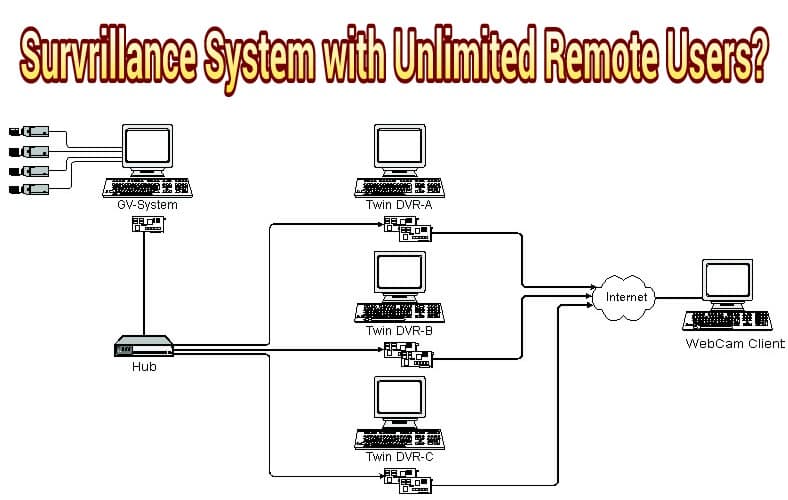
<title>Mike Haldas on "How many simultaneous remote viewers can Geovisions System support?"</title>
<link>http://videos.cctvcamerapros.com/support/topic/how-many-simultaneous-remote-viewers-can-geovisions-system-support#post-3497</link>
<pubDate>Wed, 27 Jul 2011 12:29:27 +0000</pubDate>
<dc:creator>Mike Haldas</dc:creator>
<guid isPermaLink="false">3497@http://videos.cctvcamerapros.com/support/</guid>
<description><p>How many simultaneous viewers can Geovisions System support using Internet Explorer web browser viewing?</p>
<p>For Geovision systems, the number of remote views is based upon the number of camera channels being viewed.<br />
Geovision can output a maximum of 125 channels simultaneously.</p>
<p>So for example, if you have 5 cameras being accessed at the same time for all users, the Geovision system can support 25 simultaneous users.</p>
<p>This goes for Geovision DVR cards as well as GV-NVR IP camera software.
</p></description>
</item>
<item>
<title>hvss@optonline.net on "iphone surveillance viewing using Geovision GV-iView app"</title>
<link>http://videos.cctvcamerapros.com/support/topic/iphone-viewing#post-3496</link>
<pubDate>Tue, 26 Jul 2011 21:06:41 +0000</pubDate>
<dc:creator>hvss@optonline.net</dc:creator>
<guid isPermaLink="false">3496@http://videos.cctvcamerapros.com/support/</guid>
<description><p>All the ports required are open and port 80 had to be changed as my ISP has it blocked.  The port I am using is open an set accordingly on all aspects.  The ports were checked with open port check tool.
</p></description>
</item>
<item>
<title>JCHaldas on "iphone surveillance viewing using Geovision GV-iView app"</title>
<link>http://videos.cctvcamerapros.com/support/topic/iphone-viewing#post-3495</link>
<pubDate>Tue, 26 Jul 2011 14:59:15 +0000</pubDate>
<dc:creator>JCHaldas</dc:creator>
<guid isPermaLink="false">3495@http://videos.cctvcamerapros.com/support/</guid>
<description><p><a href="mailto:hvss@optonline.net">hvss@optonline.net</a>,</p>
<p>Are the ports showing open?
</p></description>
</item>
<item>
<title>hvss@optonline.net on "iphone surveillance viewing using Geovision GV-iView app"</title>
<link>http://videos.cctvcamerapros.com/support/topic/iphone-viewing#post-3493</link>
<pubDate>Tue, 26 Jul 2011 13:14:31 +0000</pubDate>
<dc:creator>hvss@optonline.net</dc:creator>
<guid isPermaLink="false">3493@http://videos.cctvcamerapros.com/support/</guid>
<description><p>Since nothing seemed to work I shut down the computer and removed the hardware and did a destructive recovery of my PC which brought the system back to factory.  Installed all updates, the GeoVision GV600 DVR card and all required software (v8.4) and set the system up as required.  I can not log in from my laptop through the Internet Provider IP but can do so through my wireless network IP (this has only been done from home).  My GViView for live view through 3G I get login failed.  The remote playback I can log in but when I play back a stream I get flashes of green and white light no image.<br />
The operating system on my PC is XP with SP3.
</p></description>
</item>
<item>
<title>JCHaldas on "iphone surveillance viewing using Geovision GV-iView app"</title>
<link>http://videos.cctvcamerapros.com/support/topic/iphone-viewing#post-3489</link>
<pubDate>Fri, 22 Jul 2011 10:47:39 +0000</pubDate>
<dc:creator>JCHaldas</dc:creator>
<guid isPermaLink="false">3489@http://videos.cctvcamerapros.com/support/</guid>
<description><p><a href="mailto:hvss@optonlone.net">hvss@optonlone.net</a>,</p>
<p>Are all of the ports showing open? Including the one that you changed?</p>
<p>Also if you changed the http port from 80 to say 8000. You will have to type in <strong>http://</strong>ipaddress<strong>:8000</strong>. Make sure you type in <strong>http://</strong> before the ip address and than <strong>:port numeber you changed the http port to.</strong></p>
<p>I hope this helps</p>
<p>Thanks James
</p></description>
</item>
<item>
<title>hvss@optonline.net on "iphone surveillance viewing using Geovision GV-iView app"</title>
<link>http://videos.cctvcamerapros.com/support/topic/iphone-viewing#post-3486</link>
<pubDate>Wed, 20 Jul 2011 22:02:31 +0000</pubDate>
<dc:creator>hvss@optonline.net</dc:creator>
<guid isPermaLink="false">3486@http://videos.cctvcamerapros.com/support/</guid>
<description><p>I did that and for some reason port 80 is closed so I changed it and adjusted the settings on all programs to match.  Still no luck in establishing a connection.
</p></description>
</item>
<item>
<title>JCHaldas on "iphone surveillance viewing using Geovision GV-iView app"</title>
<link>http://videos.cctvcamerapros.com/support/topic/iphone-viewing#post-3484</link>
<pubDate>Wed, 20 Jul 2011 14:15:47 +0000</pubDate>
<dc:creator>JCHaldas</dc:creator>
<guid isPermaLink="false">3484@http://videos.cctvcamerapros.com/support/</guid>
<description><p><a href="mailto:hvss@optonlone.net">hvss@optonlone.net</a>,</p>
<p>Make sure the following ports are open.</p>
<p>80<br />
4550<br />
5550<br />
5511<br />
8866</p>
<p>You can use this tool to see if they are open or closed. <a href="http://videos.cctvcamerapros.com/check-open-port-forwarding-tool" rel="nofollow">http://videos.cctvcamerapros.com/check-open-port-forwarding-tool</a></p>
<p>Thanks James
</p></description>
</item>
<item>
<title>hvss@optonline.net on "iphone surveillance viewing using Geovision GV-iView app"</title>
<link>http://videos.cctvcamerapros.com/support/topic/iphone-viewing#post-3483</link>
<pubDate>Wed, 20 Jul 2011 12:49:00 +0000</pubDate>
<dc:creator>hvss@optonline.net</dc:creator>
<guid isPermaLink="false">3483@http://videos.cctvcamerapros.com/support/</guid>
<description><p>I updated from 8.3 to 8.4 as suggested and now I can not log on from either my laptop or my iPhone.  All the settings are the same and am now at a total loss.
</p></description>
</item>
<item>
<title>JCHaldas on "iphone surveillance viewing using Geovision GV-iView app"</title>
<link>http://videos.cctvcamerapros.com/support/topic/iphone-viewing#post-3478</link>
<pubDate>Mon, 18 Jul 2011 16:28:30 +0000</pubDate>
<dc:creator>JCHaldas</dc:creator>
<guid isPermaLink="false">3478@http://videos.cctvcamerapros.com/support/</guid>
<description><p><a href="mailto:hvss@optonline.net">hvss@optonline.net</a>,</p>
<p>I know there was some issues with 8.3 software and the iphone live viewing. You should upgrade to the new 8.4.0.1 software.</p>
<p>Thanks James
</p></description>
</item>
<item>
<title>JCHaldas on "iphone surveillance viewing using Geovision GV-iView app"</title>
<link>http://videos.cctvcamerapros.com/support/topic/iphone-viewing#post-3477</link>
<pubDate>Mon, 18 Jul 2011 16:28:27 +0000</pubDate>
<dc:creator>JCHaldas</dc:creator>
<guid isPermaLink="false">3477@http://videos.cctvcamerapros.com/support/</guid>
<description><p><a href="mailto:hvss@optonline.net">hvss@optonline.net</a>,</p>
<p>I know there was some issues with 8.3 software and the iphone live viewing. You should upgrade to the new 8.4.0.1 software.</p>
<p>Thanks James
</p></description>
</item>
<item>
<title>hvss@optonline.net on "iphone surveillance viewing using Geovision GV-iView app"</title>
<link>http://videos.cctvcamerapros.com/support/topic/iphone-viewing#post-3475</link>
<pubDate>Sun, 17 Jul 2011 23:13:53 +0000</pubDate>
<dc:creator>hvss@optonline.net</dc:creator>
<guid isPermaLink="false">3475@http://videos.cctvcamerapros.com/support/</guid>
<description><p>I have a Verizon iPhone 4 and GeoVision V8.3 and installed the GViView on my phone.  I followed the set up to the letter and can only get the RPB to work.  The DVR looks like it is going to log in and I get 8 blue screens where the images should be and after a few seconds it says login failed.  I have no problem with my remote view on my laptop from other locations and am wondering if it is an issue with the GViView.  If I use the IP address to my WAN while in range of the network I can get the DVR to work.  I&#39;m stuck any suggestions would be appreciated.
</p></description>
</item>
<item>
<title>carlosp000 on "Geovision Blackberry Support and Setup Instructions"</title>
<link>http://videos.cctvcamerapros.com/support/topic/geovision-blackberry-support-and-setup-instructions#post-3458</link>
<pubDate>Fri, 08 Jul 2011 10:44:53 +0000</pubDate>
<dc:creator>carlosp000</dc:creator>
<guid isPermaLink="false">3458@http://videos.cctvcamerapros.com/support/</guid>
<description><p>Hi Mike, I can&#39;t to connect from an BlackBerry, this seems impossible! the phone is Blackberry Bold 9700, I installed GV-Remote View V1.2 for BlackBerry OS 5.0 to 6.0, but the application show me an error message as: error IOException.</p>
<p>I think that it&#39;s an programming error, what do you think?</p>
<p>I have Geovision System 8.4, I am not see any BBview software for the computer on this version, I only see BBview for the phone.
</p></description>
</item>
<item>
<title>Mike Haldas on "Geovision 8.4 Software and Driver Update Instructions"</title>
<link>http://videos.cctvcamerapros.com/support/topic/geovision-84-software-and-driver-update-instructions#post-3457</link>
<pubDate>Fri, 08 Jul 2011 09:52:39 +0000</pubDate>
<dc:creator>Mike Haldas</dc:creator>
<guid isPermaLink="false">3457@http://videos.cctvcamerapros.com/support/</guid>
<description><p>Here is a link to a PDF file that contains the Geovision software upgrade instructions:</p>
<p><a href="http://videos.cctvcamerapros.com/pdf/geovision/software-upgrade/GeoVision-8.4-Software-Upgrade-Instructions.pdf" rel="nofollow">http://videos.cctvcamerapros.com/pdf/geovision/software-upgrade/GeoVision-8.4-Software-Upgrade-Instructions.pdf</a>
</p></description>
</item>
<item>
<title>helano on "iphone surveillance viewing using Geovision GV-iView app"</title>
<link>http://videos.cctvcamerapros.com/support/topic/iphone-viewing#post-3451</link>
<pubDate>Tue, 28 Jun 2011 13:46:40 +0000</pubDate>
<dc:creator>helano</dc:creator>
<guid isPermaLink="false">3451@http://videos.cctvcamerapros.com/support/</guid>
<description><p>Hi James. Tks for the help. I tried with port 8080 and it did work. In fact, I had already tried earlier and it did not work. However, as you were very positive about Iview working with other ports other than 80, I started thinking about what I was doing wrong and I sudenlly realized I had forgotten a very basic point: to include the port after my IP on Iview. In short, for the benefit of whoever might bump into the same problem:<br />
OO GEOVISION: go to Webserver Setup -&#62; HTTP Port and write 8080 (or other).<br />
On your Router: unblock this port on your Firewall (if it is blocked); it might be necessary to route WAN traffic on port 8080 to you PC IP (LAN traffic), if you have a router.<br />
On your Iphone: on the IP field -&#62; write your IP (ou a domain acquired with DynDns, e.g)followed by &#34;:8080&#34;; for example: 186.034.126:8080  or johnsmith.home.dyndns.org:8080<br />
It worked perfectly for me!!<br />
Tks for the help.
</p></description>
</item>
<item>
<title>JCHaldas on "iphone surveillance viewing using Geovision GV-iView app"</title>
<link>http://videos.cctvcamerapros.com/support/topic/iphone-viewing#post-3449</link>
<pubDate>Mon, 27 Jun 2011 14:32:37 +0000</pubDate>
<dc:creator>JCHaldas</dc:creator>
<guid isPermaLink="false">3449@http://videos.cctvcamerapros.com/support/</guid>
<description><p>Hello Helano,</p>
<p>Yes you can change the http port from 80 to any available port such as 8000 or 8080.</p>
<p>Please let me know if you have any questions.</p>
<p>Thanks James
</p></description>
</item>
<item>
<title>Mike Haldas on "Geovision 8.4 Software and Driver Update Instructions"</title>
<link>http://videos.cctvcamerapros.com/support/topic/geovision-84-software-and-driver-update-instructions#post-3448</link>
<pubDate>Mon, 27 Jun 2011 11:53:07 +0000</pubDate>
<dc:creator>Mike Haldas</dc:creator>
<guid isPermaLink="false">3448@http://videos.cctvcamerapros.com/support/</guid>
<description><p>The following instructions can be used to upgrade a PC based Geovision DVR to the latest software and driver versions:</p>
<p><ol type="1"><li><br />
First confirm with a GeoVision representative that the card is compatible with the 8.4 software. You can do so by chatting with a representative here <a href="http://usavisionsys.com" rel="nofollow">http://usavisionsys.com</a> or call the reseller the card was purchased through. They should be able to confirm your DVR card is compatible with the 8.4 software.</li></p>
<p><li>Uninstall the 8.2 software. You can do so by clicking  Start  &#62; All Programs &#62; GVxxx (Geovision Folder &#62; Uninstall GeoVision Multicam System.</li></p>
<p><li>You can download the software here <a href="http://videos.cctvcamerapros.com//downloads/geovision/Geovision-8.4-Software.zip" rel="nofollow">http://videos.cctvcamerapros.com//downloads/geovision/Geovision-8.4-Software.zip</a></li></p>
<p><li>Once you are done downloading the GeoVision Software extract the files. You do this by simply right clicking on the folder and you will see adoption to extract files.</li></p>
<p><li>Once the Files are extracted open the folder and locate the “Driver” folder. You will see a exe file named “DrvInst”</li><br />
double click this icon and press the install button. </p>
<p><li>Once the drivers are installed locate and double click the “SETUP” exe icon</li></p>
<p><li>Now it will prompt you to select the DVR card series. Select the card series you need to install the software for and press next.</li></p>
<p><li>Next select video format. If you are in the US you will select &#34;NTSC&#34;</li></p>
<p><li>Now select the video resolution and press next. 1024 x 768 recommended.</li></p>
<p><li>If you would like the GeoVision to run on startup please check to select the “Add to the Startup function</li></p>
<p><li>If you are using an IR remote control with the GeoVision Server you will need To select “Install the IR Remote Control”. If not proceed by pressing next.</li></p>
<p><li>Choose your destination (Default is fine)</li></p>
<p><li>Choose your program file (Default is fine)</li></p>
<p></ol>
</p></description>
</item>
<item>
<title>helano on "iphone surveillance viewing using Geovision GV-iView app"</title>
<link>http://videos.cctvcamerapros.com/support/topic/iphone-viewing#post-3445</link>
<pubDate>Sun, 26 Jun 2011 18:43:20 +0000</pubDate>
<dc:creator>helano</dc:creator>
<guid isPermaLink="false">3445@http://videos.cctvcamerapros.com/support/</guid>
<description><p>Hi everyone. I have a GV-800 card on my PC and I want to use an IPhone4 with GV-iview to monitor my home cameras. The problem is that my ISP blocks port 80 and it seems that Iview only works if that port is available, because I always get a message saying the program is not able to connect to GV-800. I have followed all the instructions to config the board and teste it by taking the PC to a friend&#39;s house who uses a different ISP and I was able to see the cameras on my Iphone. Is there any way to get iview working with another port? Tks in advance for the help.
</p></description>
</item>
<item>
<title>Mike Haldas on "Does Geovision GV-NVR Software Work with Windows Server 2003?"</title>
<link>http://videos.cctvcamerapros.com/support/topic/does-geovision-gv-nvr-software-work-with-windows-server-2003#post-3440</link>
<pubDate>Wed, 22 Jun 2011 09:57:32 +0000</pubDate>
<dc:creator>Mike Haldas</dc:creator>
<guid isPermaLink="false">3440@http://videos.cctvcamerapros.com/support/</guid>
<description><p>An installation partner contacted me today and asked if the Geovision 8.4 NVR software that is included with Geovision IP cameras can be installed on a Windows 2003 server.</p>
<p>Unfortunately, the answer is no.  Geovision GV-NVR 8.4 is compaible with the following operating systems:</p>
<p><ul><li>32-Bit: Windows XP, Windows Vista, Windows 7, Windows Server 2008</li><li>64-Bit: Windows 7, Windows Server 2008</li><br />
</ul></p>
<p>For additional information and specification for the GV-NVR software version 8.4, users can download the spec here:<br />
<a href="http://videos.cctvcamerapros.com/pdf/geovision/Geovision-GV-NVR-Spec.pdf" rel="nofollow">http://videos.cctvcamerapros.com/pdf/geovision/Geovision-GV-NVR-Spec.pdf</a></p>
<p>Page 5 confirms which operating systems are compatible.
</p></description>
</item>
<item>
<title>Mike Haldas on "How to setup Geovision surveillance system for Mac DVR viewing"</title>
<link>http://videos.cctvcamerapros.com/support/topic/how-to-setup-geovision-surveillance-system-for-mac-dvr-viewing#post-3429</link>
<pubDate>Fri, 17 Jun 2011 15:21:11 +0000</pubDate>
<dc:creator>Mike Haldas</dc:creator>
<guid isPermaLink="false">3429@http://videos.cctvcamerapros.com/support/</guid>
<description><p>The following setup instructions are provided to guide users through how to setup a Mac desktop or laptop to remotely monitor a Geovision surveillance system.  This concept is sometimes referred to a DVR viewer.</p>
<p>Please click here to access the setup document:<br />
<a href="http://videos.cctvcamerapros.com/pdf/geovision/Geovision-Mac-OS-Remote-Viewing-Setup.pdf" rel="nofollow">http://videos.cctvcamerapros.com/pdf/geovision/Geovision-Mac-OS-Remote-Viewing-Setup.pdf</a>
</p></description>
</item>
<item>
<title>JCHaldas on "GV-VS04H Video Server External USB HDD"</title>
<link>http://videos.cctvcamerapros.com/support/topic/gv-vs04h-video-server-external-usb-hdd#post-3415</link>
<pubDate>Fri, 10 Jun 2011 13:38:51 +0000</pubDate>
<dc:creator>JCHaldas</dc:creator>
<guid isPermaLink="false">3415@http://videos.cctvcamerapros.com/support/</guid>
<description><p>Hello Today we had a customer call with the following question.<br />
<strong><br />
Question:</strong> Can you unplug the external USB HDD and plug in as needed to be used like a &#34;hot swap hard drive&#34;.<br />
<strong><br />
Answer: </strong>Every time you want to remove it, you have to log into the web interface and Log into the storage settings right next to the format section there is a &#34;Remove&#34; button.That is the safe eject button. If you just unplug it, the most recent video files would not be properly written into the database the &#34;Eject&#34; button forces the database to update before removing it from the storage pool.
</p></description>
</item>
<item>
<title>Mike Haldas on "Geovision Surveillance Video Backup Export Instructions"</title>
<link>http://videos.cctvcamerapros.com/support/topic/geovision-surveillance-video-backup-export-instructions#post-3404</link>
<pubDate>Mon, 06 Jun 2011 11:32:17 +0000</pubDate>
<dc:creator>Mike Haldas</dc:creator>
<guid isPermaLink="false">3404@http://videos.cctvcamerapros.com/support/</guid>
<description><p>A customer called to day and asked us to provide instructions to backup or export surveillance video from a <a href="http://www.cctvcamerapros.com/Geovision-Surveillance-Camera-Systems-s/420.htm">Geovision DVR</a>.  CCTV Camera Pros provided the following step by step instructions as provided from Geovision.</p>
<p><a href="http://videos.cctvcamerapros.com/pdf/geovision/instructions/Geovision-Video-Backup-Instructions.pdf" rel="nofollow">http://videos.cctvcamerapros.com/pdf/geovision/instructions/Geovision-Video-Backup-Instructions.pdf</a>
</p></description>
</item>
<item>
<title>Mike Haldas on "GV-VS04H for CCTV to IP Conversion and Mac Security Camera Viewing"</title>
<link>http://videos.cctvcamerapros.com/support/topic/gv-vs04h-for-cctv-to-ip-conversion-and-mac-security-camera-viewing#post-3397</link>
<pubDate>Wed, 01 Jun 2011 07:41:09 +0000</pubDate>
<dc:creator>Mike Haldas</dc:creator>
<guid isPermaLink="false">3397@http://videos.cctvcamerapros.com/support/</guid>
<description><p>The GV-VS04H network video server supports iPhone access using the free GV-Eye HD iPhone app.  See the below video for a demonstration of the video server connected to 4 CCTV cameras being viewer remotely over the Internet from an iPhone.</p>
<p>Another nice thing is that the App can connect to multiple servers so are not limited viewing only one set of 4 cameras.  Also the app works with all <a href="http://www.cctvcamerapros.com/Geovision-IP-Cameras-s/417.htm">Geovision IP cameras</a>.  </p>
<p>[video]http://www.youtube.com/watch?v=qexr0F5Gzno[/video]</p>
<p>Visit this page for more information on this amazing device: <a href="http://www.cctvcamerapros.com/Geovision-Network-Video-Server-p/gv-vs04h.htm" rel="nofollow">http://www.cctvcamerapros.com/Geovision-Network-Video-Server-p/gv-vs04h.htm</a>
</p></description>
</item>
<item>
<title>Mike Haldas on "GV-VS04H for CCTV to IP Conversion and Mac Security Camera Viewing"</title>
<link>http://videos.cctvcamerapros.com/support/topic/gv-vs04h-for-cctv-to-ip-conversion-and-mac-security-camera-viewing#post-3386</link>
<pubDate>Thu, 26 May 2011 10:35:25 +0000</pubDate>
<dc:creator>Mike Haldas</dc:creator>
<guid isPermaLink="false">3386@http://videos.cctvcamerapros.com/support/</guid>
<description><p>The following chat transcript has some very useful information related to the <a href="http://www.cctvcamerapros.com/Geovision-Network-Video-Server-p/gv-vs04h.htm">Geovision GV-VS04H video server which provides CCTV to IP conversion for 4 cameras</a>.</p>
<p>Customer:<br />
   Regarding the Geovision GV-VS04H network video server, I just wanted to make sure all 4 cameras could be veiwed at the same time &#38; if i used used 25 or so if they would work with evologic software</p>
<p>CCTV Camera Pros Support:<br />
   Hello, yes you can view all 4 cameras on the same screen.  From which device were you planning on viewing from?</p>
<p>Customer:<br />
   I was wanting to use a mac pro with evologic software</p>
<p>CCTV Camera Pros Support:<br />
   I am not familiar with evologic software.  Is that for video surveillance?</p>
<p>Customer:<br />
   yes</p>
<p>CCTV Camera Pros Support:<br />
    Can you explain how you wanted the video server and the evologic software to work together?</p>
<p>Customer:<br />
    i currently have less than 100 analog cams &#38; i want to convert them to ip &#38; use software on a mac to veiw them</p>
<p>CCTV Camera Pros Support:<br />
    ah, I see.  In order to view cameras connected to the Geovision GV-VS04H, you must use the included NVR software that comes with the server.  This software is designed for Windows. Your Mac computers can then connect to the webserver on the Geovision NVR software PC to view your cameras.</p>
<p>CCTV Camera Pros Support:<br />
    Unfortunately there is not a direct interface to the web server of the video server for non-Internet Explorer browsers. You can connect direct to the server using iPhone, iPad, and Android.  But not direct from Mac.  I have spoken to Geovision product management and requested that direct Mac access be added to the development roadmap.</p>
<p>    Does this make sense?</p>
<p>    Did you realize that for Mac access you do need to run the Geovision NVR software on a Windows PC?</p>
<p>Customer:<br />
    no i didnt.. i am currently using pci cards in multiple pcs &#38; its working ok but the pci cards are getting obsolete. i need something with more power &#38; less pc&#39;s</p>
<p>Customer:<br />
    i would like to use network type cams instead of going thru the internet</p>
<p>CCTV Camera Pros Support:<br />
    So you are looking to migrate over time from Analog to IP cameras.  That is the overall goal?</p>
<p>Customer:<br />
    yes, i need something to network my cctv cams if possible</p>
<p>CCTV Camera Pros Support:<br />
    OK, I think I have a better solution for you.  For now, you can use Geovision DVR cards &#38; your existing PCs for your existing CCTV cameras.  The Geovision software that is included with the Geovision DVR cards is a hybrid so will work with both Geovision DVR cards / CCTV cameras as well as Geovision IP cameras</p>
<p>Customer:<br />
    a pc can only handle 16 cams, i need something to handle at least 100 cams</p>
<p>CCTV Camera Pros Support:<br />
    The Geovision software is awesome and accessible by both Mac and PC.  Also iPhone, iPad, Android, Blackckberry, etc.  Each GV PC can actually handle up to 32 cameras.</p>
<p>Customer:<br />
    i want to do away with pc&#39;s</p>
<p>CCTV Camera Pros Support:<br />
    There is software to manage more than one PC to scales to hundreds or thousands of cameras.</p>
<p>CCTV Camera Pros Support:<br />
    And you also want to eventually do away with your analog cameras?</p>
<p>Customer:<br />
    yes</p>
<p>CCTV Camera Pros Support:<br />
    So you want a non-PC based recorder?</p>
<p>Customer:<br />
    yes</p>
<p>CCTV Camera Pros Support:<br />
    OK.  Let me check something...</p>
<p>CCTV Camera Pros Support:<br />
    This is a stand alone NVR that we supply: <a href="http://www.cctvcamerapros.com/Network-Digital-Video-Recorder-p/nuuo-nv-4160.htm" rel="nofollow">http://www.cctvcamerapros.com/Network-Digital-Video-Recorder-p/nuuo-nv-4160.htm</a></p>
<p>CCTV Camera Pros Support:<br />
    There is a new version coming out next month that is completely accessible via Mac OS</p>
<p>CCTV Camera Pros Support:<br />
    There is no single device that I know of that can handle 100+ cameras and has direct Mac access.  You will need multiple recorders but they can be managed centrally so it does not seem like separate physical devices. For your existing IP cameras, this IP server is compatible with the NUUO NVR: <a href="http://www.cctvcamerapros.com/Video-Encoder-p/vivotek-vs7100.htm" rel="nofollow">http://www.cctvcamerapros.com/Video-Encoder-p/vivotek-vs7100.htm</a>.  That IP server is also accessible directly from Mac using Safari, Firefox, or Chrome web browsers, unlike the Geovision IP server.</p>
<p>Customer:<br />
    i will check this out .. thanx</p>
<p>CCTV Camera Pros Support:<br />
    your welcome.  Do you have any additional questions?</p>
<p>Customer:<br />
    that will do for now ..have a good one</p>
<p>CCTV Camera Pros Support:<br />
    OK, if you think of anything, you can email me at <a href="mailto:mike@cctvcamerapros.net">mike@cctvcamerapros.net</a>.  Thank You!
</p></description>
</item>
<item>
<title>JCHaldas on "GeoVision Blackberry RUN ERROR:java.io.IOException: Invalid url parameter."</title>
<link>http://videos.cctvcamerapros.com/support/topic/geovision-blackberry-run-errorjavaioioexception-invalid-url-parameter#post-3011</link>
<pubDate>Wed, 27 Apr 2011 11:24:06 +0000</pubDate>
<dc:creator>JCHaldas</dc:creator>
<guid isPermaLink="false">3011@http://videos.cctvcamerapros.com/support/</guid>
<description><p>Hello Robrieman,</p>
<p>What version OS is your blackberry running?</p>
<p>Thanks James
</p></description>
</item>
<item>
<title>DrMichaels on "Geovision 8.4 Software Download"</title>
<link>http://videos.cctvcamerapros.com/support/topic/geovision-84-software-download#post-3008</link>
<pubDate>Tue, 26 Apr 2011 10:39:19 +0000</pubDate>
<dc:creator>DrMichaels</dc:creator>
<guid isPermaLink="false">3008@http://videos.cctvcamerapros.com/support/</guid>
<description><p>Thank you very much for posting this new version, Mike.</p>
<p>    Dr. Michaels
</p></description>
</item>
<item>
<title>robrieman on "GeoVision Blackberry RUN ERROR:java.io.IOException: Invalid url parameter."</title>
<link>http://videos.cctvcamerapros.com/support/topic/geovision-blackberry-run-errorjavaioioexception-invalid-url-parameter#post-3006</link>
<pubDate>Mon, 25 Apr 2011 17:29:34 +0000</pubDate>
<dc:creator>robrieman</dc:creator>
<guid isPermaLink="false">3006@http://videos.cctvcamerapros.com/support/</guid>
<description><p>I have version 8.4 and it still doesn&#39;t work. Any idea why?<br />
Thanks!
</p></description>
</item>
<item>
<title>JCHaldas on "Geovision 8.4 Software Download"</title>
<link>http://videos.cctvcamerapros.com/support/topic/geovision-84-software-download#post-2985</link>
<pubDate>Thu, 07 Apr 2011 16:10:22 +0000</pubDate>
<dc:creator>JCHaldas</dc:creator>
<guid isPermaLink="false">2985@http://videos.cctvcamerapros.com/support/</guid>
<description><p>Hello Bev,</p>
<p>Unfortunately I am not familiar with the DVR.  You may want to contact the vendor you purchased the unit from, they should be able to give you some incite.</p>
<p>Thanks James
</p></description>
</item>
<item>
<title>Bev on "Geovision 8.4 Software Download"</title>
<link>http://videos.cctvcamerapros.com/support/topic/geovision-84-software-download#post-2984</link>
<pubDate>Thu, 07 Apr 2011 04:42:32 +0000</pubDate>
<dc:creator>Bev</dc:creator>
<guid isPermaLink="false">2984@http://videos.cctvcamerapros.com/support/</guid>
<description><p>I have a black box netrome security system, and I would like to know if I can access my cameras on my iPad.  I download several apps to my iPad but nothing seems to work</p>
<p>Bev
</p></description>
</item>
<item>
<title>sahil610 on "Geovision 8.4 Software Download"</title>
<link>http://videos.cctvcamerapros.com/support/topic/geovision-84-software-download#post-2970</link>
<pubDate>Sat, 26 Mar 2011 23:33:56 +0000</pubDate>
<dc:creator>sahil610</dc:creator>
<guid isPermaLink="false">2970@http://videos.cctvcamerapros.com/support/</guid>
<description><p>thanx a lott mike
</p></description>
</item>
<item>
<title>Mike Haldas on "iPhone App to Control PTZ Cameras"</title>
<link>http://videos.cctvcamerapros.com/support/topic/iphone-app-to-control-ptz-cameras#post-2965</link>
<pubDate>Thu, 24 Mar 2011 10:30:46 +0000</pubDate>
<dc:creator>Mike Haldas</dc:creator>
<guid isPermaLink="false">2965@http://videos.cctvcamerapros.com/support/</guid>
<description><p><strong>A customer recently contacted CCTV Camera Pros with the following question related to controlling a PTZ camera using an iPhone app or iPad app:</strong></p>
<p>I have a Panisonic DVR system with 6 PTZ cameras installed at my residence.  I want to view and control them from iphone or ipad.  Can your iCamViewer app do this? If so, what encoder(s) would you suggest to add?</p>
<p><strong>CCTV Camera Pros response:</strong></p>
<p>Thank You for contacting us and for your interest in the iCamViewer App.  As of right now, the iCamViewer is not an option for PTZ controls.  Support may be added later this year but right now it does not support PTZ controls from the app.  Also, typically the cost of adding a network video servers for each of your PTZ cameras ends up being equal to or greater than the cost of a CCTV DVR that natively supports remote PTZ camera controls via an iPhone app that is made specifically for that DVR.</p>
<p>If you are using standard analog PTZ cameras that use RS-485 for the controls, you may want to consider a new DVR (unless the manufacturer of your DVR is developing an app sometime soon).  If you are open to this, I suggest checking out our iDVR-E series <a href="http://www.cctvcamerapros.com/8ch-Stand-Alone-DVR-p/idvr-e8.htm">stand alone DVR</a> or a <a href="http://www.cctvcamerapros.com/Geovision-DVR-Computers-Geovision-Surveillance-DVRs-s/60.htm">Geovision PC based surveillance DVR</a>.  There is a new iPhone app available for it that is one of the best I have seen on the market besides Geovision (which is a PC based system that we also supply).  Please see the below links to these two options as well as some additional information such as screenshots of the apps and setup instructions.  Please let me know your thoughts.</p>
<p><a href="http://www.cctvcamerapros.com/8ch-Stand-Alone-DVR-p/idvr-e8.htm" rel="nofollow">http://www.cctvcamerapros.com/8ch-Stand-Alone-DVR-p/idvr-e8.htm</a></p>
<p><a href="http://www.facebook.com/photo.php?fbid=10150176259771145&#038;set=a.142320096144.135575.61507771144&#038;ref=nf" rel="nofollow">http://www.facebook.com/photo.php?fbid=10150176259771145&#038;set=a.142320096144.135575.61507771144&#038;ref=nf</a></p>
<p><a href="http://www.cctvcamerapros.com/Geovision-DVR-Computer-p/pcpro-gv8.htm" rel="nofollow">http://www.cctvcamerapros.com/Geovision-DVR-Computer-p/pcpro-gv8.htm</a></p>
<p><a href="http://www.cctvcamerapros.com/Geovision-iPhone-Application-GV-iView-Setup-s/329.htm" rel="nofollow">http://www.cctvcamerapros.com/Geovision-iPhone-Application-GV-iView-Setup-s/329.htm</a>
</p></description>
</item>
<item>
<title>dav on "iphone surveillance viewing using Geovision GV-iView app"</title>
<link>http://videos.cctvcamerapros.com/support/topic/iphone-viewing#post-2958</link>
<pubDate>Wed, 23 Mar 2011 20:00:41 +0000</pubDate>
<dc:creator>dav</dc:creator>
<guid isPermaLink="false">2958@http://videos.cctvcamerapros.com/support/</guid>
<description><p>Hello everyone. I have a geovision dvr connected to my home network and I can access it just fine from my iphone 4 , with the gv-iview app.  when i try to use the app on my iphone outside my network using at&#38;t 3g, i can only get the recorded view portion to work.  When i select the live view (dvr) using the required same ip address it starts to go to the six camera split screen page, but it is all black and only shows dvr and record button for a breif moment then it crashes and the app clodes completly.  I have all the required ports open, 8866. 80, 5511, etc.  I have checked them using the <a href="http://videos.cctvcamerapros.com/check-open-port-forwarding-tool">open port tool</a>.  The only thing that seems wierd is I cant port forward port 80 to my netgear router.  It says it is already being us by other configurations.  But the port checker tool says its open. And like i said the app does work with recorded view, just not live view.  The geovision capture card is 1480 ver. 8.3.4, and my iphone app is Gv-iView v2.1.1.  Do you know how to correct this problem.  I see it over and over again on support forumns and I have tried many of the tips I found on the forumns.  Let me know if you have a solution.  Thanks
</p></description>
</item>
<item>
<title>JCHaldas on "Software is Incompattible With Your Location"</title>
<link>http://videos.cctvcamerapros.com/support/topic/software-is-incompattible-with-your-location#post-2957</link>
<pubDate>Wed, 23 Mar 2011 14:15:54 +0000</pubDate>
<dc:creator>JCHaldas</dc:creator>
<guid isPermaLink="false">2957@http://videos.cctvcamerapros.com/support/</guid>
<description><p>Sibannac,</p>
<p>You may want to try uninstalling the software and reinstalling. Also if that does not work please try upgrading to the newest version of software which is 8.4.</p>
<p>Thanks James
</p></description>
</item>
<item>
<title>sibannac on "Software is Incompattible With Your Location"</title>
<link>http://videos.cctvcamerapros.com/support/topic/software-is-incompattible-with-your-location#post-2955</link>
<pubDate>Tue, 22 Mar 2011 17:31:10 +0000</pubDate>
<dc:creator>sibannac</dc:creator>
<guid isPermaLink="false">2955@http://videos.cctvcamerapros.com/support/</guid>
<description><p>What if you get this error and the IR Remote Control is disabled?
</p></description>
</item>
<item>
<title>Mike Haldas on "Geovision Control Center or GV Center V2 to monitor multiple locations?"</title>
<link>http://videos.cctvcamerapros.com/support/topic/geovision-control-center-or-gv-center-v2-to-monitor-multiple-locations#post-2954</link>
<pubDate>Mon, 21 Mar 2011 10:31:06 +0000</pubDate>
<dc:creator>Mike Haldas</dc:creator>
<guid isPermaLink="false">2954@http://videos.cctvcamerapros.com/support/</guid>
<description><p><strong>A customer recently contacted CCTV Camera Pros and asked the following question related to Geovision surveillance systems:</strong></p>
<p>Hello, I have 5 locations, each with a <a href="http://www.cctvcamerapros.com/GeoVision-GV-800-Card-p/gv-800-4.htm">Geovision GV-800</a> System.  With the <a href="http://www.cctvcamerapros.com/Geovision-Control-Center-p/gv-control-center.htm">Geovision GV-Control Center software</a>, can I view all locations in one screen or do you have another solution that you recommend?</p>
<p><strong>CCTV Camera Pros provided the following response:</strong></p>
<p>Thank You for contacting CCTV Camera Pros.  You can monitor up to 5 locations and 80 cameras using the <a href="http://www.cctvcamerapros.com/Geovision-Central-Monitoring-p/gv-center-v2.htm">Geovision Center V2 CMS software</a> that is included on the Geovision CD.  For more than 5 locations you need to upgrade to the Professional Center V2 software.  Please refer to this page for more information and setup instructions for Geovision Center V2:</p>
<p><a href="http://www.cctvcamerapros.com/Geovision-Center-V2-Setup-s/252.htm">http://www.cctvcamerapros.com/Geovision-Center-V2-Setup-s/252.htm</a>
</p></description>
</item>
<item>
<title>Mike Haldas on "Geovision Surveillance PTZ Camera Setup"</title>
<link>http://videos.cctvcamerapros.com/support/topic/geovision-surveillance-ptz-camera-setup#post-2943</link>
<pubDate>Thu, 17 Mar 2011 10:38:06 +0000</pubDate>
<dc:creator>Mike Haldas</dc:creator>
<guid isPermaLink="false">2943@http://videos.cctvcamerapros.com/support/</guid>
<description><p><strong>A customer recently contacted CCTV Camera Pros and asked the following:</strong></p>
<p>I have a <a href="http://www.cctvcamerapros.com/GeoVision-GV-1480-Card-p/gv-1480-16.htm">Geovision GV-1480</a> surveillance system working fine.  It is Geovision software Version 8.31. I want to know how do I add one or two PTZ cameras for parking lot I like <a href="http://www.cctvcamerapros.com/Pan-Tilt-Zoom-Camera-p/ptz-a10x.htm">PTZ-A10X Pan Tilt Zoom Camera</a>, and its demo on your website.</p>
<p><strong>CCTV Camera Pros providing the following information:</strong></p>
<p>Thank You for contacting CCTV Camera Pros.  In order to use two PTZ-A10X Pan Tilt Zoom Cameras with your <a href="http://www.cctvcamerapros.com/Geovision-DVR-Computers-Geovision-Surveillance-DVRs-s/60.htm">Geovision surveillance DVR</a>, you must add a <a href="http://www.cctvcamerapros.com/geovision-gv-com-p/gv-com.htm">Geovision GV-COM RS-485 PTZ controller</a> to your system which you can find here:</p>
<p><a href="http://www.cctvcamerapros.com/geovision-gv-com-p/gv-com.htm" rel="nofollow">http://www.cctvcamerapros.com/geovision-gv-com-p/gv-com.htm</a></p>
<p>You can also use a <a href="http://www.cctvcamerapros.com/geovision-gvnet-card-p/gv-net.htm">Geovision GV-NET PTZ controller</a> if you prefer that the controller is installed inside the PC instead of as an external USB device.</p>
<p>PTZ cameras require an additional pair of cable for the PTZ controls.  This cable pair connects to the GV-COM controller.  When setting up more than one PTZ camera, you can daisy chain the RS-485 cables from one PTZ to the next.  This means that you run the RS-485 cables (typically a single pair from a CAT-5 or CAT-3 is used) from the GV-COM or GV-NET to the first PTZ camera, then run an additional cable pair out of the RS-485 of the first camera and into the RS-485 inputs of the second camera.</p>
<p>You can find more information about setting up <a href="http://www.cctvcamerapros.com/PTZ-Security-Cameras-s/45.htm">PTZ cameras</a> using Geovision here:</p>
<p><a href="http://www.cctvcamerapros.com/geovision-card-support-s/155.htm#ptz-camera-setup" rel="nofollow">http://www.cctvcamerapros.com/geovision-card-support-s/155.htm#ptz-camera-setup</a></p>
<p>Please let us know if we can help further.
</p></description>
</item>
<item>
<title>Mike Haldas on "Geovision Surveillance System Remote Viewing Bandwith Calculator"</title>
<link>http://videos.cctvcamerapros.com/support/topic/geovision-surveillance-system-remote-viewing-bandwith-calculator#post-2924</link>
<pubDate>Tue, 08 Mar 2011 15:10:35 +0000</pubDate>
<dc:creator>Mike Haldas</dc:creator>
<guid isPermaLink="false">2924@http://videos.cctvcamerapros.com/support/</guid>
<description><p><strong>A customer contacted CCTV Camera Pros and asked the following questions related to a <a href="http://www.cctvcamerapros.com/Geovision-DVR-Computers-Geovision-Surveillance-DVRs-s/60.htm">Geovision surveillance system</a>:</strong></p>
<p>Does Geovision have a bandwidth calculator for customers to calculate / estimate upload requirements / bandwidth speed for Internet connections based on streaming 16 cameras.  Also if there is a way to limit remote viewing to only certain cameras to conserve bandwidth.</p>
<p><strong>Geovision technical support responded with the following information:</strong></p>
<p>Yes there is a Geovision bandwidth calculator available online here: <a href="http://www.geovision.com.tw/english/cal_webcam_test1-5.asp" rel="nofollow">http://www.geovision.com.tw/english/cal_webcam_test1-5.asp</a></p>
<p>For 16 channels of <a href="http://www.cctvcamerapros.com">CCTV cameras</a> over the internet, it usually required around 1Mbps to 2Mbps of upload speed depending on resolution settings of the cameras.</p>
<p>You can manipulate the quality and number of cameras that can be seen across the web using the Geovision main console.
</p></description>
</item>
<item>
<title>Philippe on "Geovision Pos Text Sender"</title>
<link>http://videos.cctvcamerapros.com/support/topic/geovision-pos-text-sender#post-2903</link>
<pubDate>Thu, 24 Feb 2011 23:40:06 +0000</pubDate>
<dc:creator>Philippe</dc:creator>
<guid isPermaLink="false">2903@http://videos.cctvcamerapros.com/support/</guid>
<description><p>Do you know a good solution for that? One that would work like POS but more reliable?<br />
If you guys sell it please let me know the prices or send me a link.</p>
<p>Thank you.
</p></description>
</item>
<item>
<title>JCHaldas on "Geovision Pos Text Sender"</title>
<link>http://videos.cctvcamerapros.com/support/topic/geovision-pos-text-sender#post-2898</link>
<pubDate>Wed, 23 Feb 2011 11:34:01 +0000</pubDate>
<dc:creator>JCHaldas</dc:creator>
<guid isPermaLink="false">2898@http://videos.cctvcamerapros.com/support/</guid>
<description><p>Philippe,<br />
 There is a 12 port text sender dongle available which installs onto the dvr. It should work but there may be tons of tech support involved POS = Pain in the Rear.</p>
<p>I hope this helps.</p>
<p>Thanks
</p></description>
</item>
<item>
<title>Philippe on "Geovision Pos Text Sender"</title>
<link>http://videos.cctvcamerapros.com/support/topic/geovision-pos-text-sender#post-2890</link>
<pubDate>Sat, 19 Feb 2011 14:43:16 +0000</pubDate>
<dc:creator>Philippe</dc:creator>
<guid isPermaLink="false">2890@http://videos.cctvcamerapros.com/support/</guid>
<description><p>Hi, I work for a retail chain store located in Dallas and I was wondering if anyone here recomends the POS solution. </p>
<p>Contacting the geovision office they told me that for windows based POS I needed the text sender dongle, which is around 500 dollars for the 10 port one. </p>
<p>If we have around 10 cash registers in each store it means that the 10 port dongle would be enough for all of them or do I need more? Also our reports are generated at the server so I don&#39;t know if that changes anything.
</p></description>
</item>
<item>
<title>craigg1234 on "iphone surveillance viewing using Geovision GV-iView app"</title>
<link>http://videos.cctvcamerapros.com/support/topic/iphone-viewing#post-2808</link>
<pubDate>Mon, 20 Dec 2010 21:40:49 +0000</pubDate>
<dc:creator>craigg1234</dc:creator>
<guid isPermaLink="false">2808@http://videos.cctvcamerapros.com/support/</guid>
<description><p>I HAVE A IPHONE TRYING TO CONNECT TO H.264   PUT IP  IN AND  PORT   BUT CONNECTION FAILED  WHAT AM I DOING WRONG
</p></description>
</item>
<item>
<title>wolverine on "Should I setup Geovision in the admin or regular account in Windows 7?"</title>
<link>http://videos.cctvcamerapros.com/support/topic/should-i-setup-geovision-in-the-admin-or-regular-account-in-windows-7#post-2789</link>
<pubDate>Mon, 13 Dec 2010 14:02:16 +0000</pubDate>
<dc:creator>wolverine</dc:creator>
<guid isPermaLink="false">2789@http://videos.cctvcamerapros.com/support/</guid>
<description><p>I installed Geovision 8.4 in my new Windows 7 system, under the administrative account. It runs without any problem. </p>
<p>To reduce risk associated with administrative account, I set up a regular user account. However, when I started Geovision it took about 20 minutes for the program to load. I tried the &#34;run as administrator&#34; option but did not help.</p>
<p>Am I doing something wrong? Must the system be run under admin account to avoid this severe slow-down? What do you guys do?</p>
<p>Thanks
</p></description>
</item>
<item>
<title>P3N15 on "Geovision 8.4 Software Download"</title>
<link>http://videos.cctvcamerapros.com/support/topic/geovision-84-software-download#post-2763</link>
<pubDate>Mon, 29 Nov 2010 05:11:40 +0000</pubDate>
<dc:creator>P3N15</dc:creator>
<guid isPermaLink="false">2763@http://videos.cctvcamerapros.com/support/</guid>
<description><p>thanx a lot
</p></description>
</item>
<item>
<title>EDDIE on "GeoVision Blackberry RUN ERROR:java.io.IOException: Invalid url parameter."</title>
<link>http://videos.cctvcamerapros.com/support/topic/geovision-blackberry-run-errorjavaioioexception-invalid-url-parameter#post-2755</link>
<pubDate>Thu, 25 Nov 2010 01:10:09 +0000</pubDate>
<dc:creator>EDDIE</dc:creator>
<guid isPermaLink="false">2755@http://videos.cctvcamerapros.com/support/</guid>
<description><p>java.io.ioexception:peer reused the connection ok<br />
i java.lang.nullpoiterException
</p></description>
</item>
<item>
<title>Mike Haldas on "Geovision 8.4 Software Download"</title>
<link>http://videos.cctvcamerapros.com/support/topic/geovision-84-software-download#post-2726</link>
<pubDate>Tue, 09 Nov 2010 12:36:50 +0000</pubDate>
<dc:creator>Mike Haldas</dc:creator>
<guid isPermaLink="false">2726@http://videos.cctvcamerapros.com/support/</guid>
<description><p>Geovision 8.4 software has been released.  CCTV Camera Pros has Geovision 8.4 available to download here:</p>
<p><a href="http://videos.cctvcamerapros.com/downloads/geovision/Geovision-8.4-Software.zip" rel="nofollow">http://videos.cctvcamerapros.com/downloads/geovision/Geovision-8.4-Software.zip</a></p>
<p>Some of the new features of Geovision 8.4 are:<br />
<ul><li>Support for Vivotek IP cameras: FD7131, FD7132, FD7141, FD8161, FD8361, IP7130, IP7133, IP7137, IP7160, IP7330, IP8330, IP8332, IZ7151, PZ7122, SD7313 and SD7323</li><li>Support for GV-FE110 fisheye camera and ImmerVision IMV1 Panomorph lens</li><li>Video compacting by keeping key frames only</li><li>Schedule center for compacting video, merging video, and fast backup and restore</li><li>Face count and detection function</li><li>Compatibility with IP devices using ONVIF/PSIA standards</li><li>On demand display to automatically adjust live view resolution for dual-stream video</li><li>Economic mode to customize recording frame rate for IP devices</li><li>Listing tampering alarm events from IP devices in system log</li><li>Round-the-clock audio recording</li><li>Support for AMR and AAC audio codec</li><li>Support for new PTZ cameras: VDI CT-58SPD, Bosch G3 and COP 15-CD55TW Pelco D</li><li>Support for new GeoVision IP cameras: GV-BL110D, GV-BX120D, BX220D, GV-BX320D, GV-FE110, GV-PT110D and GV-PTZ010D</li><li>Support for more ACTi IP cameras: CAM-6610N, TCD-2500, TCM-1511, TCM-3511 and TCM-5611</li><li>Support for more Axis IP cameras: M1011, M3011, M3014, P1311, P1343, P1344, P1346, P3343, P3344, P5534 and Q1755</li><li>Support for more Canon IP cameras: VB-C500D and VB-C60B</li><li>Support for more CNB IP cameras: IVP4030VR KC1 and INS2000 KC1</li><li>Support for more D-Link IP cameras: DCS-3415, DCS-5230, DCS-6110 and DCS-3411</li><li>Support for more EtroVision IP cameras: EV6150A, EV6151A, EV6250A and EV8150A</li><li>Support for more MOBOTIX IP cameras: D12 and Q24</li><li>Support for Panasonic BB-HCM715</li><li>Support for more Pelco IP cameras: IXS0C and IXE20C</li><li>Support for more Sanyo IP cameras: VCC-HD2100P and VCC-HD2300P</li><li>Support for more Sony IP cameras: SNC-DH140, SNC-RH124 and SNT-EX104</li><br />
</ul><br />
For a complete list of new features, please visit:<br />
<a href="http://www.geovision.com.tw/english/4_2.asp" rel="nofollow">http://www.geovision.com.tw/english/4_2.asp</a>
</p></description>
</item>
<item>
<title>JCHaldas on "Geovision Password Reset Instructions"</title>
<link>http://videos.cctvcamerapros.com/support/topic/geovision-password-reset-instructions#post-2694</link>
<pubDate>Tue, 12 Oct 2010 09:13:33 +0000</pubDate>
<dc:creator>JCHaldas</dc:creator>
<guid isPermaLink="false">2694@http://videos.cctvcamerapros.com/support/</guid>
<description><p>If you do have the password removal option enabled then here are the instructions on doing so <a href="http://usavisionsys.com/files/Password_Removal_Procedure_B03B0209.pdf" rel="nofollow">http://usavisionsys.com/files/Password_Removal_Procedure_B03B0209.pdf</a>
</p></description>
</item>
<item>
<title>Mike Haldas on "MAC DVR Card for Video Surveillance"</title>
<link>http://videos.cctvcamerapros.com/support/topic/mac-dvr-card-for-video-surveillance#post-2683</link>
<pubDate>Tue, 05 Oct 2010 10:15:22 +0000</pubDate>
<dc:creator>Mike Haldas</dc:creator>
<guid isPermaLink="false">2683@http://videos.cctvcamerapros.com/support/</guid>
<description><p><strong>A customer contacted CCTV Camera Pros and asked the following question:</strong></p>
<p>Hi, I am looking to buy a DVR card to put in my Macs. What do you have available?  I require a DVR card that will take min 8 Cameras.</p>
<p><strong>CCTV Camera Pros response:</strong></p>
<p>Thank You for contacting CCTV Camera Pros.  I am sorry but we do not carry any DVR cards for MAC PCs and unfortunately, I do not know of any on the market at this time.  CCTV Camera Pros does have some options for you though as far as live viewing security cameras from a MAC computer and even controlling the settings on the DVR.  Here is a link to our iDVR-PRO which is a stand alone surveillance DVR that allows you to view and control cameras remotely from any MAC PC.  It is also compatible with Windows PCs, iPhone, Blackberry, and Android cell phones.</p>
<p>It comes is an 8 or 16 channel model:<br />
<a href="http://www.cctvcamerapros.com/CCTV-Digital-Video-Recorder-p/idvr-pro8.htm" rel="nofollow">http://www.cctvcamerapros.com/CCTV-Digital-Video-Recorder-p/idvr-pro8.htm</a></p>
<p><a href="http://www.cctvcamerapros.com/CCTV-Camera-DVR-p/idvr-pro16.htm" rel="nofollow">http://www.cctvcamerapros.com/CCTV-Camera-DVR-p/idvr-pro16.htm</a></p>
<p>Here is a link to a video that shows remote access from a Macintosh laptop using Safari, Firefox, and Chrome web browsers:<br />
<a href="http://www.youtube.com/watch?v=SZ6j1zb3Kb4" rel="nofollow">http://www.youtube.com/watch?v=SZ6j1zb3Kb4</a></p>
<p>We also sell Geovision PC based surveillance DVRs that allow you to view your security cameras remotely over the Internet from a MAC.  The actual Geovision recorder is based on a Windows PC.</p>
<p><a href="http://www.cctvcamerapros.com/Geovision-DVR-Computers-Geovision-Surveillance-DVRs-s/60.htm" rel="nofollow">http://www.cctvcamerapros.com/Geovision-DVR-Computers-Geovision-Surveillance-DVRs-s/60.htm</a></p>
<p>Please let us know if you have any additional questions.
</p></description>
</item>
<item>
<title>ced on "iphone surveillance viewing using Geovision GV-iView app"</title>
<link>http://videos.cctvcamerapros.com/support/topic/iphone-viewing#post-2682</link>
<pubDate>Mon, 04 Oct 2010 14:04:42 +0000</pubDate>
<dc:creator>ced</dc:creator>
<guid isPermaLink="false">2682@http://videos.cctvcamerapros.com/support/</guid>
<description><p>1- i have 3 gv 1480 cards<br />
2- i have one iphone<br />
3- i have one router</p>
<p>i can connect my  3 cards with dm-multiview.<br />
i can&#39;t with my iphone</p>
<p>Card one: 8866<br />
card two: 8867 </p>
<p>i can just connect on my first card with  my iphone?<br />
please help
</p></description>
</item>
<item>
<title>Mike Haldas on "Geovision GV-600 Audio Board Installation"</title>
<link>http://videos.cctvcamerapros.com/support/topic/geovision-gv-600-audio-board-installation#post-2676</link>
<pubDate>Sun, 26 Sep 2010 19:23:25 +0000</pubDate>
<dc:creator>Mike Haldas</dc:creator>
<guid isPermaLink="false">2676@http://videos.cctvcamerapros.com/support/</guid>
<description><p>A customer recently asked <a href="http://www.youtube.com/cctvcamerapros">CCTV Camera Pros on our youTube channel</a> how to install a the audio extension board onto a <a href="http://www.cctvcamerapros.com/GeoVision-GV-600-Card-p/gv-600-4.htm">GV-600 DVR card</a>.</p>
<p>CCTV Camera Pros response:</p>
<p>Please see the below diagram to reference how to install the audio extension board on a GV-600 Geovision surveillance system.  The process is similar for all of the Geovision audio boards.<br />
<img src="http://videos.cctvcamerapros.com/images/geovision/Geovision-GV-600-Audio-Installation.jpg">
</p></description>
</item>
<item>
<title>JCHaldas on "Software is Incompattible With Your Location"</title>
<link>http://videos.cctvcamerapros.com/support/topic/software-is-incompattible-with-your-location#post-2675</link>
<pubDate>Thu, 23 Sep 2010 16:44:00 +0000</pubDate>
<dc:creator>JCHaldas</dc:creator>
<guid isPermaLink="false">2675@http://videos.cctvcamerapros.com/support/</guid>
<description><p><strong>We recently had a customer call with the following issue:</strong><br />
I have set up a new server running Windows XP and  I am getting an error message saying that the software is incompatible with your location every time that I reboot the system.  It happens before the software loads and will not load until you select okay.  Do you have any idea what could be the cause of this?</p>
<p><strong>Solution:</strong> Disable the IR Remote control on startup
</p></description>
</item>
<item>
<title>JCHaldas on "GeoVision Dual Card Installation"</title>
<link>http://videos.cctvcamerapros.com/support/topic/geovision-dual-card-installation#post-2672</link>
<pubDate>Mon, 20 Sep 2010 13:45:25 +0000</pubDate>
<dc:creator>JCHaldas</dc:creator>
<guid isPermaLink="false">2672@http://videos.cctvcamerapros.com/support/</guid>
<description><p>Hello,</p>
<p>Today I am going to be going over the installation and setup of the GeoVision Dual Card mode. </p>
<p>1.) Seat the GeoVision pci card into PC.</p>
<p>2.) The best and easiest route would be to uninstall any current Geovision software and drivers that are on the PC.</p>
<p>3.) Now that all of the old software and drivers are uninstalled. You can now restart the PC. </p>
<p>4.) Next insert the GeoVision disk with the drivers and software into the PC.</p>
<p>5.) Install the Geovision drivers and software.</p>
<p>6.) Once the GeoVision system is installed. In the GeoVision system Click the configure button &#62; General Settings &#62; Audio/Camera Install</p>
<p>7.) On the Audio/Camera Install check the Limit port box. Once the box is checked use the directional arrows to adjust the amount of video ports you want to be enabled within the GeoVision software.
</p></description>
</item>
<item>
<title>Mike Haldas on "GeoVision Screen Capture / Pink Screen"</title>
<link>http://videos.cctvcamerapros.com/support/topic/geovision-screen-capturepink-screen#post-2645</link>
<pubDate>Thu, 19 Aug 2010 06:40:31 +0000</pubDate>
<dc:creator>Mike Haldas</dc:creator>
<guid isPermaLink="false">2645@http://videos.cctvcamerapros.com/support/</guid>
<description><p>James,</p>
<p>Great post.  I had tried many years ago to create screen captures from Geovision to write support articles for the website.  Nice find and nice post!</p>
<p>Thanks.<br />
-Mike
</p></description>
</item>
<item>
<title>JCHaldas on "GeoVision Screen Capture / Pink Screen"</title>
<link>http://videos.cctvcamerapros.com/support/topic/geovision-screen-capturepink-screen#post-2643</link>
<pubDate>Tue, 17 Aug 2010 14:20:23 +0000</pubDate>
<dc:creator>JCHaldas</dc:creator>
<guid isPermaLink="false">2643@http://videos.cctvcamerapros.com/support/</guid>
<description><p><strong>We Recently had a customer contact CCTV Camera Pros regarding Geovision surveillance systems that had the following question:</strong></p>
<p>I am trying to screen capture the DVR software page and am not able to freeze frame the video image. The image comes back as purple or pink instead of capturing a screenshot of the video at that time. Is there any way to capture the image from the cameras?</p>
<p><strong>CCTV Camera Pros response:</strong></p>
<p>Yes, you can perform screen captures in <a href="http://www.cctvcamerapros.com/Geovision-DVR-Computers-Geovision-Surveillance-DVRs-s/60.htm">Geovision surveillance</a> software.  You need to disable the Directdraw Overlay option to get rid of the pink screen.  To do this, Click on the configure button &#62; General Setting &#62; System configure.  Within the system configure window, find and disable &#34;Enable Directdraw Overlay&#34;.  Click OK and then restart the software by startup settings.
</p></description>
</item>
<item>
<title>Mike Haldas on "Geovision GV-4016 GV-4008 X 2 Motherboard Recommendation"</title>
<link>http://videos.cctvcamerapros.com/support/topic/geovision-gv-4016-gv-4008-x-2-motherboard-recommendation#post-2631</link>
<pubDate>Wed, 04 Aug 2010 13:12:05 +0000</pubDate>
<dc:creator>Mike Haldas</dc:creator>
<guid isPermaLink="false">2631@http://videos.cctvcamerapros.com/support/</guid>
<description><p>A customer recently contacted us and asked which motherboard we recommend to build a Geovision GV-4016 system which consists of 2 GV-4008 PCIe hardware compression cards.</p>
<p>The recommendation is the ASUS P6T motheboard with an i7 CPU.
</p></description>
</item>
<item>
<title>JCHaldas on "GeoVision Blackberry RUN ERROR:java.io.IOException: Invalid url parameter."</title>
<link>http://videos.cctvcamerapros.com/support/topic/geovision-blackberry-run-errorjavaioioexception-invalid-url-parameter#post-1193</link>
<pubDate>Wed, 09 Jun 2010 11:46:12 +0000</pubDate>
<dc:creator>JCHaldas</dc:creator>
<guid isPermaLink="false">1193@http://videos.cctvcamerapros.com/support/</guid>
<description><p>Hello leonleoj,</p>
<p>It will be supported on GeoVision 8.4</p>
<p>Thanks
</p></description>
</item>
<item>
<title>leonleoj on "GeoVision Blackberry RUN ERROR:java.io.IOException: Invalid url parameter."</title>
<link>http://videos.cctvcamerapros.com/support/topic/geovision-blackberry-run-errorjavaioioexception-invalid-url-parameter#post-1190</link>
<pubDate>Tue, 08 Jun 2010 10:16:00 +0000</pubDate>
<dc:creator>leonleoj</dc:creator>
<guid isPermaLink="false">1190@http://videos.cctvcamerapros.com/support/</guid>
<description><p>Any time line on when you will support v5.0 or later?</p>
<p>Thanks.
</p></description>
</item>
<item>
<title>Mike Haldas on "Does Geovision iPhone app GV-iView work with Intensifier security Cameras?"</title>
<link>http://videos.cctvcamerapros.com/support/topic/does-geovision-iphone-app-gv-iview-work-with-intensifier-security-cameras#post-1173</link>
<pubDate>Tue, 01 Jun 2010 06:33:37 +0000</pubDate>
<dc:creator>Mike Haldas</dc:creator>
<guid isPermaLink="false">1173@http://videos.cctvcamerapros.com/support/</guid>
<description><p><strong>A customer recently contacted CCTV Camera Pros with the following questions:</strong></p>
<p>I am about to purchase 3 Speco Intensifier security Cameras to be installed around my house.  Do you recommend Speco &#34;Intensifier&#34; cameras, or Standard LED cameras?</p>
<p>Also, I would like to deploy/integrate Geovision iPhone Application GV-iView, what do I need to do the get Geovision app working (buy specific DVR, or any DVR would work)? Would you please elaborate on GeoVision iPhone App requirements?</p>
<p>I appreciate your follow-up.</p>
<p>CCTV Camera Pros supplied the following support response:</p>
<p>Speco cameras are good and yes they do work with Geovision systems as any CCTV camera does. CCTV Camera Pros carries our own line of intensifier cameras that also have infrared LEDs built in which we recommend.  You can control the output of the LEDs or even if you want the IRs off using the cameras on screen display.  You can see our intensifier cameras with IR LEDs here:<br />
<a href="http://www.cctvcamerapros.com/Outdoor-CCTV-Camera-p/bipro-s600vf12.htm" rel="nofollow">http://www.cctvcamerapros.com/Outdoor-CCTV-Camera-p/bipro-s600vf12.htm</a></p>
<p>The BIPRO-S600VF12 camera is used on this live ustream video feed.  If you click the below link, then on one of the archived videos of a night time recording, you can see how the cameras perform at night.  You can also log in anytime at to see the live video feed.<br />
<a href="http://www.cctvcamerapros.com/Florida-Live-Wildlife-Camera-s/381.htm" rel="nofollow">http://www.cctvcamerapros.com/Florida-Live-Wildlife-Camera-s/381.htm</a></p>
<p>The GV-iView, Geovision surveillance iPhone app will only work with a <a href="http://www.cctvcamerapros.com/Geovision-DVR-Computers-Geovision-Surveillance-DVRs-s/60.htm">Geovision DV</a>R or <a href="http://www.cctvcamerapros.com/Geovision-DVR-Cards-s/27.htm">Geovision DVR card</a></p>
<p>The Geovision software and the iPhone app that Geovision supplies is not compatible with any other third party system. </p>
<p>Click here to <a href="http://www.cctvcamerapros.com/Geovision-iPhone-Application-GV-iView-Setup-s/329.htm">view setup instructions for the Geovision iPhone app, GV-iView</a>.</p>
<p>Please let us know if we can help further.
</p></description>
</item>
<item>
<title>JCHaldas on "GeoVision (No Windows Permissions To Download OCX)"</title>
<link>http://videos.cctvcamerapros.com/support/topic/geovision-no-windows-permissions-to-download-ocx#post-1166</link>
<pubDate>Tue, 25 May 2010 15:04:08 +0000</pubDate>
<dc:creator>JCHaldas</dc:creator>
<guid isPermaLink="false">1166@http://videos.cctvcamerapros.com/support/</guid>
<description><p>Amanda,</p>
<p>If you are running Internet explorer 8 try following these instructions. <a href="http://support.nuuo.com/mediawiki/index.php/Why_my_IE8_doesn%27t_work_well_with_software_version_3.2%3F" rel="nofollow">http://support.nuuo.com/mediawiki/index.php/Why_my_IE8_doesn%27t_work_well_with_software_version_3.2%3F</a>. Also adjust the UAC to the lowest level. You can find that by going into the start menu &#62; control panel &#62;user accounts &#62; user account control.</p>
<p>And here are the instructions for the blackberry setup:<br />
<a href="http://videos.cctvcamerapros.com/support/topic/geovision-blackberry-support-and-setup-instructions" rel="nofollow">http://videos.cctvcamerapros.com/support/topic/geovision-blackberry-support-and-setup-instructions</a>
</p></description>
</item>
<item>
<title>JCHaldas on "DVR Remote Viewing Setup &amp; Trouble Shooting"</title>
<link>http://videos.cctvcamerapros.com/support/topic/dvr-remote-setup-trouble-shooting#post-1165</link>
<pubDate>Mon, 24 May 2010 19:12:48 +0000</pubDate>
<dc:creator>JCHaldas</dc:creator>
<guid isPermaLink="false">1165@http://videos.cctvcamerapros.com/support/</guid>
<description><p>This <a href="http://videos.cctvcamerapros.com/support/">surveillance forum</a> post walks users through basic steps for setting up and trouble shooting remote viewing setup for <a href="http://www.cctvcamerapros.com/Surveillance-DVRs-s/23.htm">surveillance DVRs</a>.</p>
<p>Most DVR&#039;s are very similar when setting up remote viewing.  The 1st step is enabling your remote viewing server. It may also be referred to as web server or webcam server.  The term will vary depending on the manufacturer of the DVR that you are setting up. This step may not apply for all DVR&#039;s, I noticed this applies more with PC Based DVR&#039;s.</p>
<p>Once you have the web server enabled you will need to get the LAN (Local Area Network) IP Address for your DVR. If you have a<strong> PC Based </strong><strong>DVR</strong> you can retrieve your IP Address by simply going to Start Menu &#62; All Programs &#62; Accessories &#62; Command Prompt. Once you have the Command Prompt window open type in ipconfig and press enter. That will give you your ip address. <strong>For stand alone DVR&#039;s</strong> you can find your LAN ip address by logging into your router and viewing the attached devices or in the network settings in your DVR. It may not be referred to as network setup the terminology may be a bit different you may want to open up your DVR Manual to check, I promise it wont bite. </p>
<p>Now that you have your LAN IP Address. We are going to try to connect to the DVR locally in other words with a pc on the same network as your DVR. Some DVR&#039;s require a client to be installed on the pc you are trying to connect from. Others allow you to connect using Internet Explorer. If you are trying to log in via internet explorer and your DVR is not using port 80 you will need to type your ip address like this <strong><a href="http://ipaddress:port" rel="nofollow">http://ipaddress:port</a> #</strong> so if my ip address is 192.168.1.100 and port number is 7000 It should look like this <strong><a href="http://192.168.1.100:7000" rel="nofollow">http://192.168.1.100:7000</a></strong>. If your default port is 80 you can just simply type the ip address in this case it would look like this 192.168.1.100</p>
<p>Once you have connected locally with your LAN IP Address you will need to setup port forwarding. This will forward the port for your DVR to the Internet so you can view it remotely. Here is a link to the port forwarding setup of some commonly used routers <a href="http://www.cctvcamerapros.com/Internet-Surveillance-Setup-s/156.htm" rel="nofollow">http://www.cctvcamerapros.com/Internet-Surveillance-Setup-s/156.htm</a>. Also if your router has any firewalls that may block the transmission of the video you will need to disable that firewall.</p>
<p>The last step is to get your WAN (Wide Area Network) IP Address you can do this by going to this website on a computer local to your dvr <a href="http://dvripaddress.com" rel="nofollow">http://dvripaddress.com</a> This website will display your ip address.Try to connect using this IP Address If you cannot connect using that ip address this means the ports are not open you can check using this useful tool <a href="http://videos.cctvcamerapros.com/check-open-port-forwarding-tool" rel="nofollow">http://videos.cctvcamerapros.com/check-open-port-forwarding-tool</a>. If you have DSL Service with a modem that is separate from the router call your internet service provider and tell them you need to bridge the modem to the router and take down any firewalls blocking the ports that you have forwarded.  Also if you have DSL in most cases you will not be able to connect with that ip address while you are still in the local network.</p>
<p>You should be all setup if you have any questions please feel free to post.
</p></description>
</item>
<item>
<title>anandp124 on "GeoVision (No Windows Permissions To Download OCX)"</title>
<link>http://videos.cctvcamerapros.com/support/topic/geovision-no-windows-permissions-to-download-ocx#post-1164</link>
<pubDate>Mon, 24 May 2010 16:15:34 +0000</pubDate>
<dc:creator>anandp124</dc:creator>
<guid isPermaLink="false">1164@http://videos.cctvcamerapros.com/support/</guid>
<description><p>Also how do i access the geovision on my blackberry curve?
</p></description>
</item>
<item>
<title>anandp124 on "GeoVision (No Windows Permissions To Download OCX)"</title>
<link>http://videos.cctvcamerapros.com/support/topic/geovision-no-windows-permissions-to-download-ocx#post-1163</link>
<pubDate>Mon, 24 May 2010 16:11:39 +0000</pubDate>
<dc:creator>anandp124</dc:creator>
<guid isPermaLink="false">1163@http://videos.cctvcamerapros.com/support/</guid>
<description><p>Hello</p>
<p>I just bought a new laptop that has windows 7.  Im am trying to start the online access to my camera system (geovison 1480) and coming across this problem.<br />
I have a problem with connection with WIN 7. &#34;No windows permission to OCX&#34;  Can you help me?</p>
<p>where do i start.  I need to watch my shop while i am away.
</p></description>
</item>
<item>
<title>JCHaldas on "Can I Use My Existing CCTV Cameras in Conjuntion With IP Cameras?"</title>
<link>http://videos.cctvcamerapros.com/support/topic/can-i-use-my-existing-cctv-cameras-in-conjuntion-with-ip-cameras#post-1161</link>
<pubDate>Fri, 21 May 2010 16:30:15 +0000</pubDate>
<dc:creator>JCHaldas</dc:creator>
<guid isPermaLink="false">1161@http://videos.cctvcamerapros.com/support/</guid>
<description><p><strong>We Recently had a customer contact CCTV Camera Pros with the following question:</strong><br />
What Are the Advantages of IP Cameras? How do you record using IP cameras,will it work with my current CCTV Cameras. </p>
<p><strong>CCTV Camera Pros Response:</strong><br />
The IP Cameras are a bit different than your typical CCTV Surveillance camera in the sense that CCTV Cameras connect directly to the back of your recording device or DVR. Where as the IP Cameras are plugged into your router and are ran over you internal network. The advantage of IP cameras is they can record in a much higher resolution. Depending on the camera up to 8 Mega Pixels. IP Cameras produce a much sharper resolution, great for applications which require details like Facial recognition or the ability to digitally zoom in on a specific object or area live or while reviewing previously recorded events. Another advantage when using IP Cameras is they have built in web server which will allow you to Remotely View and configure your cameras as long as you have internet connection were the camera is located.</p>
<p> In small 1-3 camera setups  you can use an existing PC as your NVR (Network Video Recorder) , most IP cameras come with a basic recording software that you can download on a Windows PC  . This software can not be used in conjunction with your current CCTV DVR System. </p>
<p>For your case because you want to use your current CCTV Cameras you will need what is know as a Hybrid System which supports IP and CCTV Cameras. Our Hybrid systems can manage up to 32 cameras. Here are the Leading Manufacturers your can use for a Hybrid System. NUUO <a href="http://www.cctvcamerapros.com/NUUO-Surveillance-Systems-s/296.htm" rel="nofollow">http://www.cctvcamerapros.com/NUUO-Surveillance-Systems-s/296.htm</a> GeoVision <a href="http://www.cctvcamerapros.com/Geovision-DVR-Computers-Geovision-Surveillance-DVRs-s/60.htm" rel="nofollow">http://www.cctvcamerapros.com/Geovision-DVR-Computers-Geovision-Surveillance-DVRs-s/60.htm</a> and Alnet <a href="http://www.cctvcamerapros.com/Alnet-Surveillance-Systems-s/376.htm" rel="nofollow">http://www.cctvcamerapros.com/Alnet-Surveillance-Systems-s/376.htm</a>. We provide fully built custom Hybrid systems to fit your application.
</p></description>
</item>
<item>
<title>JCHaldas on "GeoVision Pink Screen Solution"</title>
<link>http://videos.cctvcamerapros.com/support/topic/geovision-pink-screen-solution#post-1139</link>
<pubDate>Fri, 30 Apr 2010 13:16:14 +0000</pubDate>
<dc:creator>JCHaldas</dc:creator>
<guid isPermaLink="false">1139@http://videos.cctvcamerapros.com/support/</guid>
<description><p>We recently call with the below question<br />
<strong><br />
Q:I see a &#34;pink screen&#34;, or my monitor video gets scrambled in some camera layout modes. What is the problem?</strong></p>
<p><strong>A:</strong>If you disable the &#34;Enable full screen mode&#34; feature in the configuration manual, your video should be OK. In order to use the full screen mode (display videos from cameras only, no hot buttons), we recommend you choice of any AGP video cards that supports DirectX 8.0 and above.If you are using on board video chip, they cannot support overlay display mode. You can get around to this by installing an DirectX version 9.0 and above VGA card on the AGP slot.
</p></description>
</item>
<item>
<title>Mike Haldas on "iPhone Access Video Surveillance Systems"</title>
<link>http://videos.cctvcamerapros.com/support/topic/iphone-access-video-surveillance-systems#post-964</link>
<pubDate>Fri, 09 Apr 2010 09:34:18 +0000</pubDate>
<dc:creator>Mike Haldas</dc:creator>
<guid isPermaLink="false">964@http://videos.cctvcamerapros.com/support/</guid>
<description><p>A customer recently contacted CCTV Camera Pros with the following questions:</p>
<p>I have a new client who has bought a  AVerDiGi EB 1304 NET .<br />
I did not sell him the sytem - as his IT guy I know that he usses apple exclusively and that ActiveX is a no go.  The problem is that he wants me to sort out remote viw for OSX and iphone.</p>
<p>Which leaves me to question : what I can do as I dont know if the iphone viewer requires mjpeg or mp4, the cameras on offer are all duplex cams. So basically give me more tech info so that I can match IPcams / DVR / video servers for clients using iphone - there is very little choice regarding survailance equipment avalible in South Africa</p>
<p>I belive that there are also websites which are able to pull the stream from DVR and upload to iphone / firefox and safari.<br />
What are your thoughts on this - who would you recomend?</p>
<p><strong>CCTV Camera Pros Response</strong></p>
<p>For now we have 3 surveillance camera solutions that work with CCTV cameras or IP cameras with remote iPhone viewing access.  </p>
<p>This is a stand alone analog (CCTV) DVR called the iDVR which will work with CCTV cameras only:<br />
<a href="http://www.cctvcamerapros.com/H264-Stand-Alone-DVRs-s/358.htm" rel="nofollow">http://www.cctvcamerapros.com/H264-Stand-Alone-DVRs-s/358.htm</a></p>
<p>Our Geovision systems are hybrid, meaning that they work with both IP and CCTV cameras:<br />
<a href="http://www.cctvcamerapros.com/Geovision-DVR-Computers-Geovision-Surveillance-DVRs-s/60.htm" rel="nofollow">http://www.cctvcamerapros.com/Geovision-DVR-Computers-Geovision-Surveillance-DVRs-s/60.htm</a></p>
<p>Here is a link to the iPhone application for Geovision:<br />
<a href="http://www.cctvcamerapros.com/Geovision-iPhone-Application-GV-iView-Setup-s/329.htm" rel="nofollow">http://www.cctvcamerapros.com/Geovision-iPhone-Application-GV-iView-Setup-s/329.htm</a></p>
<p>Last, CCTV Camera Pros has developed an iPhone application that can work with IP cameras or with CCTV cameras connected to network video servers:<br />
<a href="http://www.cctvcamerapros.com/CCTV-Camera-iPhone-App-s/362.htm" rel="nofollow">http://www.cctvcamerapros.com/CCTV-Camera-iPhone-App-s/362.htm</a></p>
<p>Please let us know if you have any questions about these solutions.</p>
<p>Sincerely.<br />
-Mike Haldas
</p></description>
</item>
<item>
<title>chrish on "Incorrect Database Location"</title>
<link>http://videos.cctvcamerapros.com/support/topic/incorrect-database-location#post-806</link>
<pubDate>Mon, 22 Mar 2010 13:36:51 +0000</pubDate>
<dc:creator>chrish</dc:creator>
<guid isPermaLink="false">806@http://videos.cctvcamerapros.com/support/</guid>
<description><p>From the Main Console, you must press the &#34;Configure&#34; button (bottom of screen, 3rd from left), click &#34;General Setting&#34; then click System Configure (or press &#34;F9&#34; on your keyboard).  This pulls up the System Configure dialog box.  In the center area of the screen in the &#34;Video Log Storage&#34; section, press the &#34;Set Location&#34; button.  Then press &#34;Storage Group Folder&#34;.  Click &#34;Remove Storage&#34; for the F\GV800 location.  Then Click the &#34;Add Storage&#34; icon at the top left and choose the cameras you wish to record in this location (usually all).  Then press the &#34;add new path&#34; folder icon and choose the file path to the D:\ location.  Click &#34;OK&#34; to save setting.
</p></description>
</item>
<item>
<title>shaywood on "Incorrect Database Location"</title>
<link>http://videos.cctvcamerapros.com/support/topic/incorrect-database-location#post-726</link>
<pubDate>Fri, 12 Mar 2010 17:36:41 +0000</pubDate>
<dc:creator>shaywood</dc:creator>
<guid isPermaLink="false">726@http://videos.cctvcamerapros.com/support/</guid>
<description><p>Recently had to reinstall my computer which houses geovision gv800 and software.  After my reinstall I ran the geovision restore program I had previously created. Everything restored fine EXCEPT the database folder location as displayed in the System Configuration screen under Video Log Storage.  It shows the database folder as F:\GV800 instead of D:\GV800.   How can I manually change the location of the database folder?
</p></description>
</item>
<item>
<title>JCHaldas on "GeoVision (No Windows Permissions To Download OCX)"</title>
<link>http://videos.cctvcamerapros.com/support/topic/geovision-no-windows-permissions-to-download-ocx#post-542</link>
<pubDate>Tue, 16 Feb 2010 15:54:44 +0000</pubDate>
<dc:creator>JCHaldas</dc:creator>
<guid isPermaLink="false">542@http://videos.cctvcamerapros.com/support/</guid>
<description><p>Hello Tomas243<br />
 if you are running Internet explorer 8 try following these instructions. <a href="http://support.nuuo.com/mediawiki/index.php/Why_my_IE8_doesn%27t_work_well_with_software_version_3.2%3F" rel="nofollow">http://support.nuuo.com/mediawiki/index.php/Why_my_IE8_doesn%27t_work_well_with_software_version_3.2%3F</a>. Also adjust the UAC to the lowest level. You can find that by going into the start menu &#62; control panel &#62;user accounts &#62; user account control.</p>
<p> James
</p></description>
</item>
<item>
<title>tomas243 on "GeoVision (No Windows Permissions To Download OCX)"</title>
<link>http://videos.cctvcamerapros.com/support/topic/geovision-no-windows-permissions-to-download-ocx#post-541</link>
<pubDate>Tue, 16 Feb 2010 13:34:05 +0000</pubDate>
<dc:creator>tomas243</dc:creator>
<guid isPermaLink="false">541@http://videos.cctvcamerapros.com/support/</guid>
<description><p>I have a problem with connect with WIN 7. &#34;No windows permission to OCX&#34; In settings of IE is everything ok. Can you help me?
</p></description>
</item>
<item>
<title>wolverine on "TCP/IP server not showing in the system"</title>
<link>http://videos.cctvcamerapros.com/support/topic/tcpip-server-not-showing-in-the-system#post-488</link>
<pubDate>Mon, 08 Feb 2010 20:17:28 +0000</pubDate>
<dc:creator>wolverine</dc:creator>
<guid isPermaLink="false">488@http://videos.cctvcamerapros.com/support/</guid>
<description><p>Thanks James. I will give DMMultiview a try.
</p></description>
</item>
<item>
<title>JCHaldas on "TCP/IP server not showing in the system"</title>
<link>http://videos.cctvcamerapros.com/support/topic/tcpip-server-not-showing-in-the-system#post-487</link>
<pubDate>Mon, 08 Feb 2010 16:11:18 +0000</pubDate>
<dc:creator>JCHaldas</dc:creator>
<guid isPermaLink="false">487@http://videos.cctvcamerapros.com/support/</guid>
<description><p>Hey Wolverine,</p>
<p>I contacted Geovision and they recommended the DMMultiview Software to view your cameras without running Active X controls. You can find this software on your GeoVision Disk that came with your card or you can download from this link.<br />
<a href="http://www.usavisionsys.com/download/file.php?category=1&#038;file=f899139df5e1059396431415e770c6dd" rel="nofollow">http://www.usavisionsys.com/download/file.php?category=1&#038;file=f899139df5e1059396431415e770c6dd</a></p>
<p>Thanks James
</p></description>
</item>
<item>
<title>JCHaldas on "TCP/IP server not showing in the system"</title>
<link>http://videos.cctvcamerapros.com/support/topic/tcpip-server-not-showing-in-the-system#post-486</link>
<pubDate>Mon, 08 Feb 2010 14:42:28 +0000</pubDate>
<dc:creator>JCHaldas</dc:creator>
<guid isPermaLink="false">486@http://videos.cctvcamerapros.com/support/</guid>
<description><p>I will look into that and see if they have a remote client that does not require Active X controls</p>
<p>Thanks James
</p></description>
</item>
<item>
<title>wolverine on "TCP/IP server not showing in the system"</title>
<link>http://videos.cctvcamerapros.com/support/topic/tcpip-server-not-showing-in-the-system#post-485</link>
<pubDate>Mon, 08 Feb 2010 12:47:25 +0000</pubDate>
<dc:creator>wolverine</dc:creator>
<guid isPermaLink="false">485@http://videos.cctvcamerapros.com/support/</guid>
<description><p>Hi James:</p>
<p>Thanks for the information. I really do not like to downgrade - I use the multiple view in the Webcam through internet explorer. The earlier versions are not as good. However I could not use it in my company laptop because the company laptop does not allow these activeX installations. Was hoping the TCP client software will avoid the problem. Wish Geovision can re-insert the TCP/IP server even without updates.</p>
<p>I do not have an iPhone yet but certainly this new feature will be very useful and allow people to view the cameras at any time.</p>
<p>Thanks</p>
<p>Wolverine
</p></description>
</item>
<item>
<title>JCHaldas on "TCP/IP server not showing in the system"</title>
<link>http://videos.cctvcamerapros.com/support/topic/tcpip-server-not-showing-in-the-system#post-484</link>
<pubDate>Fri, 05 Feb 2010 16:09:30 +0000</pubDate>
<dc:creator>JCHaldas</dc:creator>
<guid isPermaLink="false">484@http://videos.cctvcamerapros.com/support/</guid>
<description><p>Hey Wolverine,</p>
<p>Unfortunately GeoVision did away with the Remote Client software and the TCP/IP Server. The only way to get that feature you will have to downgrade your software to 8.2 or earlier. If you do choose to downgrade you will not be able to use the sweet I-Phone app as seen here <a href="http://www.cctvcamerapros.com/Geovision-iPhone-Application-GV-iView-Setup-s/329.htm" rel="nofollow">http://www.cctvcamerapros.com/Geovision-iPhone-Application-GV-iView-Setup-s/329.htm</a></p>
<p>Thanks James
</p></description>
</item>
<item>
<title>wolverine on "TCP/IP server not showing in the system"</title>
<link>http://videos.cctvcamerapros.com/support/topic/tcpip-server-not-showing-in-the-system#post-482</link>
<pubDate>Fri, 05 Feb 2010 10:22:51 +0000</pubDate>
<dc:creator>wolverine</dc:creator>
<guid isPermaLink="false">482@http://videos.cctvcamerapros.com/support/</guid>
<description><p>I have a GV800 system with software 8.3.2. I would like to use the remote viewer software on client PCs due to the restrictions on Client PCs making web access not feasible. However, I could not find the TCP/IP in either the network menu or the system configuration menu as was shown in the Geovision Technical menu. ANybody can provide some insight why this happens.</p>
<p>Previously I used an earlier version of GV800 card with software 6.1 which I do not have this problem.</p>
<p>Thanks
</p></description>
</item>
<item>
<title>Mike Haldas on "iPhone Access Surveillance System"</title>
<link>http://videos.cctvcamerapros.com/support/topic/iphone-access-surveillance-system#post-401</link>
<pubDate>Mon, 01 Feb 2010 08:28:27 +0000</pubDate>
<dc:creator>Mike Haldas</dc:creator>
<guid isPermaLink="false">401@http://videos.cctvcamerapros.com/support/</guid>
<description><p>A customer contacted CCTV Camera Pros with the following questions:</p>
<p>I wanted to see if your company can assist me with my security camera &#38; DVR needs. Here is what I&#39;m looking for:</p>
<p>I would like to have 5 cameras connected to a DVR for recording. In addition to remotely monitoring the cameras via the Internet and the local network, I would also like to monitor the cameras from iPhone using cell phone coverage, ie. 3G, Edge.</p>
<p>Is this setup possible? If so, would you please respond to this email at your earliest convenience.</p>
<p><strong><br />
CCTV Camera Pros response:</strong></p>
<p>Yes this is possible using either our iDVR stand alone DVRs or Geovision PC based DVRs.  They are both great solutions and both offer remote viewing using the iPhone as well as a laptop or desktop PC.  The Geovision system is higher end with a very nice native iPhone app, GV-iView, for camera viewing.  The iDVR is a more economical solution where you access the cameras from the safari web browser for iPhone access.  Here are links to the two different DVRs:</p>
<p><a href="http://www.cctvcamerapros.com/H264-Stand-Alone-DVRs-s/358.htm" rel="nofollow">http://www.cctvcamerapros.com/H264-Stand-Alone-DVRs-s/358.htm</a></p>
<p><a href="http://www.cctvcamerapros.com/Geovision-DVR-Computers-Geovision-Surveillance-DVRs-s/60.htm" rel="nofollow">http://www.cctvcamerapros.com/Geovision-DVR-Computers-Geovision-Surveillance-DVRs-s/60.htm</a></p>
<p>Here are the setup instructions for the GV-iView iPhone app for Geovision:</p>
<p><a href="http://www.cctvcamerapros.com/Geovision-iPhone-Application-GV-iView-Setup-s/329.htm" rel="nofollow">http://www.cctvcamerapros.com/Geovision-iPhone-Application-GV-iView-Setup-s/329.htm</a></p>
<p>Either of these systems can be used with any CCTV camera on our website:</p>
<p><a href="http://www.cctvcamerapros.com/CCTV-Security-Cameras-s/50.htm" rel="nofollow">http://www.cctvcamerapros.com/CCTV-Security-Cameras-s/50.htm</a></p>
<p>Please let us know if you have any other questions or would like to receive a free quote.</p>
<p>Sincerely.<br />
-Mike
</p></description>
</item>
<item>
<title>JCHaldas on "GeoVision Blackberry RUN ERROR:java.io.IOException: Invalid url parameter."</title>
<link>http://videos.cctvcamerapros.com/support/topic/geovision-blackberry-run-errorjavaioioexception-invalid-url-parameter#post-216</link>
<pubDate>Fri, 15 Jan 2010 14:12:28 +0000</pubDate>
<dc:creator>JCHaldas</dc:creator>
<guid isPermaLink="false">216@http://videos.cctvcamerapros.com/support/</guid>
<description><p>We recently had a customer contact us with this question regarding accessing security cameras remotely from Geovision using a blackberry cell phone.</p>
<p><strong>Q:</strong> I attempted to install the BBview app on both a Blackberry 8900 and the new Bold 9700 with no luck.  When I try to connect to the DVR I get the following error message:</p>
<p>TCP Connection Error</p>
<p>RUN ERROR:java.io.IOException: Invalid url parameter</p>
<p><strong>A1:</strong> As of now, Geovision supports up the latest Blackberry OS version 4.7.   Is the Bold running on version 5.0 or later.  If that is the case, then we do not have support for those mobile phones yet.  GeoVision is currently working on a new BBView application release that will support OS version 5.0 and above.If you are running 4.7 or below follow steps below.</p>
<p><strong>A2:</strong> Try a direct TCP connection.  This will be under the APN information the user has configured under Options, Advanced Options, TCP. This should allow you to connect using BBview.
</p></description>
</item>
<item>
<title>JCHaldas on "GeoVision DMMultiView not able to enable video polling"</title>
<link>http://videos.cctvcamerapros.com/support/topic/geovision-dmmultiview-not-able-to-enable-video-polling#post-215</link>
<pubDate>Fri, 15 Jan 2010 13:56:45 +0000</pubDate>
<dc:creator>JCHaldas</dc:creator>
<guid isPermaLink="false">215@http://videos.cctvcamerapros.com/support/</guid>
<description><p>We Recently had a customer who was viewing his cameras remotely using the DMMultiView.He was trying to enable video polling to cycle through the cameras one at a time. After clicking the video polling it would only cycle one camera.</p>
<p><strong>Solution:</strong> Hold down the ctrl button on your keyboard while holding, click all of the cameras you want to cycle through. If you are doing this correctly the camera box that you a selecting should have a red rim around the outside of the box. So you should have a red rim around all of the cameras you want to cycle through. Once you have all of the cameras selected press the video polling button. You have just successfully enabled video Polling!
</p></description>
</item>
<item>
<title>JCHaldas on "Storage of Geovision Multicam Surveillance System Installed path not enough"</title>
<link>http://videos.cctvcamerapros.com/support/topic/storage-of-multicam-surveillance-system-installed-path-not-enough#post-214</link>
<pubDate>Fri, 15 Jan 2010 13:37:01 +0000</pubDate>
<dc:creator>JCHaldas</dc:creator>
<guid isPermaLink="false">214@http://videos.cctvcamerapros.com/support/</guid>
<description><p>We recently had a customer who was receiving this error message upon start up of the GeoVision Multicam Software: <strong>Storage of Multicam Surveillance System Installed path not enough Free Space Above 50MB.<br />
</strong><br />
<strong>Solution1:</strong> Install the Geovision Multicam Software onto a disk with more than 50MB of free space.If this does not help please follow steps of solution 2.</p>
<p><strong>Solution2:</strong> Check If the hard drive you are using for the direct path is compressed. To check Start &#62; Computer &#62; right click (C:)&#62; Properties &#62; General &#62; Make sure the Compress this Drive to save disk space is unchecked. After this is done and the GeoVision is still giving the error. Make sure the disk is not compressed and uninstall the GeoVision Software and reinstall.
</p></description>
</item>
<item>
<title>JCHaldas on "GeoVision Repair Data Base Utility"</title>
<link>http://videos.cctvcamerapros.com/support/topic/geovision-repair-data-base-utility#post-209</link>
<pubDate>Mon, 11 Jan 2010 19:37:19 +0000</pubDate>
<dc:creator>JCHaldas</dc:creator>
<guid isPermaLink="false">209@http://videos.cctvcamerapros.com/support/</guid>
<description><p>We recently had a customer contact us about the following:</p>
<p>Q: We have a user that deleted events out of the event log.  the recordings are still there but don&#39;t display in the event log.  Is there a way to regenerate them to display in the log</p>
<p>A: You must use the Repair Data Base Utility tool. To access this go to start &#62; all programs &#62; GV Folder &#62; Geovision Repair Data Base Utility.The GeoVision Multicam Software must be temporarily shut off.  This will sync all of the files within the Hard Drive specified with  the GeoVision View Log.
</p></description>
</item>
<item>
<title>Mike Haldas on "NUUO vs. Geovision DVR Cards"</title>
<link>http://videos.cctvcamerapros.com/support/topic/nuuo-vs-geovision-dvr-cards#post-186</link>
<pubDate>Wed, 16 Dec 2009 16:45:47 +0000</pubDate>
<dc:creator>Mike Haldas</dc:creator>
<guid isPermaLink="false">186@http://videos.cctvcamerapros.com/support/</guid>
<description><p>A customer recently contacted us with the following questions.  Our answers are inline with the message:</p>
<p>Thank you for contacting CCTV Camera Pros.  Please see answers to your questions below:</p>
<p>    We currently have a JPEG2000 stand alone 16 camera DVR. We’ve picked out a nice rack mount server that we’d like to install a DVR card in to replace the JPEG2000. I see NUUO and Geovision, any major differences with them? </p>
<p>They both support the same major features.  NUUO is compatible with many more brand of IP cameras if you ever plan on using any IP cameras in your system.  NUUO is also a little more flexible in supporting multiple cards on a single system.</p>
<p>    We were looking at the GV-1240-16. I noticed the GV-1240-16 comes with Geovision version 8 software. Does that include some remote viewing capabilities? </p>
<p>Yes, both NUUO and Geovision are able to be remotely viewed from either Internet explorer or from the remote viewing client included on the CD.</p>
<p>    Looks like there’s separate CMS software for both NUOO and Geovision.</p>
<p>That is correct, both include CMS.</p>
<p>    For storage with either card, does it require a single drive or RAID array, or can we configure it to record onto multiple local drives? </p>
<p>Yes, either systems can record to one or multiple drives and both NUUO and Geovision support RAID because they are built in Windows which supports RAID.</p>
<p>    And would should we not use the OS drive for recording? </p>
<p>Correct, we always recommend not using the OS drive for video storage.</p>
<p>    Is there an easy formula for figuring how much history we can record before overwriting? </p>
<p>Here is a link to a calculator for NUUO:<br />
<a href="http://support.nuuo.com/calculator/" rel="nofollow">http://support.nuuo.com/calculator/</a></p>
<p>I apologize that I do not have one for Geovision.</p>
<p>    We’d like to get the best quality but still be able to save a reasonable amount, might end up with 4GB in storage but can easily add more if needed.</p>
<p>    Just looking to make sense of this so I can comfortably make a recommendation, both seem to be about the same price.</p>
<p>I understand.  Please let us know if we can help further.  Also here is a link to some useful NUUO videos if you have time to take a look.</p>
<p><a href="http://www.cctvcamerapros.com/NUUO-Surveillance-Systems-s/296.htm#videos" rel="nofollow">http://www.cctvcamerapros.com/NUUO-Surveillance-Systems-s/296.htm#videos</a></p>
<p>Sincerely.<br />
-Mike
</p></description>
</item>
<item>
<title>Mike Haldas on "Geovision DVR Card &amp; IP Camera License Integration"</title>
<link>http://videos.cctvcamerapros.com/support/topic/geovision-dvr-card-ip-camera-license-integration#post-178</link>
<pubDate>Thu, 03 Dec 2009 07:49:14 +0000</pubDate>
<dc:creator>Mike Haldas</dc:creator>
<guid isPermaLink="false">178@http://videos.cctvcamerapros.com/support/</guid>
<description><p>mcsworks,</p>
<p>Yes, Geovision does support megapixel resolution using Arecont megapixel IP cameras.  Can you please describe in detail the view that you are in on your Geovision system and how you are getting there?</p>
<p>Thank You.<br />
-Mike
</p></description>
</item>
<item>
<title>Mike Haldas on "Geovision Center V2 Central Monitoring Software"</title>
<link>http://videos.cctvcamerapros.com/support/topic/geovision-center-v2-central-monitoring-software#post-169</link>
<pubDate>Tue, 24 Nov 2009 13:35:21 +0000</pubDate>
<dc:creator>Mike Haldas</dc:creator>
<guid isPermaLink="false">169@http://videos.cctvcamerapros.com/support/</guid>
<description><p>A customer recently contacting us with the following question on Geovision center V2 software, which is the Geovision CMS (central monitoring station) software:</p>
<p>I currently have a 4 channel Geovision system using a GV-800 dvr card.  Our company would like to add a 2nd system ata different location.  For this system we need a 16 channel Geovision system.  I heard that Geovision supports accessing multiple systems from one computer.  Can you please let us know how this is done and if any additional software is required to do this?</p>
<p><strong>CCTV Camera Pros response:</strong><br />
The software CD that is included with all Geovision DVR cards includes the Geovision Center V2 standard version which allows you to remotely connect to and monitor up to 5 Geovision systems and up to 80 channel / security cameras.  So, there is no additional software purchase required to monitor up to 5 systems.  If you ever expand beyond 5 systems or 80 cameras, you can upgrade to <a href="http://www.cctvcamerapros.com/Geovision-Central-Monitoring-p/gv-center-v2.htm">Geovision Center V2 PRO - Professional Series</a>.</p>
<p>Follow up question from customer:<br />
How many cameras can be displayed on one screen using the Center V2 software?</p>
<p><strong>Response from CCTV Camera Pros:</strong></p>
<p>The number of cameras that can be displayed by the Center V2 software depends on the video resolution on the monitor you are using.  Please see below:</p>
<p>In the 1024 x 768 resolution, select 6, 15, or 24 screen divisions for a single monitor; 9, 25, or 36 screen divisions for dual monitors.</p>
<p>In the 1280 x 1024 resolution, select 6, 12, or 24 screen divisions for a single monitor; 9, 20, or 42 screen divisions for dual monitors.</p>
<p>In the 1600 x 1200 resolution, select 6, 12, or 24 screen divisions for a single monitor; 9, 16, or 36 screen divisions for dual monitors.</p>
<p>In the 1680 x 1050, 1920 x 1200 and 1440 x 900 resolutions, select 6, 15, or 28 screen divisions for a<br />
single monitor; 9, 20, or 42 screen divisions for dual<br />
5 monitors.</p>
<p>In the 1920 x 1200 resolution, select 6, 15, or 28 screen divisions for a single monitor; 9, 20, or 42 screen divisions for dual monitors.</p>
<p>In the 1920 x 1080 resolution, select 6, 15, or 28 screen divisions for a single monitor; 6, 20, or 35 screen divisions for dual monitors.</p>
<p>In the 1280 x 800 resolution, select 6, 12, 24 screen divisions for a single monitor; 9, 16, 30 screen divisions for dual monitors.</p>
<p>Here is a link to the complete <a href="http://videos.cctvcamerapros.com/pdf/geovision/GV-CMS-Center-V2-Manual.pdf">Geovision center V2 manual</a> which is where I got the above information from.
</p></description>
</item>

</channel>
</rss>