LPR Camera for Gate Access Control

Home Forums Viewtron Security Camera Systems Support License Plate Recognition (LPR) LPR Camera for Gate Access Control

  • automatic license plate recognition camera gate access control

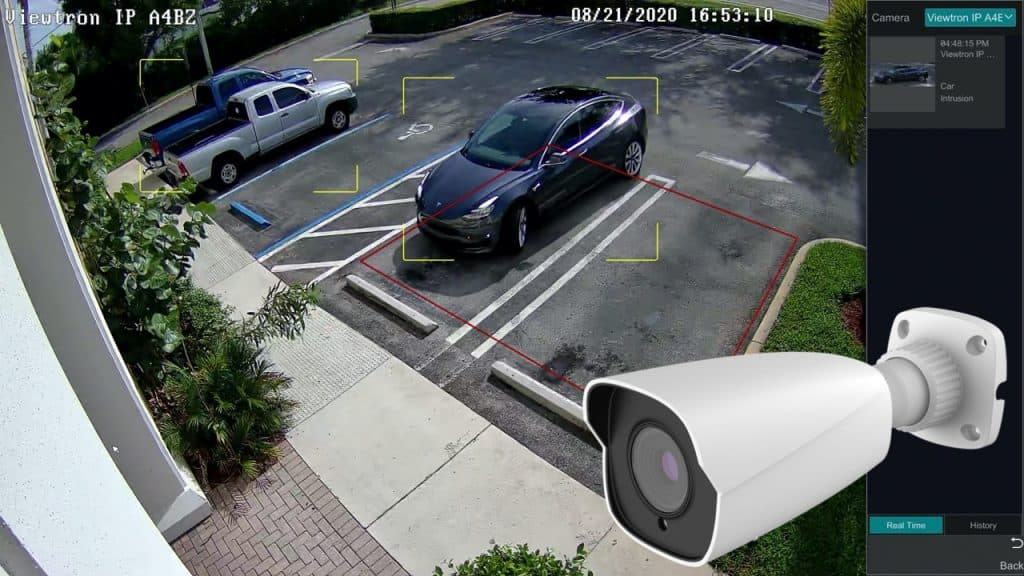
    This is how I set up license plate gate access control with one Viewtron LPR camera. The license plate recognition software is on the camera. There is no internet required for the plate read, and there is no software license for the ALPR. Watch the video above to see a simulation of gate open from an authorized license plate database built into the Viewtron LPR camera.

    If you want to control a gate, trigger a relay input, or run a Home Assistant automation, this camera already has a physical dry contact output, and also has a developer API for license plate recognition applications.

    Some DIY installers use Frigate running on a PC to do the license plate recognition. For most users, that is too complicated. It is also a lot more setup and maintenance than our Viewtron LPR camera that has the AI software built into it that does the plate detection and recognition.

    Please note: If you are still deciding between a capture camera and a recognition camera, read this post first: license plate capture vs ALPR. This post is for people who already know they want to use the automatic license plate recognition for gate access control or some other type of automation.


    This is how it works

    1. The Viewtron LPR-IP4 is aimed at the lane at plate height. Sweet spot is 25–70 ft. Max is 100 ft. Do not try to read a plate from the house on a 400 ft driveway.
    2. An AI overview camera sits higher on the same pole and watches the whole approach. The LPR camera is dark and tight at night on purpose. It is great for capturing plates but not for an overview of the vehicle. That is what the overview camera is for.
    3. Both cameras record to a Viewtron NVR. The NVR is what gives you the searchable plate database. A third-party NVR will take the RTSP video (license plate capture). It will not give you the ALPR user interface. The Viewtron NVR is fully integrated with all of the LPR AI software functions.
    4. When a plate is read, the camera can close its alarm relay, send Wiegand to an access panel, and / or send an outbound webhook API / HTTP POST to your server.
    5. If you want to install an alarm light or siren at the gate, you can use the alarm relay outputs that are built into Viewtron NVRs. Viewtron NVRs are now also integrated with Shelly smart relays if you want to use one of those.

    LPR camera and AI overview camera on the same pole

    That warehouse pole is the layout I recommend. LPR low and close to the lane, with minimal horizontal and vertical angles from the plate detection zone.


    What lives on the camera

    The hard part is already on the LPR-IP4.

    • On-camera AI software to detect plates and automatically recognize numbers and letters. The plate number is inferred on the camera. No extra PC, no cloud API key.
    • Allow / block lists on the camera (10,000 plates). The 8 channel and larger Viewtron NVRs go to 50,000.
    • Alarm relay on the camera. For a simple gate, you can wire the camera relay to the gate operator and skip the software entirely.
    • Use the Wiegand output if you want to manage the access control rules from an existing system. I walked through that here: LPR camera Wiegand interface.
    • HTTP POST / API if you want the plate in Home Assistant, Node-RED, or your own custom app. Setup is in the LPR camera API post.
    LPR camera HTTP POST API

    Watch this LPR camera API video to learn more.


    Gate Access  Control: three options

    1. Zero software. Camera reads a whitelist plate, alarm output closes, gate operator opens. Works if Home Assistant is down. Works if the internet is down.
    2. Access control panel. Camera sends the plate over Wiegand. Use the panel you already have.
    3. HTTP POST. Camera sends the plate, the snapshot, and the allow/block status to your endpoint. From there you can do Home Assistant, Node-RED, logging, whatever you want. The Home Assistant integration and the Node-RED LPR node are already documented if you want that path.

    LPR camera gate access wiring to NVR alarm output

    If you want to install an alarm light or siren at the gate, you can use the alarm relay outputs that are built into Viewtron NVRs. Viewtron NVRs are now also integrated with Shelly smart relays. I already walked through the wiring and the NVR click-path here: AI security camera wireless alarm relay.
    Viewtron NVR Shelly wireless alarm relay


    LPR Camera Installation Tips

    Most failed LPR jobs I see are because of the physical installation, not LPR software limitations.

    • Mount under 4 ft high, as perpendicular to the plate as you can get.
    • 25–70 ft is the sweet spot for the Viewtron LPR-IP4. 100 ft is the max I will tell people. A long farm driveway means the camera goes at the gate, not on the house.
    • Always pair an AI overview camera. You can setup vehicle detection on the overview camera which will save you time if a plate detection is missed.
    • The more minimal the horizontal and vertical angle to the plate detection zone, the better.

    LPR camera installation angle for license plate recognition

    The full click-path and measurements are in the LPR camera installation guide.

    ANPR LPR camera installation

    If you already have Home Assistant or Node-RED

    If you are a Home Assistant or Node-RED user, you can use the Viewtron IP camera API / SDK for integration. You can still do lights, notify, garage, logging. Let the camera read the plate. Use your automations for the stuff they are good at.

    Developer docs: Home Assistant · Node-RED · Python HTTP POST server


    Who this is for

    • Homes with private driveways and gates.
    • Gated community or HOA. Use the NVR plate database and the LPR gated community layout.
    • Rural / farm gate. Put the LPR at the gate. Use a wireless bridge if you can not run cable. The read stays local so a downed internet link does not brick the gate.

    If you only review video after something happens and you do not need the plate number as text, you may only need license plate capture. You can read about LPR vs license plate capture here.


    Products used in this project

    LPR camera video demos

    Watch more LPR camera video demos.


    Have Questions / Need Help?

    If you want a gate that opens on a license plate, email me at mike@viewtron.com. Me and the team design these for home, business, and government.